You launched your photo contest three weeks ago. Since then, you've received 47 emails with attachments that won't open, 12 Dropbox links that expired, a Google Drive folder someone accidentally shared as "view only," and a WeTransfer file called IMG_8847.jpg with zero context about who submitted it or which category it belongs to. Your tracking spreadsheet has gaps. Your inbox is a disaster. And the submission deadline is tomorrow.
Collecting creative work from external contributors — photographers, artists, videographers, students — is harder than collecting documents from clients. The files are large. The metadata matters. And contributors don't work for you, so you can't force them into a complicated system.
Below you'll find five submission form templates for photo contests, photo uploads, art submissions, drawing entries, and video uploads. Each one lists the fields you need and explains why they matter.
5 Creative Submission Form Templates
These five templates cover different scenarios, but they follow the same structure: collect the creator's contact info, capture details about the work, handle the file upload, and secure rights and permissions. Adapt the fields to match your project.
1. Photo Contest Entry Form
Photo contests pull in hundreds or thousands of entries. You need a form that captures everything in one pass — no back-and-forth emails, no missing details. This template works for community photography contests, magazine competitions, corporate photo challenges, and themed events.
- Full name — the entrant's legal name for judging records and winner announcements
- Email address — for status updates, winner notifications, and follow-up questions
- Phone number (optional) — backup contact if a winner doesn't respond to email
- Photo title — for judging reference, catalog display, and exhibition labeling
- Contest category — dropdown or radio buttons (landscape, portrait, street, wildlife, macro, etc.) to keep judging organized
- Photo description — 2-3 sentences about where it was taken, what inspired the shot, and any relevant context
- Camera and settings (optional) — camera model, lens, aperture, shutter speed, ISO. Some contests require this to verify authenticity
- Photo upload — high-resolution image (JPEG, TIFF, or PNG). Specify minimum resolution (e.g., 300 DPI, 3000px on the longest side)
- Editing disclosure — whether the photo has been digitally altered beyond basic adjustments. Important for documentary and nature categories
- Rights agreement — checkbox confirming the entrant owns the image and grants exhibition/publication rights. Non-negotiable
Set clear file naming rules ("Lastname_Title_Category") and specify whether you accept one entry per person or multiple. "Unlimited entries" sounds generous until someone uploads 85 photos and buries your review queue.
2. Photo Upload / Collection Form
Not every photo collection is a contest. This template covers ongoing workflows — event photographers delivering to a client, marketing teams collecting product shots from field reps, real estate agents gathering property images, or schools collecting student portraits.
- Photographer / contributor name — who took or is submitting the photos
- Email address — for confirmation receipts and follow-up requests
- Organization or company — relevant when collecting from multiple teams, vendors, or agencies
- Project or event name — ties photos to a specific project, campaign, or property listing. Use a dropdown for a defined list of active projects
- Photo descriptions — brief caption or context: what's in the image, where it was shot, who appears in it
- Date photos were taken — important for editorial use, event documentation, and version control
- High-resolution photo upload — allow multiple file uploads. Specify accepted formats (JPEG, TIFF, RAW, PNG) and resolution requirements
- Usage rights and licensing — does the photographer retain copyright, grant exclusive or non-exclusive rights, or transfer ownership?
- Model or property release status — does the photographer have signed releases for recognizable people or private property? Without these, you can't use the photos commercially. For a ready-made release, see our model release form template
- Special instructions — open text field for editing preferences, embargo dates, or credit line requirements
If you're collecting from non-professionals (field reps, volunteers, event attendees), keep it simple. Instead of "300 DPI TIFF," ask for "the highest quality version on your phone" and set a minimum file size (2 MB) as a quality floor. Technical jargon in your form means fewer submissions.
3. Art Submission Form
Art submission forms serve galleries, exhibitions, juried shows, grant programs, and online art platforms. Without a structured form, curators and jurors waste time chasing missing details instead of evaluating work.
- Artist name — full legal name and, if different, the name they exhibit under
- Email address and phone number — for acceptance notifications, logistics, and exhibition details
- Artist statement — 150-300 words on the artist's practice, themes, and concept behind the submitted work. Used for catalogs, wall text, and jurying
- Artwork title — the title of each submitted piece
- Medium — oil on canvas, acrylic, mixed media, digital, sculpture, photography, etc. Include an "Other" option
- Dimensions — height x width x depth with units (inches or cm). For sculptures, include weight. You need this for shipping, insurance, and deciding where each piece goes in the space
- Year completed — some calls restrict entries to work completed within a specific timeframe
- Image upload — JPEG, minimum 1500px on the longest side, neutral background. Allow 1-3 images per artwork for detail shots
- Price and availability — is the work for sale? Retail price? Available for the full exhibition period? Galleries need this for sales materials and insurance
- Exhibition history (optional) — where this piece or similar work has been shown. Jurors often consider this in competitive shows
Spell out image requirements precisely — "high-resolution" means different things to different people. Say "JPEG, minimum 1500px on the longest side" instead. And clarify your policy on previously exhibited work upfront. A disqualification after the deadline frustrates everyone.
4. Drawing / Illustration Entry Form
Drawing and illustration entries have a tighter scope than general art submissions: illustration contests, children's art competitions, school programs, editorial illustration calls, and publication submissions. The form can be shorter because the context is more focused.
- Artist / illustrator name — full name. For school programs, include the student's grade or age group
- Email address — or a parent/guardian email for minors
- Age or age category — essential for youth competitions that judge within age brackets (6-8, 9-12, 13-17, 18+)
- Drawing title — the title of the submitted piece
- Medium and tools — pencil, ink, charcoal, colored pencil, digital (Procreate, Photoshop, Illustrator). Some contests restrict to traditional or digital only
- Theme or prompt response — a 1-2 sentence explanation of how the drawing relates to the contest theme
- Image upload — JPEG or PNG. For traditional work: scan or photograph on a flat, well-lit surface. For digital: export at maximum resolution
- Parental consent (for minors) — checkbox confirming a parent/guardian approves the submission, display of the work, and use of the child's first name
For school-age submissions, keep instructions visual. Show an example of "a good scan" versus "a bad phone photo." Parents submitting artwork from their phone often send dark, angled images that sell the student's work short.
5. Video Upload / Submission Form
Video submissions are where generic form tools fall apart. File sizes regularly exceed 500 MB for short films and can hit 5+ GB for higher-quality work. Email can't handle it. Google Forms caps out. And YouTube links surrender your control over quality, access, and archival.
This template works for film festivals, video contests, corporate video calls, student film programs, and UGC campaigns. For a deeper look at the full workflow, see our guide on how to collect video submissions.
- Creator / director name — the primary contact for the submission
- Email address and phone number — video submissions often need coordination around formats and screening schedules
- Video title — the official title of the work
- Runtime / length — duration in minutes and seconds. Lets you flag entries that exceed maximum runtime limits before review
- Genre or category — documentary, narrative, animation, music video, commercial, experimental, etc.
- Synopsis — 100-200 words on the video's content, story, or concept. Used for scheduling and first-round screening
- Video file upload — original file in MP4, MOV, or AVI. Specify preferred codec (H.264), minimum resolution (1080p), and maximum file size. Check your form tool's per-file limit first, because some cap uploads at a few megabytes
- Cast and crew list (optional) — names and roles for credits and award eligibility
- Talent release form — confirmation that all people appearing on screen have signed releases. Include a file upload field for the signed documents. For a template, see our model release form template
- Music and licensing clearance — does the video include copyrighted music? Has the creator obtained licensing rights? Protects you from copyright claims if the work is screened or published
Standardize on MP4/H.264 to avoid playback issues during judging. And set expectations for upload time — a 2 GB file on a typical home connection takes 30-60 minutes. Tell contributors to use a wired or stable Wi-Fi connection and keep their browser open until the upload completes.
How to Collect Creative Submissions at Scale
The templates above give you the right fields. But fields on a page don't solve anything if the tool behind them chokes on the files your contributors need to send.
A single high-resolution photo can be 25 MB. A RAW file hits 50-80 MB. A short video easily exceeds 1 GB. Standard form tools make this hard. Google Forms accepts files up to 10 GB, but every submitter needs a Google account, and many other form builders cap files far lower, so people end up sharing links from other services. That means scattered files across email, Dropbox, and WeTransfer that you have to track and organize by hand. The scenario from the top of this article? That's how it happens.
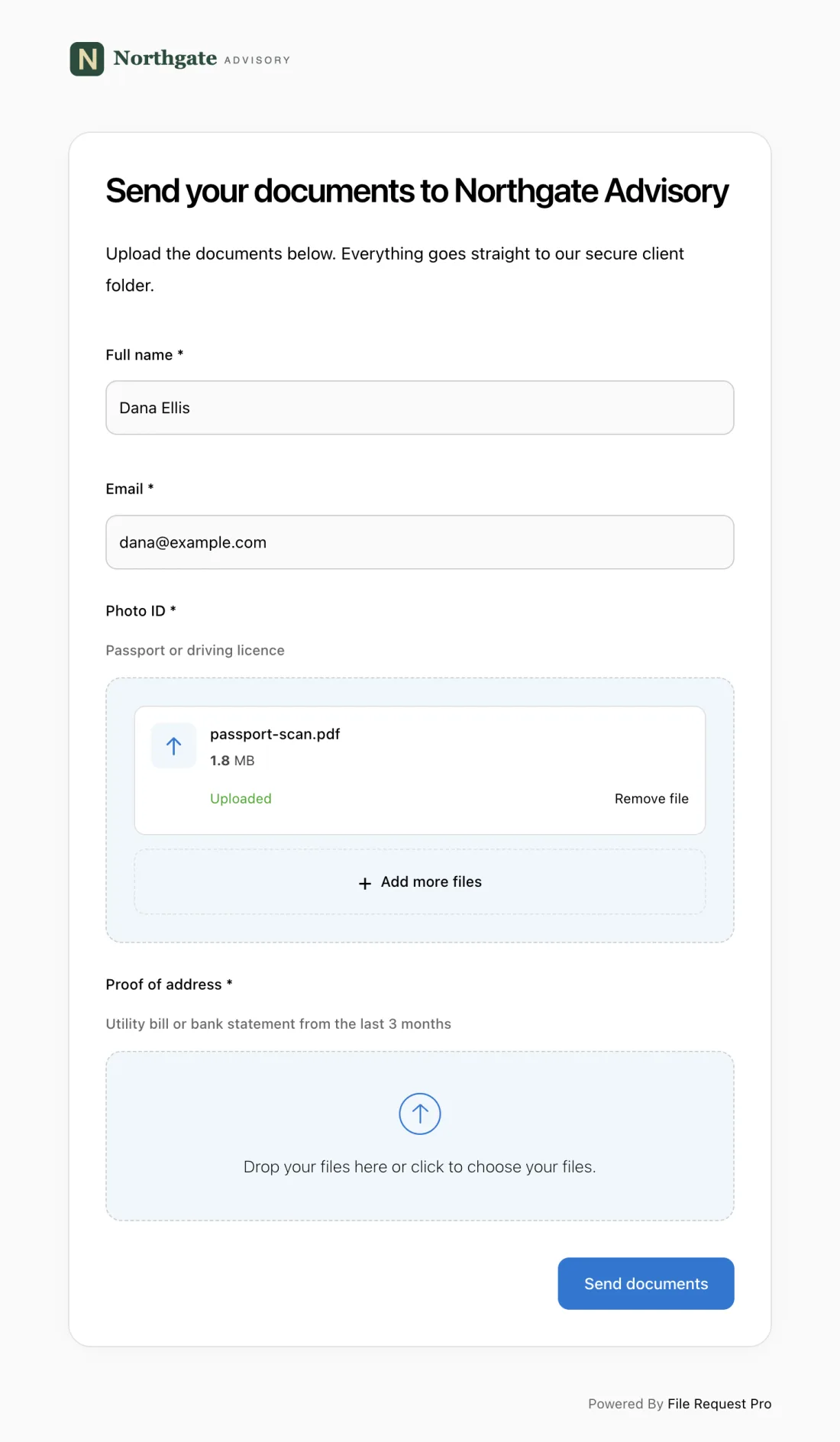
File Request Pro is built for exactly this — collecting large files and structured information from people outside your organization, without forcing them to create an account or learn new software.
- Large file handling — accept photos, videos, and art files up to 5 GB per upload. No file size errors, no workarounds, no "please send via WeTransfer instead."
- Branded upload pages — your logo, your colors, your contest or gallery name. Contributors see a professional submission portal, not a generic form that undermines your credibility.
- Form fields + file uploads on one page — combine all the template fields above with file upload zones so information and files arrive together. No more matching orphaned files to spreadsheet rows.
- Automated reminders — nudge contributors who started a submission but didn't finish. One reminder two days before the deadline can recover dozens of entries that would otherwise be lost.
- Cloud storage sync — files route straight to Google Drive, Dropbox, or OneDrive, organized by submission, project, or contributor. No manual downloading and sorting.
- No account required — contributors click a link and start uploading. No sign-ups, no app installs. This matters when your submitters are students, freelance photographers, or first-time contest entrants.
Best Practices for Creative Submission Forms
Publish submission guidelines before the form. Don't bury file format requirements and eligibility rules inside field descriptions. A visible summary above the form means fewer disqualified entries and fewer "what format do you need?" emails.
Set file naming rules. "Lastname_Title_Category.jpg" saves hours of sorting. Without it, you'll stare at hundreds of files named IMG_4392.jpg and have no idea who sent what.
Test with real files before launch. Upload a full-size photo, a large video, and fill in every field. Confirm files reach the right cloud folder and confirmation emails fire. Discovering your form breaks on a 500 MB file after you've shared the link with 200 people is a problem you can avoid entirely.
Build in deadline buffers. Set the public deadline three days before your actual review date. That buffer gives you time to chase incomplete submissions and handle last-minute technical issues without delaying your judges.
Send confirmation immediately. Contributors who upload a large file and see nothing will assume it failed. They'll resubmit (creating duplicates) or email you asking for confirmation. An automatic receipt prevents both.
Frequently Asked Questions
What file formats should I accept for photo submissions?
JPEG is the safest default. Accept TIFF and PNG for lossless printing quality. For professional photographers, specify whether you want RAW files (CR2, NEF, ARW) or processed exports. For most contests, high-resolution JPEG at 300 DPI and 3000px on the longest side is sufficient.
How large are typical creative submission files?
High-resolution JPEGs run 5-25 MB. TIFF or RAW files reach 50-80 MB. A 3-minute video at 1080p is 300-500 MB. A 10-minute short film at 4K can exceed 5 GB. These sizes rule out email and many form builders, whose file limits are far lower, especially on free plans.
Do I need a model release form for photo and video submissions?
If recognizable people appear in the work and you plan to publish, exhibit, or use it commercially, yes. Collect signed releases alongside the submission with a dedicated file upload field. For a template, see our model release form guide.
How do I handle submissions from minors?
Collect parental or guardian consent alongside the entry. Include a checkbox specifying what the consent covers: display of the work, use of the child's first name, and publication in catalogs or online galleries. For school programs, check whether blanket consent forms are already on file.
Can I collect both digital and physical artwork through the same form?
Yes. Use the form to collect information and digital documentation for all submissions, including photos of physical artwork. For pieces that need shipping, add fields for dimensions, weight, and delivery method. The form handles documentation and intake; physical logistics happen separately.
What's the best way to organize large volumes of submissions?
Use a tool that routes files directly to cloud storage folders organized by category, date, or contributor. Manual downloading and sorting breaks down once you pass a few dozen entries. File Request Pro syncs to Google Drive, Dropbox, or OneDrive automatically and creates a folder structure that matches your review workflow — so files are organized before you even open them.
