Every organization that verifies identity documents — banks running KYC checks, landlords screening tenants, HR teams onboarding new hires — faces the same problem. Documents arrive scattered across emails, critical fields get missed, expired IDs slip through, and no one can say for certain what was checked and when. A single missed document can mean a failed audit, a fraudulent tenant, or an onboarding delay that drags on for weeks.
Below you will find a ready-to-use document verification form template with 40+ fields organized by category, checklists for four common use cases, and a better way to collect identity documents at scale.
What Is a Document Verification Form?
A document verification form is a structured checklist used to collect and review identity and supporting documents. It tells the person being verified exactly what to provide, and gives the verifier a consistent way to record what was received.
Most document verification forms cover four areas:
- Identity verification — government-issued photo ID confirming the person is who they claim to be
- Address verification — utility bills, bank statements, or official correspondence confirming where they live
- Financial or employment verification — income, employment status, or financial standing
- Internal review and sign-off — who verified the documents, the date, and the outcome
Without a standardized form, verification is inconsistent — one team member checks the passport but forgets the proof of address, another accepts an expired ID. A document verification form turns this into a repeatable process with nothing left to memory.
Document Verification Form Template: 40+ Fields by Category
Not every field will apply to every situation — a landlord doesn't need tax returns, and a bank running a KYC check doesn't need employment references. Pick the sections that match your use case.
Personal Information and Identity
Every document verification process starts here. These fields confirm who the person is.
- Full legal name (as shown on government-issued ID) — Must match the identity documents. Note any former names or aliases.
- Date of birth — Cross-referenced against the ID document.
- Nationality — Required for KYC and immigration-related checks.
- Government-issued ID type — Passport, national ID card, driver's license, or other.
- ID number — Record exactly as shown, including letters or special characters.
- Issuing country or authority
- Issue date
- Expiration date — Expired documents are not valid. This field stops your team from accidentally accepting one.
- Photo ID upload — Clear scan or photo of the front (and back if applicable). Accepted formats: JPEG, PNG, PDF.
- Secondary ID upload (if required) — Some processes require two forms of identification.
- Phone number
- Email address
Address Verification
Proof of address confirms that the person lives where they say they do. For most regulatory frameworks, the document must be recent — typically dated within the last three months.
- Current residential address — Street, city, state/province, postal code, and country.
- How long at this address? — If under three months, you may need to verify the previous address too.
- Proof of address document type — Utility bill, bank statement, government letter, council tax bill, or tenancy agreement.
- Proof of address upload — Must show name, current address, and a date within three months.
- Previous address (if at current address less than 3 months)
Financial Verification
Required for KYC, mortgage applications, tenant screening, and any situation where you need to confirm financial standing.
- Bank name and branch
- Account number (last four digits only) — Full account numbers require extra security handling.
- Recent bank statement upload (last 3 months) — Confirms the account holder name matches the ID.
- Proof of income type — Pay stubs, tax return, employment letter, or pension statement.
- Proof of income upload — Two to three recent pay stubs (employed) or last two years of tax returns (self-employed).
- Source of funds declaration — Required for higher-risk KYC checks.
- Tax identification number (TIN or SSN) — Collect securely — never over email.
Employment Verification
Employment checks confirm that a person works where they claim and earns what they state. Essential for tenant screening, mortgage applications, and background checks.
- Current employer name
- Employer address — Confirms the employer is a real business at a verifiable location.
- Job title or position — Cross-referenced against the employment letter or pay stubs.
- Employment start date — Lenders and landlords typically want at least two years of continuous employment.
- Employment type — Full-time, part-time, contract, or self-employed.
- Gross monthly or annual income — Verified against pay stubs or tax returns.
- Employment verification letter upload — On company letterhead, confirming position, start date, and salary.
- HR or supervisor contact details — For follow-up if needed.
Document Checklist: Required Documents
Check off each document as it is received and reviewed.
- Government-issued photo ID — Current, unexpired, with a photograph.
- Proof of address — Dated within three months, showing name and current address.
- Proof of income — Two recent pay stubs, or last two tax returns if self-employed.
- Bank statement (last 3 months)
- Employment verification letter — On company letterhead.
- Additional documents (if applicable) — Professional licenses, business registration, or power of attorney.
Consent and Declarations
- I confirm all information provided is true and accurate. — Mandatory checkbox.
- I consent to identity verification checks. — Required for regulatory compliance.
- I understand that false or misleading information may result in rejection.
- Digital signature or typed full name
- Date of submission — Creates a timestamp for the audit trail.
Verification Status (Internal Use Only)
Completed by the verifier after review. Not visible to the person being verified.
- Verifier name
- Date of verification review
- Verification result — Approved, rejected, or pending (additional documents required).
- Reason for rejection (if applicable) — e.g., expired ID, name mismatch, illegible scan. Documenting the reason protects you in disputes.
- Additional notes
- Risk level assigned (if applicable) — Standard, medium, or high. Used in KYC and AML processes.
Sample Identity Verification Form
Need a shorter form that only confirms who someone is? This sample identity verification form covers the core fields. Adapt the labels for a customer verification form or account verification form:
- Full legal name (as shown on ID)
- Date of birth
- Current residential address
- Nationality
- ID document type (passport / national ID / driving licence)
- ID document number and expiry date
- Issuing country or authority
- Upload: photo page of the ID document
- Upload: proof of address dated within the last 3 months
- Upload: selfie or liveness photo (if your process requires one)
- Declaration and signature with date
For account verification, add the account number and the reason for the check. For customer verification in a retail context, drop the proof of address unless a regulation requires it.
A blurry or cropped upload means another round of chasing emails. Put the file requirements next to each upload field (colour, all four corners visible, under 10 MB) and you'll get a usable document the first time.
Document Verification by Use Case
Different industries prioritize different sections of the template. Here are four common use cases.
KYC and Financial Services
Financial institutions are legally required to verify customer identity under Anti-Money Laundering (AML) and Counter-Terrorist Financing (CTF) regulations. Fines for non-compliance regularly run into the millions. Your form should include:
- All personal identity and address fields above, plus nationality and former names
- Source of funds and source of wealth declarations — required for Enhanced Due Diligence (EDD)
- Politically Exposed Person (PEP) screening
- Sanctions list check — screening against UN, EU, OFAC, and HMT lists
- Risk assessment outcome — the due diligence tier (Simplified, Standard, or Enhanced)
- Ongoing monitoring schedule — when the next periodic review is due
For a detailed walkthrough of KYC requirements, see our KYC Know Your Customer checklist.
Tenant Screening
One problem tenant can cost $5,000 to $10,000+ in unpaid rent, damage, and eviction fees. Thorough document verification before signing a lease is your first line of defense. Prioritize:
- Government-issued photo ID
- Proof of income — pay stubs or tax returns showing income is at least 3x monthly rent
- Employment verification letter
- Bank statements — confirming the applicant can cover deposit and first month
- Previous landlord references — with permission to contact them
- Credit and background check authorization
Important: Fair Housing laws prohibit questions about race, religion, national origin, familial status, disability, or sex. Every applicant must receive the same form.
Employee Onboarding
Employers face penalties for hiring people not authorized to work — making document verification a legal obligation, not a nice-to-have. Your form should cover:
- Right-to-work verification — In the US, Form I-9. In the UK, passport, visa, or biometric residence permit.
- Government-issued photo ID
- Social Security card or national insurance number
- Educational qualifications — degree certificates or transcripts, if relevant
- Professional licenses or certifications — for regulated professions
- Previous employment references — with authorization to verify
- Background check consent
Client Onboarding for Professional Services
Law firms, accountants, and financial advisors must verify client identity before engagement — both for regulatory compliance and fraud prevention. Key additions:
- Personal identity verification — photo ID and proof of address
- Business verification (corporate clients) — company registration, certificate of incorporation, directors, and beneficial owners
- Source of funds — especially important for firms subject to AML regulations
- Conflict of interest check — names of all parties involved
- Engagement letter acknowledgment
- Power of attorney — if someone is acting on the client's behalf
Beyond the Checklist: Collecting and Verifying Documents at Scale
A template tells you what to collect. But the template alone does not solve the hardest part: getting people to send the right documents, on time, in one place.
Here is what goes wrong when verification still relies on email and static forms:
- Documents arrive scattered across inboxes. A passport in one message, a utility bill a week later, a bank statement from a different email address. Your team spends more time piecing submissions together than reviewing them.
- Versions get mixed up. A client sends an updated bank statement, but your team already filed the old one. Now no one knows which is current.
- There is no audit trail. When a regulator asks when a document was received and who reviewed it, you are digging through email threads to reconstruct a timeline.
- Follow-up is manual. Someone has to track who has submitted, who has not, and send reminder after reminder by hand.
- Sensitive documents sit in unsecured inboxes. Passport scans sent as email attachments have no encryption, no access controls, and no expiration.
File Request Pro lets you create a branded upload page where clients, tenants, or employees submit identity documents directly — with form fields alongside file uploads, so everything arrives together.
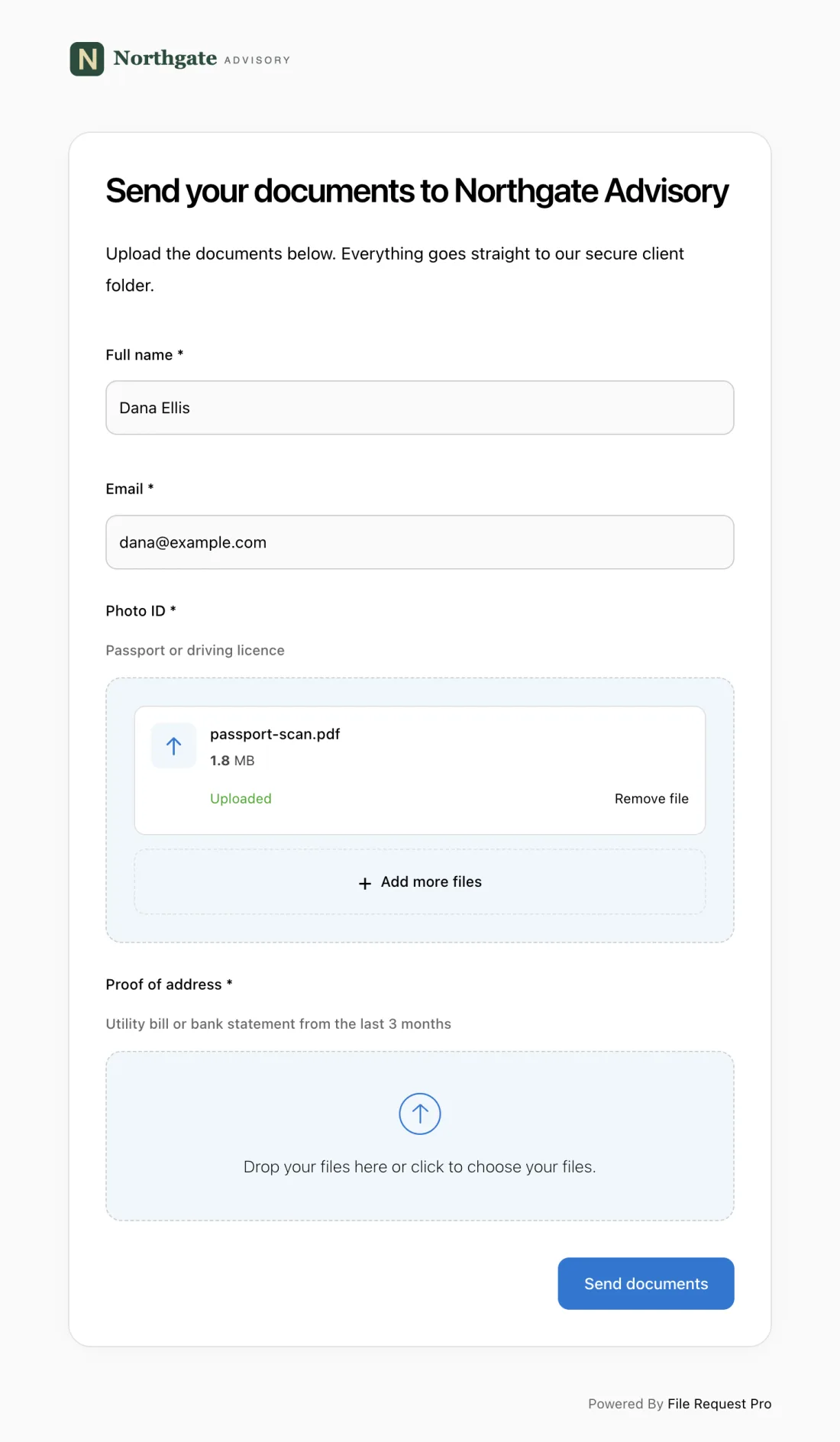
Here is how it works:
- One link, one place. The person clicks a link, fills in their details, uploads documents, and submits — no account, no app, no password.
- Automated reminders. Emails go out at intervals you set. People who have not submitted get nudged automatically — your team never sends another "just following up" email.
- Cloud storage sync. Uploaded documents go straight to Google Drive, OneDrive, SharePoint, or Dropbox — organized into folders by person.
- Encryption and access controls. Files are encrypted in transit and at rest. Unlike email, documents are protected behind access controls from the moment they arrive.
- Complete audit trail. Every submission is logged — who uploaded what and when. If a regulator asks, you have the answer in seconds.
For compliance-driven industries, this combination of structured collection, automated follow-up, and auditable storage turns a multi-week document chase into days.
Document Verification Best Practices
1. Use a standardized form for every verification
Apply the same form to every person you verify. If an audit reveals inconsistent checks across clients, that becomes a liability — and regulators will notice.
2. Check expiration dates on every document
An expired passport is not valid for identity verification. Build expiration date fields into your form and train your team to check them first. It is one of the most common mistakes — and the easiest to prevent.
3. Cross-reference details across documents
The name on the photo ID should match the proof of address, which should match the bank statement. Discrepancies do not always mean fraud — people change names or use nicknames — but every mismatch should be flagged and noted.
4. Never accept documents over unsecured email
Passport scans and bank statements are sensitive personal data. Email has no encryption and no access controls. Use a secure upload tool that encrypts files in transit and at rest.
5. Document your verification decisions
Record who reviewed each submission, when, and what they decided. If a document was rejected, note the reason. This protects your organization in disputes, regulatory reviews, and litigation.
Frequently Asked Questions
What is a document verification form used for?
It is used to collect and review identity documents — passports, proof of address, financial records — in a consistent, repeatable way. Common uses include KYC checks, tenant screening, employee onboarding, and client onboarding for professional services.
What documents are typically required for identity verification?
At minimum: a government-issued photo ID (passport, driver's license, or national ID card) and proof of address (utility bill or bank statement dated within three months). Depending on the context, you may also need proof of income, employment verification, or a tax identification number.
How long should document verification records be kept?
It depends on your industry. Financial services firms must keep KYC records for at least five years after the relationship ends. Employers should keep I-9 forms for three years after hire or one year after employment ends, whichever is later. Landlords should retain records for three to four years. Always check your local requirements.
Can document verification be done online?
Yes, and for most organizations it should be. Online forms let people upload documents from any device. Digital submission is faster, reduces errors through field validation, and creates a cleaner audit trail than paper or email.
What is the difference between document verification and identity verification?
Document verification confirms that a specific document is genuine, valid, and belongs to the person presenting it. Identity verification is the broader process of confirming someone is who they claim to be — which may include document checks, biometrics, database lookups, or in-person identification.
How do I handle incomplete document submissions?
Use a form that marks which documents are required and blocks submission until mandatory fields are filled. For people who start but do not finish, set up automated reminders at intervals you choose — daily, every three days, or weekly — until the submission is complete. This is far more effective than manual follow-up.
Ready to stop chasing documents over email? Try File Request Pro free and create your first document verification page in minutes. Clients and applicants upload through a single link — no account needed. You get automated reminders, encrypted storage, cloud sync to Google Drive or OneDrive, and a complete audit trail. No coding required.
Free Client Onboarding Checklist
Get the complete document checklist for your industry — interactive, with progress tracking.
Use the Free Checklist Tool →