Every organization collects personal information. Whether you are onboarding employees, enrolling students, or registering volunteers, someone needs to hand over their name, address, phone number, emergency contacts, and ID details before anything else moves forward. The problem is how most organizations collect it. Email threads with attachments that never arrive. Paper forms buried in filing cabinets. Word documents passed back and forth with half the fields left blank. A personal information sheet (also called a personal information form) fixes this. It collects the right data securely and consistently, with no back-and-forth.
Below you will find a complete personal information form template with 30+ fields, use-case variations for HR, schools, client intake, and volunteer programs, and a secure way to collect sensitive personal data online.
What Is a Personal Information Sheet?
A personal information sheet, or personal information form, collects key details from an individual — identity, contact, emergency, and background information — in a single submission. Instead of chasing five separate emails, you get everything you need in one step.
Common use cases:
- HR onboarding — employee details for payroll, benefits, and compliance
- Student enrollment — contact, guardian, medical, and educational background
- Client intake — personal and business details before starting an engagement
- Membership registration — member information for nonprofits, associations, and clubs
- Volunteer applications — availability, skills, and emergency contacts
Personal Information Form Template: 30+ Essential Fields
This personal information form template covers the fields most organizations need, grouped into seven categories. Not every form requires every field — pick the ones that fit your use case and skip the rest.
Basic Contact Information
- Full legal name — First, middle, and last name as it appears on government-issued ID.
- Preferred name or nickname — The name the person goes by daily, so name badges and directories are correct from day one.
- Date of birth — For age verification, benefits eligibility, and identity confirmation. Specify the format (MM/DD/YYYY or DD/MM/YYYY).
- Gender — For benefits administration, housing assignments, or demographic reporting. Offer an open-text option.
- Home address — Street, city, state/province, ZIP/postal code, country. Needed for tax withholding, mailings, and emergencies.
- Mailing address (if different) — For people who receive mail at a PO box, campus, or temporary location.
- Primary phone number — Specify mobile if needed for texts and two-factor authentication.
- Secondary phone number — Backup number for when the primary is unreachable.
- Email address — A personal email gives you a contact point that still works after a job or school change.
Identification and Legal Information
These fields involve sensitive data. Collect only what your organization needs, and tell each person why you are asking. This section often ties into document verification processes.
- Government-issued ID type — Passport, driver's license, state ID, or national identity card.
- Government-issued ID number — Restrict access to authorized personnel only.
- Citizenship or residency status — For employment eligibility (I-9 in the US), student visa tracking, and tax treaty decisions.
- Work authorization status — Confirms right to work. Include visa type and expiration if applicable.
- Tax identification number (SSN, TIN, or equivalent) — For payroll and tax reporting. The highest-risk field on your form — do not collect unless legally required, and never send over unencrypted email.
Emergency Contacts
Collect at least two emergency contacts. When a medical emergency or workplace incident hits, having the right phone number on file saves the minutes that matter most.
- Emergency contact 1 — full name — Primary person to notify.
- Emergency contact 1 — relationship — Spouse, parent, sibling, friend. Helps responders gauge authority.
- Emergency contact 1 — phone number — Mobile preferred.
- Emergency contact 1 — email address — Backup if the call goes unanswered.
- Emergency contact 2 — full name — Backup if the first is unavailable.
- Emergency contact 2 — relationship
- Emergency contact 2 — phone number
Employment Information
Use these for employee personal information forms in HR onboarding, or on student forms collecting parent/guardian employment details.
- Employer name — Current or hiring organization.
- Job title — Current or incoming position.
- Work address — Office or site location. Relevant for multi-location organizations.
- Work phone number — Direct office line or work mobile.
- Department — For routing, benefits group assignment, and reporting.
Education
Student forms rely on this section, but it also applies to job applicants, scholarship recipients, and certification programs.
- Highest level of education — High school through doctorate or professional degree.
- Institution name — Where the highest degree was earned.
- Field of study or major — For program placement and skills assessment.
- Graduation year — Or expected graduation year for current students.
Medical and Accessibility Information
Medical data carries extra privacy obligations under HIPAA (health data), FERPA (student records), and the ADA (disability accommodations). Collect only what relates to safety or program participation.
- Known allergies — Food, drug, and environmental. Critical for workplaces and schools providing meals.
- Medical conditions relevant to the role — Conditions needing accommodation or that emergency responders should know about. Do not ask for a full medical history.
- Dietary restrictions — Vegetarian, vegan, halal, kosher, gluten-free, or other.
- Accessibility needs — Wheelchair access, sign language interpretation, screen reader compatibility.
- Health insurance provider and policy number — Only collect if your organization coordinates benefits or verifies coverage.
Additional Information
- Preferred language — So multilingual organizations send communications in the right language.
- How did you hear about us? — Tracks which referral sources bring people in, so you know where to focus outreach.
- Social media profiles — LinkedIn or professional website. Optional for most forms; useful for directories.
- Emergency medical consent — Authorizes emergency treatment if the person is incapacitated. Standard on student and volunteer forms.
- Photo and media consent — Permission to photograph or feature the person in organizational materials.
Use-Case Variations
The template above covers universal fields. Add or remove sections based on context.
HR Employee Onboarding
Employee forms extend the base template with payroll, benefits, and workplace fields:
- Bank account details for direct deposit — Bank name, routing number, account number. Never collect over email — one forwarded message exposes full banking details.
- Benefits enrollment selections — Health, dental, vision, life insurance, retirement plan choices.
- Equipment and workspace needs — Laptop, monitor setup, ergonomic accommodations.
- T-shirt or uniform size — For branded apparel.
- Previous employment history — Supports employment verification and background checks.
Student Enrollment
Student forms add guardian, academic, and school-specific fields:
- Parent or guardian name, phone, and email — Required for minors.
- Previous school name and address — For transcript requests and record transfers.
- Transcript upload — Official or unofficial transcripts.
- Special education needs or IEP status — Whether the student has an Individualized Education Program or Section 504 plan.
- Transportation needs — Bus route, carpool, or self-transport.
Client Intake
For client intake, add fields that connect the person to their organization:
- Company name and industry — Context for the relationship.
- Project or engagement description — Summary of what the client needs.
- Billing address — If different from home address.
- Preferred payment method — Credit card, ACH, wire, or invoicing terms.
Volunteer and Membership Applications
- Availability — Days, hours, and blackout dates.
- Skills and qualifications — Certifications, languages, expertise.
- References — Professional or personal, especially for roles with vulnerable populations.
- Membership type or tier — Individual, family, student, or corporate.
- Background check consent — Required for roles involving children or sensitive environments.
Privacy and Data Protection
Personal information forms collect the kind of data privacy regulations exist to protect. Getting this wrong means fines, lawsuits, and broken trust. Four principles to follow:
Data minimization. Collect only what you need. If you are registering members for a book club, you do not need their Social Security number. Every extra field increases your security burden and widens the damage if a breach happens.
GDPR compliance. The EU's General Data Protection Regulation applies to any organization collecting data from EU residents, no matter where you are based. You need a lawful basis for processing (consent or contractual necessity), clear notice about what you collect and why, a process for access or deletion requests, and data processing agreements with third-party tools that handle the data.
Secure storage. Government IDs, tax numbers, and medical data should be encrypted, with access limited to authorized staff and audit trails showing who viewed what. Paper forms in unlocked cabinets and shared drives with open permissions leave sensitive data exposed to anyone who walks by or clicks in.
Retention policies. Define how long you keep personal information — seven years for tax records, one year after a volunteer's last activity, for example. When the period ends, delete the data securely.
Collecting Personal Information Securely
The biggest risk is not the form — it is the delivery method. Paper forms vanish during office moves. Email attachments with Social Security numbers and passport scans sit in inboxes where anyone with account access can open them. One forwarded thread, and you have a data breach.
File Request Pro lets you create a branded upload page where people fill out details and upload identity documents in one secure submission. Send a link — no account creation, no app download — and they complete and submit.
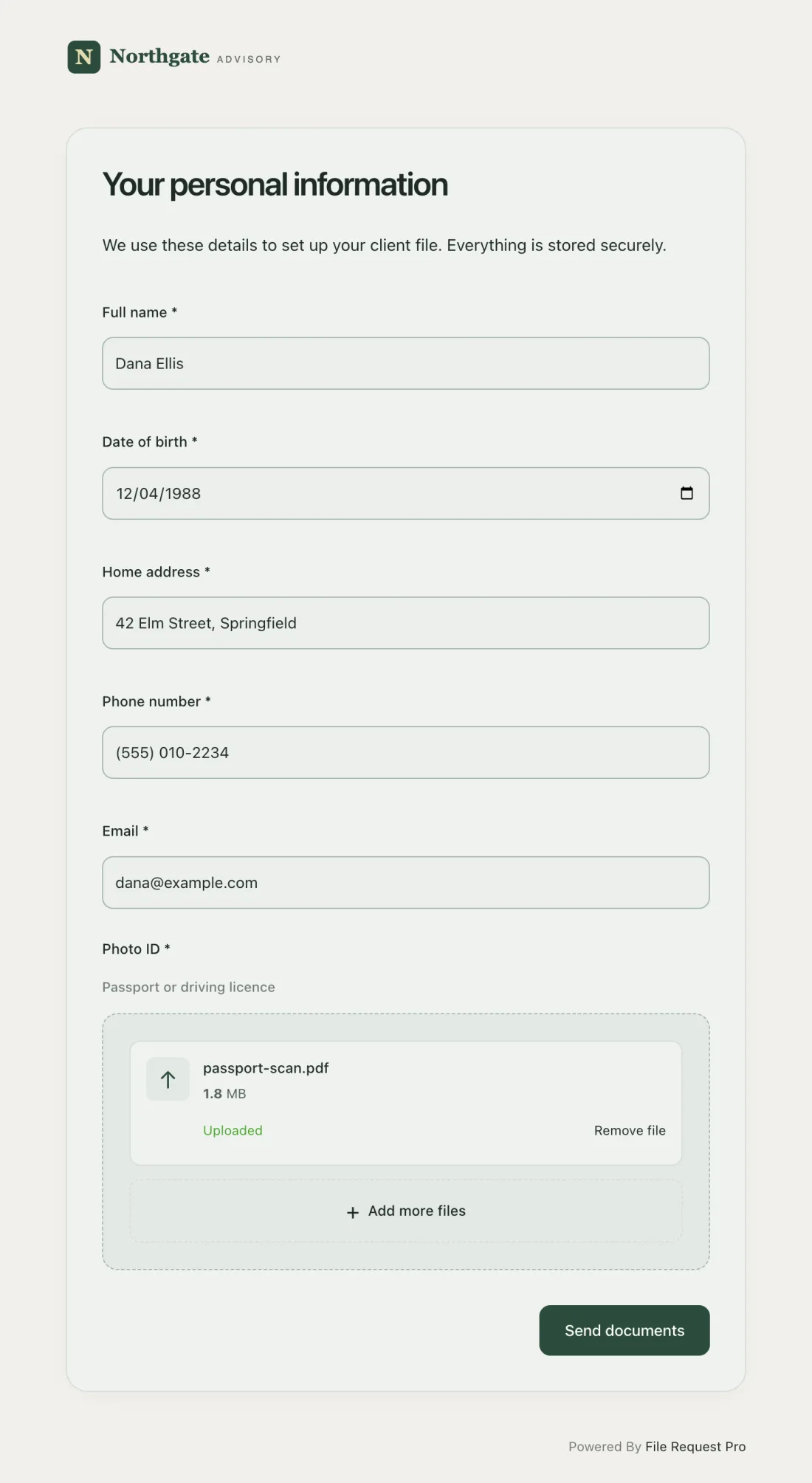
Here is how it works:
- Form fields plus file uploads on one page — Combine text fields (names, addresses) with upload fields (ID copies, photos, transcripts). Everything arrives together, so nothing falls through the cracks.
- Automated reminders — Follow-ups go out automatically to anyone who has not submitted, so you stop sending "just checking in" emails.
- Cloud storage sync — Submissions sync to Google Drive, OneDrive, SharePoint, or Dropbox with the folder structure you define. No manual downloading or sorting.
- No account required — Employees, students, and members click a link and submit. No login, no password — so you get responses instead of "I couldn't figure out how to upload it."
- Encryption and audit trail — Data is encrypted in transit and at rest. An audit trail logs every submission and file access, so compliance records are ready when you need them.
- Branded experience — Add your logo, colors, and instructions so the page looks like yours, not a third-party tool.
Best Practices for Personal Information Forms
- Explain why you need each field. People share sensitive data more willingly when they understand the reason. A form asking for a Social Security number without context gets abandoned — or filled with fake data.
- Group fields into logical sections. Breaking a 35-field form into categories (contact, identification, emergency, medical) makes it feel manageable.
- Mark optional fields clearly. If a mailing address is only needed when it differs from home, say so. People drop out over fields that do not apply to them.
- Use conditional logic. Show visa fields only when someone selects "No" for work authorization. Fewer visible fields mean higher completion rates.
- Test before sending. Fill it out yourself. If it takes longer than 10 minutes, trim it. Check every field on desktop and mobile.
Frequently Asked Questions
What should be included in a personal information form?
At minimum: full legal name, date of birth, home address, phone number, email, and at least one emergency contact. Beyond that, fields depend on your use case. HR forms add employment and tax details. Student forms add guardian and education fields. Membership forms add availability and skills. Only include fields that serve a clear purpose.
How do I create a personal information form template in Word?
Create a two-column table — labels on the left, blank spaces on the right. Use form controls from Word's Developer tab to add text fields, checkboxes, and dropdowns, then save as a template (.dotx). The downside: completed Word forms come back as email attachments, creating version control headaches and security risks when they contain IDs or tax numbers.
Is it legal to collect personal information on a form?
Yes, as long as you have a lawful basis (consent or contractual necessity) and handle data under applicable privacy laws. Tell people what you are collecting, why, how it will be stored, and how long you will keep it. GDPR (EU), CCPA (California), FERPA (US student records), and HIPAA (US health data) each add requirements based on data type and audience.
How do I protect sensitive information collected on personal information forms?
Use encrypted channels for collection and storage. Never send Social Security numbers or government IDs over unencrypted email. Limit access to authorized staff, keep an audit trail, and set retention policies so records are deleted when no longer needed.
What is the difference between a personal information form and a personal data sheet?
The terms overlap. A personal information form is filled out by the individual during onboarding or registration. A personal data sheet is sometimes a summary the organization maintains. In practice, both capture the same details.
Can I use one personal information form for all purposes?
Start with a universal template, then adapt it. An employee form needs payroll fields irrelevant to students. A volunteer application needs availability and references HR does not. One generic form either collects too much (violating data minimization) or too little (triggering follow-ups). Keep core fields and add sections by context.
Start Collecting Personal Information Securely
A standardized personal information form replaces scattered emails, incomplete submissions, and security gaps with one structured collection point. Whether you are onboarding employees, enrolling students, or registering members, the right form gets you everything in a single submission.
File Request Pro makes it simple to collect personal details and documents on one secure, branded page. Set up your form fields, add file upload slots for IDs and documents, and send the link. Automated reminders follow up with anyone who has not submitted. Submissions sync to your cloud storage (Google Drive, OneDrive, SharePoint, or Dropbox), every access is logged for compliance, and submitters never need an account — they click, fill in, and submit. Start your free trial — most teams have their first form live in under 15 minutes.
Free Client Onboarding Checklist
Get the complete document checklist for your industry — interactive, with progress tracking.
Use the Free Checklist Tool →