A good client onboarding questionnaire does two things: it collects the information you need to start working, and it shows the client you run a structured, professional process. Skip this step, and you'll spend the first two weeks chasing basic details over email. Get it right, and both sides start with clear expectations from day one.
This guide gives you 40+ ready-to-use onboarding questions organized by category, industry-specific variations for legal, accounting, marketing, and consulting firms, and practical tips on delivering your questionnaire so clients finish it on time.
Why You Need a Client Onboarding Questionnaire
Most service professionals already ask questions at the start of an engagement. The problem is how they ask. A phone call produces answers nobody writes down. A casual email thread scatters key details across 14 messages. A vague "send me what you have" leads to incomplete information and repeated follow-ups.
A structured questionnaire fixes this:
- Consistent information gathering — Every client goes through the same process, so you never miss a question.
- Faster project kickoff — You collect everything upfront instead of drip-feeding requests over weeks.
- Clearer expectations — Clients understand from day one what you need from them and what the engagement looks like.
- Less back-and-forth — One well-designed form replaces dozens of emails.
- Stronger first impression — A professional intake process builds confidence that they hired the right firm.
The key is asking the right questions. Too few, and you'll chase information later. Too many, and clients abandon the form halfway through. The categories below strike the right balance for most professional services firms.
Contact and Company Information
Start with the basics. These questions pin down who you're working with, how to reach them, and how their organization is structured. They look simple, but missing or outdated contact details cause more project delays than most people expect.
- What is your full name and job title? — Confirms your primary contact and their authority level in the organization.
- What is the best email address to reach you? — People juggle multiple email addresses. Get the one they check daily.
- What is your direct phone number? — For urgent matters, email isn't fast enough. A direct line avoids switchboards and gatekeepers.
- What is your company name and website URL? — Lets you research their business before the first working session.
- What is your company's mailing address? — Needed for contracts, invoices, and any physical correspondence.
- How many employees does your organization have? — Gives you a sense of the engagement's size and complexity.
- What industry or sector does your company operate in? — Helps you tailor your approach and spot industry-specific requirements early.
- Who else on your team will be involved in this project? — Identifies additional stakeholders early so nobody gets left out of the loop.
Project Scope and Goals
This is where you move from "who are they" to "what do they need." These questions uncover the client's objectives, define the boundaries of the engagement, and catch misalignments before work begins.
- What specific problem are you trying to solve? — Gets to the root of why they hired you, not what they think they need.
- What does a successful outcome look like for this project? — Aligns expectations from the start. Their definition of success might differ from yours.
- What are your top three priorities for this engagement? — Forces the client to rank what matters most, which helps you allocate time and resources.
- Are there any specific deliverables you expect? — Prevents scope creep by documenting what they expect to receive.
- Where do things stand right now? — Their starting point shows you the gap between where they are and where they want to be.
- Have you attempted to solve this problem before? If so, what happened? — Reveals past approaches, what worked, what didn't, and what they've already ruled out.
- Are there any constraints or limitations we should know about? — Uncovers technical, legal, or organizational restrictions before they derail your plan.
Budget and Timeline
Money and deadlines are uncomfortable topics. Asking upfront in a questionnaire is easier than raising them in conversation — and it prevents the single biggest source of client dissatisfaction: mismatched expectations on cost or delivery dates.
- What is your budget range for this project? — You don't need an exact number. A range lets you propose solutions that fit their financial reality.
- Is this budget approved, or does it need additional sign-off? — Exposes hidden approval steps that could stall the project for weeks.
- When do you need this project completed? — Tells you whether the timeline is realistic given the scope.
- Are there any hard deadlines or external events driving the timeline? — A product launch, regulatory filing, or board meeting creates a non-negotiable deadline you need to plan around.
- How quickly do you need to see initial results or progress? — Some clients are fine with a longer ramp-up. Others need quick wins to justify the spend to their boss.
- What is your preferred billing arrangement? — Hourly, fixed fee, retainer, milestone-based — knowing their preference early avoids awkward conversations later.
Communication Preferences
Poor communication kills more client relationships than poor work. These questions prevent the "I sent you an email last Tuesday" problem by pinning down how, when, and how often you'll be in touch.
- How do you prefer to communicate? — Email, phone, video call, Slack, or something else. Match their preference, not yours.
- How often would you like to receive project updates? — Weekly, biweekly, or only at milestones. Clients who want frequent updates will feel neglected if you go quiet for three weeks.
- What is the best time of day to reach you? — Especially important for clients in different time zones or with packed calendars.
- Who should receive project updates and communications? — Sometimes the decision-maker and the day-to-day contact are different people. Know who gets what.
- Do you have any existing tools or platforms you'd like us to use for collaboration? — If the client already uses Basecamp, Asana, or Teams, working within their system shows respect for their processes.
- How do you prefer to handle urgent issues or time-sensitive decisions? — Sets an escalation path before something catches fire.
Past Experience and Pain Points
A client's history with previous service providers tells you more about how to work with them than almost anything else you can ask. Their past frustrations show you what to avoid. Their positive experiences show you what to replicate.
- Have you worked with a similar service provider before? — Tells you whether they bring realistic expectations from past experience or are doing this for the first time.
- What did you like about your previous provider? — Reveals what they value and want you to continue doing.
- What didn't work well with your previous provider? — These are the landmines. If they fired their last accountant over poor communication, you know communication is non-negotiable for them.
- What prompted you to seek a new provider at this time? — Uncovers the trigger event — growth, a problem, dissatisfaction, or a new requirement.
- Is there anything about our services you're uncertain about? — Gives clients permission to voice doubts early, so you can address concerns before they grow.
- What would make you consider this engagement a failure? — A blunt question that surfaces hidden expectations and deal-breakers before they bite you.
Document and File Requirements
Most professional engagements require documents from the client: contracts, financials, brand assets, access credentials, or reference materials. Asking for these in the onboarding questionnaire — not in a separate email three days later — keeps the project moving from the start.
- Do you have existing documents, files, or materials relevant to this project? — A broad prompt that opens the door for anything useful you might not have thought to ask for.
- Can you provide your current branding guidelines, logos, or style guide? — Essential for any client-facing work. Without these, you risk producing deliverables that clash with their brand.
- Are there any contracts, agreements, or legal documents we should review? — Important for consulting, legal, and financial engagements where existing obligations shape the work.
- Do you have access credentials or logins we'll need? — For marketing, IT, or any engagement involving the client's systems. Collecting these upfront prevents "waiting for access" delays.
- What file formats do you prefer for deliverables? — PDF, Word, Google Docs, Excel — a small detail that avoids rework.
- Is there a secure method you'd like us to use for sharing sensitive files? — Shows you take data security seriously and accommodates clients with specific compliance needs.
Industry-Specific Onboarding Questions
The general questions above work for most professional services. But every industry has its own requirements. The sections below add targeted questions for four common service categories.
Legal firms
Legal onboarding carries higher stakes — confidentiality requirements, conflict checks, and regulatory obligations all demand extra questions. These supplement the general categories above.
- What is the nature of the legal matter you need assistance with? — Contract dispute, regulatory compliance, corporate formation, litigation — the answer shapes everything from staffing to timeline.
- Are there any pending deadlines, court dates, or filing requirements? — Legal deadlines are often immovable. Missing one can mean a dismissed case or a penalty.
- Have you previously engaged legal counsel on this matter? — If so, you'll need prior work product and an understanding of why they switched.
- Are there any opposing parties or related entities we should check for conflicts of interest? — Conflict checks are a professional obligation. Getting the names early speeds up clearance.
- Do you have existing contracts, correspondence, or documentation related to this matter? — The sooner you have the file, the sooner you can give informed advice.
- Are there any confidentiality or data handling requirements beyond standard attorney-client privilege? — Some clients have additional restrictions based on their industry or the sensitivity of the matter.
- Who has authority to make decisions and give instructions on this matter? — Prevents delays when you need authorization to proceed and the person you've been emailing can't give it.
Accounting and financial services
Accounting onboarding is document-heavy. Missing a single form can delay a filing by weeks. These questions help you collect everything in one pass.
For bookkeeping engagements, pair these questions with a bookkeeping client onboarding checklist of the documents and account access to request.
- What accounting software do you currently use? — QuickBooks, Xero, Sage, FreshBooks — the answer shapes your workflow and data migration plan.
- What is your fiscal year end date? — Determines reporting cycles and filing deadlines.
- Are your books up to date, or do they need cleanup before we begin? — Honest answers here prevent scope surprises. Most clients underestimate how far behind they are.
- Do you have outstanding tax filings or compliance issues? — Identifies urgent matters that may need immediate attention.
- Who currently has access to your financial records and banking information? — Tells you who can provide what you need and flags any access restrictions.
- What types of financial reports or statements do you need on a regular basis? — Profit and loss, balance sheet, cash flow, custom reports — set expectations early.
- Do you have employees? If so, how many, and are you current on payroll tax filings? — Payroll adds complexity. If they have staff, you need to know upfront.
- Are there any upcoming financial events we should plan for? — Fundraising, audits, acquisitions, or loan applications all create time-sensitive requirements.
Marketing agencies
Marketing onboarding is less about compliance and more about understanding the client's brand, audience, and competitive position. Skip this context and you'll build campaigns that look polished but miss the mark.
- Who is your target audience or ideal customer? — Demographics, psychographics, and behaviors. The more specific, the better your work will be.
- Who are your top three competitors? — Shapes positioning, messaging, and competitive analysis.
- What marketing channels are you currently using? — Social media, email, paid ads, SEO, content marketing — shows where they've spent money and what's producing results.
- Do you have access to your current analytics? — Google Analytics, social media insights, ad platform data. If they can't share it, that's a red flag worth discussing.
- What marketing efforts have worked well in the past? What flopped? — Prevents you from repeating failed experiments and builds on what already works.
- Do you have a brand voice or messaging guidelines document? — If not, you'll need to establish one. If so, you need to follow it.
- What are your key performance indicators for this engagement? — Leads, traffic, revenue, engagement, brand awareness — know what you'll be measured against.
- Can you provide login access to your social media accounts, website CMS, and ad platforms? — Collecting these during onboarding saves you a week of back-and-forth once the project starts.
Consulting firms
Consulting engagements tend to be broader and less defined than other services. These questions help you scope the work and identify the real problem — which often differs from what the client first describes. If you coach individuals rather than advise companies, use our life coaching intake questions instead.
- What triggered the decision to bring in outside help? — The trigger event reveals urgency, internal dynamics, and the outcome they're counting on.
- Who are the key stakeholders, and what are their individual priorities? — Consulting projects often involve competing interests. Map them early.
- What internal resources or data will be available to us? — Your access to people, systems, and information determines what you can realistically deliver.
- Have you engaged consultants for similar work before? What was the outcome? — Tells you whether they have consulting fatigue ("we've tried this before") or are new to the process.
- Are there any internal politics or sensitivities we should be aware of? — A direct question that most questionnaires skip. The answer often shapes the entire approach.
- What does your decision-making process look like for implementing recommendations? — Some clients act in days. Others need board approval for every change. Knowing this upfront prevents frustration on both sides.
- How will you measure the success of this engagement? — Revenue growth, cost reduction, process improvement, employee satisfaction — get the metric in writing before you start.
How to Send Your Onboarding Questionnaire
A well-written questionnaire only works if clients finish it. The delivery method matters as much as the questions themselves.
Many firms default to emailing a Word document or PDF. The client downloads the file, fills it in, saves it, and emails it back. This works for simple questionnaires, but breaks down when you also need documents -- contracts, financials, brand assets, or identity verification files. You end up with answers in one email and attachments scattered across five more.
Other firms use Google Forms or Microsoft Forms. These handle text answers well enough, but they fall short on file uploads, branding, and follow-up. They also look generic, which does not reflect well on a professional services firm charging premium rates.
File Request Pro is built for this exact use case. You create a branded, multi-page form that combines questionnaire fields with file upload zones -- so clients answer your onboarding questions and submit their documents in one sitting.
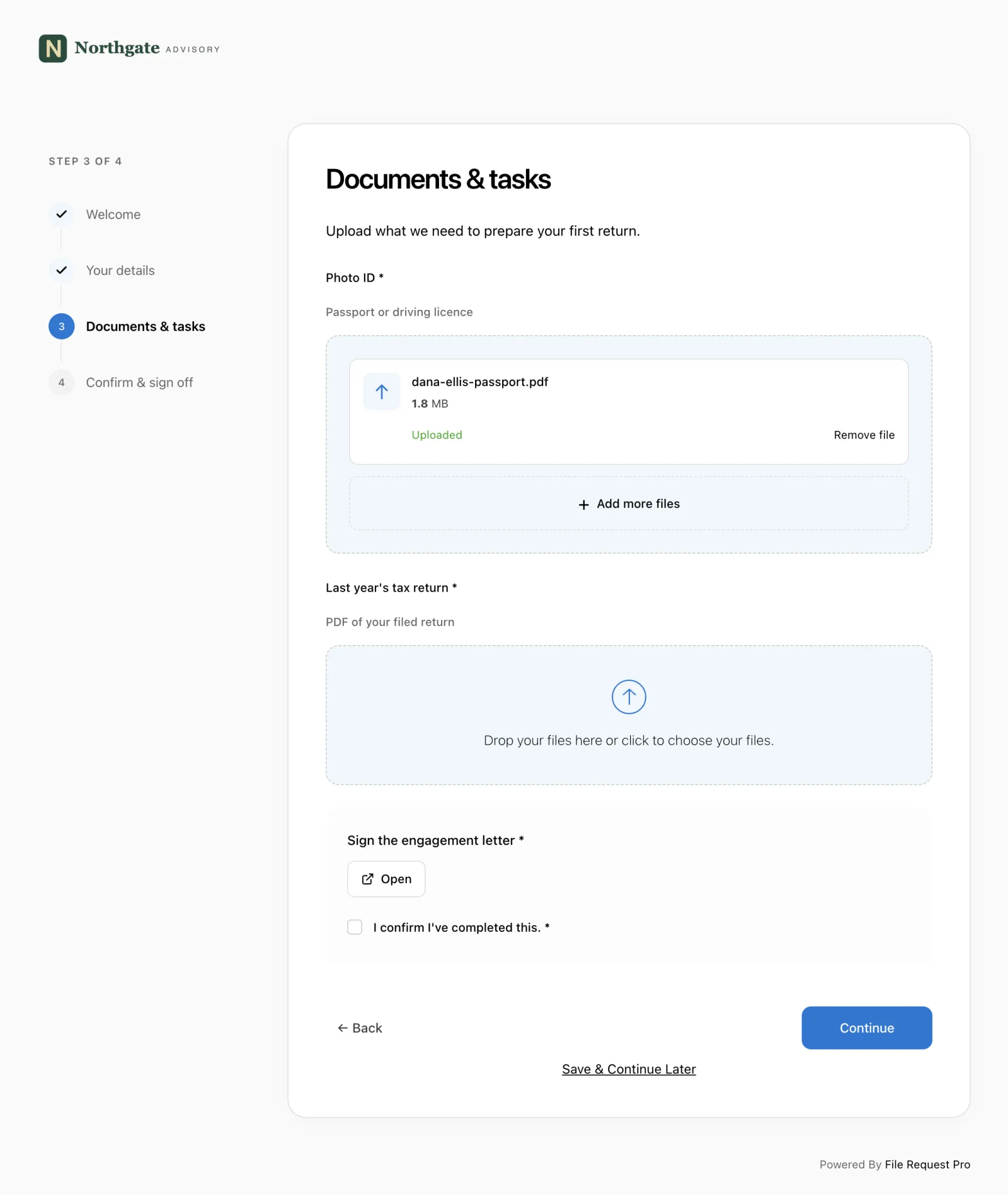
Here's how it works for client onboarding:
- Branded questionnaire pages — Add your logo, colors, and instructions. Clients see a professional intake form, not a generic survey.
- Form fields and file uploads on the same page — Ask questions and collect documents together. No separate emails for attachments.
- No client login required — Send a link. Clients click and start filling in. No accounts, no passwords, no friction.
- Automated reminders — Follow-up emails go out automatically to clients who have not finished. Stop writing "just checking in" emails by hand.
- Cloud storage integration — Submissions and uploaded files go straight to your Google Drive, OneDrive, SharePoint, or Dropbox, organized into client folders automatically.
- Conditional logic — Show different questions or file upload requests based on the client's answers. A legal firm can show different fields for corporate vs. individual clients.
The result: clients finish the questionnaire in one sitting, you get everything you need in one place, and automated reminders chase the stragglers so you don't have to.
Tips for Getting a High Completion Rate
Even the best questionnaire fails if clients don't finish it. These adjustments make a real difference in completion rates.
Keep it focused
Resist the urge to ask everything you might ever need. Focus on what you need to start working. You can always ask follow-up questions during the project. A 10-minute questionnaire gets completed. A 45-minute one gets bookmarked and ignored.
Explain why each section matters
Clients are more willing to answer questions when they understand the purpose. A brief sentence before each section — "This helps us tailor our approach to your industry" — reduces friction and increases thoughtful responses.
Set a clear deadline
Without a deadline, the questionnaire sits in the client's inbox indefinitely. Be specific: "Please complete this by Friday, March 14, so we can begin work on Monday." Tie the deadline to something tangible — a kickoff meeting, a filing date, or a project milestone.
Send it at the right time
Send your onboarding questionnaire immediately after the client signs the contract. Momentum is high, they're excited about the engagement, and the details are fresh. Wait a week and you're competing with everything else on their plate.
Make file uploads easy
If your questionnaire requires documents, don't ask clients to email them separately. Use a tool that lets them upload files directly within the form. Every extra step is another chance for the client to abandon the process.
Frequently Asked Questions
How many questions should a client onboarding questionnaire have?
Between 15 and 30 questions hits the sweet spot for most professional services firms. Fewer than 15, and you'll likely miss important details. More than 30, and completion rates drop. If you need more, break the questionnaire into sections with clear progress indicators so clients can see the finish line.
Should I use the same questionnaire for every client?
Use a core set of questions for every client, then add industry- or service-specific questions as needed. A modular approach — a base questionnaire plus add-on sections — keeps things efficient without missing context that matters for a particular engagement type.
What is the difference between an onboarding questionnaire and an intake form?
They overlap, but they're not the same. An intake form typically collects basic contact and administrative details. An onboarding questionnaire goes deeper -- goals, expectations, communication preferences, and project-specific requirements. For professional services, you usually need both, and combining them into a single form saves everyone time.
When should I send the onboarding questionnaire?
Send it the same day the client signs the engagement letter or contract. That's when motivation peaks. The longer you wait, the harder it becomes to get complete responses. Include a specific deadline and tie it to your project kickoff date.
How do I handle clients who don't complete the questionnaire?
Follow up once by email with a specific deadline. If you use File Request Pro, set up automated reminders so the system follows up for you. If a client keeps ignoring the questionnaire, address it head-on -- an incomplete onboarding delays the project and drags down the quality of your work.
Should I include document upload requests in the questionnaire?
Yes. Combining questions and document collection into a single form cuts back-and-forth dramatically. If you ask questions in one place and request documents via email, you'll spend the first two weeks of every engagement chasing attachments.
Free Client Onboarding Checklist
Get the complete document checklist for your industry — interactive, with progress tracking.
Use the Free Checklist Tool →