Extending credit without a thorough application process is one of the fastest ways to damage your cash flow. Missing trade references, incomplete financials, and vague payment commitments lead to bad debt, write-offs, and collections headaches that cost far more than the original sale was worth. A structured credit application form protects your business by collecting the information you need to make sound credit decisions before a single invoice goes out on terms.
Below you will find a complete credit application form template with 40+ fields organized by category, differences between business and consumer credit applications, industry-specific variations, and a practical approach to collecting credit applications securely online.
What Is a Credit Application Form?
A credit application form collects financial and business information from a customer requesting credit terms. Wholesalers, distributors, manufacturers, and service providers use it to evaluate creditworthiness before extending trade credit — allowing a customer to pay invoices on net 30, net 60, or net 90 terms instead of paying upfront.
It serves three purposes: risk assessment (the data to judge whether a customer will pay on time), legal protection (a signed agreement authorizing you to verify information), and compliance (a documented credit decision that holds up during audits and disputes).
Without a standardized business credit application form, your team ends up approving accounts based on gut instinct or the sales team's enthusiasm about a new deal. That inconsistency is where bad debt starts.
When Do You Need a Credit Application?
Any time your business delivers goods or services before receiving payment, you are extending credit. Common scenarios that require a formal credit application:
- New customer requesting net terms — paying invoices on 30, 60, or 90-day terms instead of upfront.
- Wholesale and distribution customers opening a credit account — retailers, contractors, and resellers who place recurring orders.
- Equipment leasing applications — proving the ability to meet monthly lease payments.
- Vendor credit evaluations — when a larger company evaluates your creditworthiness before awarding a contract.
- Consumer credit for retail financing — installment plans requiring income, employment, and personal financial information.
- Credit limit increases — existing customers requesting a higher limit should submit updated financials.
Credit Application Form Template: 40+ Essential Fields
This template covers the fields used in business (B2B) credit applications, organized into eight sections. Adapt it to match your industry and the level of risk involved.
Section 1: Business Information
- Legal business name — Exactly as registered with the state. Must match any personal guarantee or lien filing.
- DBA (Doing Business As) — Trade name, if different from the legal name.
- Business address — Physical street address, city, state, ZIP.
- Mailing address — If different from the physical address.
- Phone number
- Email address
- Website
- EIN / Federal Tax ID Number — Required for business credit checks and tax reporting.
- State of incorporation or organization
- Date business was established — Longer operating history generally indicates lower risk.
- Type of entity — Sole proprietorship, LLC, corporation, partnership. Determines whether you need a personal guarantee — a commitment that makes the owner personally liable if the business cannot pay.
- Number of employees
- Annual revenue — Ranges are acceptable (e.g., under $500K, $500K-$1M, $1M-$5M, $5M+).
- DUNS number — For Dun & Bradstreet business credit reporting, if available.
Section 2: Principal / Owner Information
Identifies the individuals behind the business — essential when a personal guarantee may be required.
- Owner / principal name
- Title
- Social Security Number (SSN) — Required if a personal guarantee is involved. The most sensitive field on the form.
- Date of birth
- Home address
- Phone number
- Percentage of ownership — Identify all owners with 20% or more ownership.
- Driver's license number and state — Optional, for additional identity verification.
Section 3: Trade References
Trade references show you how the applicant pays their bills in practice. Request at least three.
- Trade Reference 1: Company name
- Contact name
- Phone number
- Email address
- Account number
- Credit limit
- How long the account has been open
Repeat fields 23-29 for Trade References 2 and 3. If an applicant cannot provide three trade references, that itself may indicate limited credit history or strained vendor relationships.
Section 4: Bank References
- Bank name
- Branch address
- Account type — Checking, savings, or line of credit.
- Account number
- Contact name at bank
- Phone number
Some banks will only confirm the relationship exists; others will provide balance ranges and account history.
Section 5: Credit Request Details
- Credit amount requested
- Payment terms requested — Net 30, Net 60, Net 90, 2/10 Net 30 (2% discount if paid within 10 days), or other.
- Type of products or services to be purchased on credit
- Estimated monthly purchase volume — Helps you gauge whether the credit line is proportional to expected order activity.
- Accounts payable contact name, email, and phone — The person your AR team will contact for invoice and payment questions.
Section 6: Financial Information
For larger credit requests, supporting financial documents give your credit team the numbers behind the application.
- Most recent financial statements — upload. Balance sheet and income statement.
- Most recent tax return — upload. Business return (and personal if a personal guarantee is involved).
- Accounts receivable aging report — upload.
- Accounts payable aging report — upload.
Not every application requires financial statements. For credit lines under $5,000, trade references and a credit report may suffice. Above $25,000, request financials. Above $100,000, consider requiring audited statements.
Section 7: Personal Guarantee
A personal guarantee makes the business owner personally liable if the business fails to pay. Standard practice for small businesses, new companies, and sole proprietorships.
- Guarantor full legal name
- Social Security Number
- Date of birth
- Home address
- Guarantor signature
Have an attorney review this section. The language should clearly state that the guarantor assumes personal responsibility for the full amount owed, including interest, late fees, and collection costs.
Section 8: Terms, Conditions, and Authorization
This section transforms the application into a legally binding agreement:
- Authorization to check credit. Authorizes your company to obtain credit reports, contact references, and verify all information.
- Agreement to payment terms. Applicant agrees to pay all invoices within the stated terms.
- Late payment terms. Interest rate on overdue amounts (e.g., 1.5% per month) and when interest begins accruing.
- Collection costs. Applicant agrees to pay reasonable collection costs, including attorney fees.
- Credit limit adjustments. Reserve the right to adjust or revoke credit based on payment history or changed circumstances.
- Governing law. Which state's laws govern the agreement.
- Certification of accuracy. Applicant certifies all information is true and complete.
- Authorized signature, printed name, title, and date.
Business Credit vs. Consumer Credit Applications
The template above covers B2B credit applications. Consumer credit applications collect different information and face additional regulations.
B2B applications focus on trade references, bank references, financial statements, EIN, entity type, and personal guarantees for small businesses. Consumer applications focus on personal identification (SSN, DOB), income verification, housing costs, existing debt obligations, and consent for a credit bureau check. Dealerships should connect that application to their auto dealer forms and sale documents checklist so financing, vehicle, insurance, and closing records stay together.
Regulatory differences
Consumer applications are subject to the Equal Credit Opportunity Act (ECOA), Fair Credit Reporting Act (FCRA), and Truth in Lending Act (TILA). B2B applications have fewer regulatory requirements, but the FCRA still applies when pulling a business credit report. If you extend consumer credit, consult an attorney to ensure compliance.
Industry-Specific Variations
The core template applies across industries, but certain sectors need additional fields.
Wholesale and Distribution: Trade references from vendors in the same industry carry the most weight. Add fields for projected purchase volumes (credit limits are often tied to order size) and the customer's resale certificate for sales tax exemption.
Construction and Contractors: Add project-based fields (project name, address, general contractor) since material suppliers often extend credit per project. Include lien waiver language, contractor license number, and bonding information.
Equipment Leasing: Include equipment details (make, model, serial number, price), lease term (12-60 months), insurance requirements, and end-of-lease options.
Collecting Credit Applications Securely Online
Most businesses still email a PDF form and wait for customers to print, fill out, scan, and email it back. The result: Social Security numbers, bank account numbers, and tax returns travel through unsecured inboxes — sometimes forwarded three or four times as the credit team chases missing pages. One misdirected email, and your applicant's most sensitive financial data is exposed.
And a credit application is more than a single form. Financial statements, tax returns, and bank reference letters all need to accompany it. Collecting these pieces separately means documents get misplaced, versions overlap, and your credit team spends hours reassembling incomplete files.
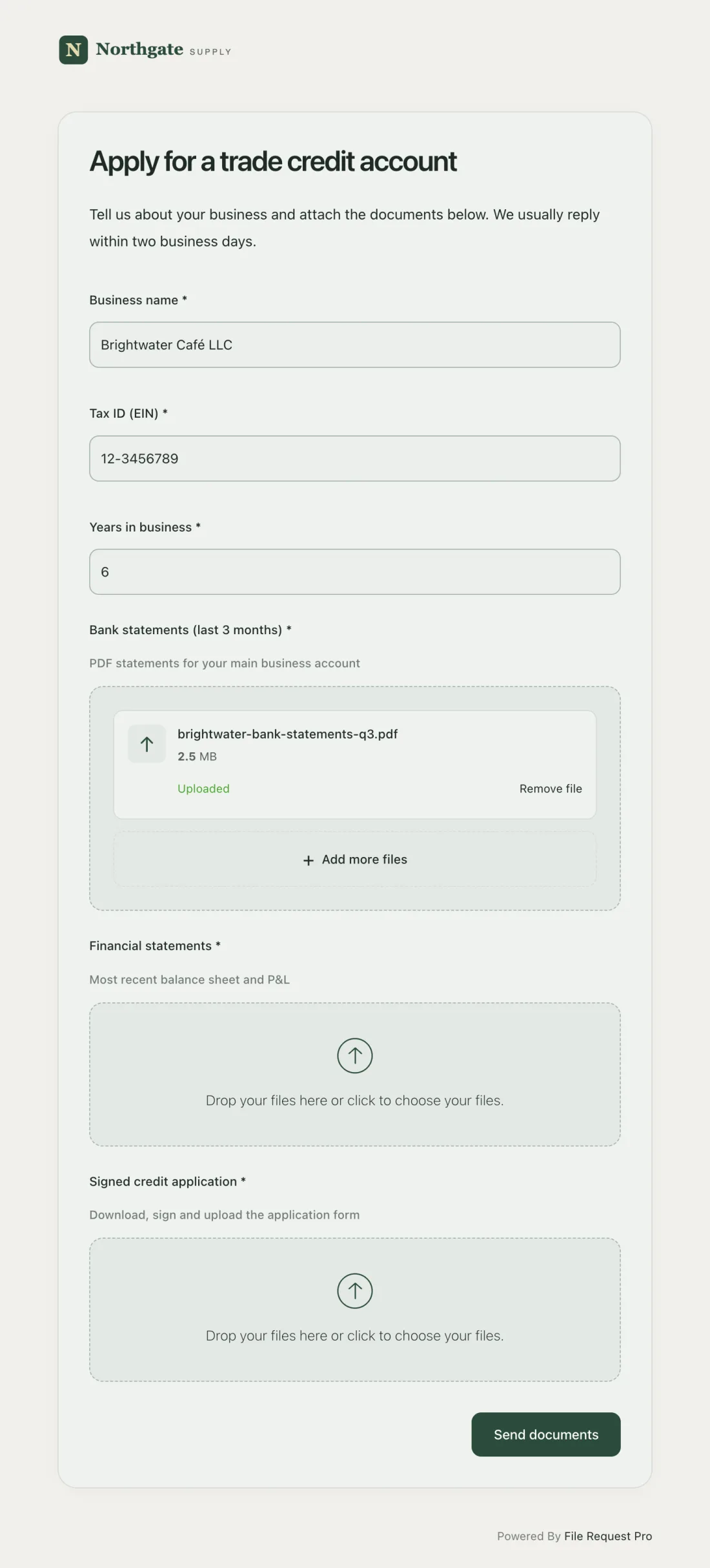
File Request Pro lets you create a branded credit application page where customers fill out the form and upload all supporting documents in a single secure submission — business information, trade references, and upload areas for financial statements and tax returns, all on one page.
Why this matters for credit applications specifically
- Encryption protects sensitive data. SSNs, bank account numbers, and tax returns should never travel through plain email. Encryption protects this information in transit and at rest. For more on keeping sensitive documents secure, see our guide to secure document sharing.
- Automated reminders close the loop. Credit applications are often started but not completed. Automated reminders nudge applicants who have not attached their financial statements or trade references — without your team chasing each one manually.
- Cloud storage sync keeps everything organized. Completed applications sync automatically to Google Drive, OneDrive, SharePoint, or Dropbox — organized by applicant name, date, or any field from the form.
- No customer account required. The applicant clicks a link, fills in the form, uploads documents, and submits. No software to install, no account to create.
- Audit trail for compliance. Every submission is logged with a timestamp showing when it was submitted and by whom — critical if a credit decision is disputed or audited. Learn more about how an audit trail supports compliance.
Best Practices for Managing Credit Applications
A good form is only half the equation. How you manage the process determines whether your credit program reduces bad debt or creates it.
Standardize your credit policy
Document credit approval criteria before the first application arrives — minimum years in business, required number of trade references, credit score thresholds, and financial statement requirements by credit tier. Written criteria produce defensible decisions that hold up when a salesperson pushes to approve a risky account.
Verify everything
Call trade references. Contact the bank. Pull a Dun & Bradstreet or Experian business credit report. Applicants who are behind on payments with other vendors will not tell you that on the form. Verification is where you find it.
Start with conservative credit limits
A new customer may deserve a $50,000 credit line eventually — start them at $10,000 and increase after 90-180 days of on-time payment. It is far easier to increase a credit limit than to collect on an over-extended account.
Review accounts regularly
Credit approval is not a one-time event. Review existing accounts at least annually — or quarterly for accounts above $50,000. Request updated financial statements, check current credit reports, and evaluate payment trends over the past 12 months.
Separate credit decisions from sales decisions
The person who approves credit should not be the person who earns a commission on the sale. Your sales team brings in the customer. Your credit team decides how much risk to take on.
Frequently Asked Questions
What information should a business credit application collect?
At minimum: legal business name, address, EIN, entity type, years in business, owner information, three trade references, a bank reference, credit amount requested, and signed authorization to check credit. For larger credit lines, add financial statements, tax returns, and a personal guarantee.
How long does it take to process a credit application?
Most businesses process credit applications in three to seven business days. The biggest delay is waiting for trade and bank references to respond to verification requests. Companies that collect all required information upfront — rather than chasing missing documents by email — typically reach a decision within five business days.
Should I require a personal guarantee on every credit application?
It depends on the business structure and credit amount. Personal guarantees are standard for sole proprietorships, new LLCs, and businesses with limited credit history. Established corporations with strong financials may not need one. Many companies require personal guarantees for credit lines above a threshold such as $25,000.
What is the difference between a credit application and a credit agreement?
A credit application collects information and authorizes you to evaluate creditworthiness. A credit agreement is the formal contract establishing terms after approval — credit limit, payment schedule, interest rates, and conditions. Many businesses combine both by including terms and conditions on the application itself.
How many trade references should I require?
Three is the industry standard — enough to identify patterns. If all three report prompt payment, the applicant is likely reliable. If even one reports slow payment from the applicant's "best" references, that is a red flag. For credit lines above $50,000, consider four or five references.
Can I collect credit applications as a PDF form emailed back and forth?
You can, but it is not recommended for applications that include SSNs, bank account numbers, and financial statements. Email is not encrypted by default, so sensitive data can be intercepted in transit. A secure online submission page protects applicant data, keeps applications organized, provides an audit trail, and eliminates back-and-forth by requiring specific uploads before submission.
What should I do when a credit application is denied?
Communicate the decision promptly and professionally. For business credit, there is no federal requirement to provide a specific reason for denial (unlike consumer credit, where the ECOA requires adverse action notices). However, many businesses offer alternatives — a smaller credit line, shorter terms like net 15, or cash on delivery — to preserve the relationship while managing risk.
A well-structured credit application form protects your cash flow, creates a defensible record, and sets clear expectations with every customer who asks for payment terms.
Ready to collect credit applications and financial documents securely? Try File Request Pro free — no credit card required — and create a branded credit application page where customers submit their application and upload supporting documents in one secure step. Encryption protects sensitive data in transit and at rest. Automated reminders follow up on incomplete submissions. Files sync to your cloud storage automatically. A full audit trail logs every submission. And your applicants never need to create an account.
Free Client Onboarding Checklist
Get the complete document checklist for your industry — interactive, with progress tracking.
Use the Free Checklist Tool →