Half of your project delays start before the project does. A client says "we need a new website" and you spend the next two weeks trading emails about scope, budget, timeline, and brand assets. A structured project intake form captures all of that in one submission — so your team starts working instead of waiting.
Why Use a Project Intake Form?
You stop scope creep before it starts. When deliverables, expectations, and boundaries are documented before anyone opens a design file, both sides share a reference point. The intake form becomes your statement of work's foundation — and your defense when scope discussions come up later.
You catch budget mismatches early. A budget range question surfaces misalignments before you invest 10+ hours in discovery. If a client wants a 40-page site on a $5K budget, you have that conversation in week one — not week four, after your team has started wireframes.
You get assets upfront instead of chasing them for weeks. Logos, brand guidelines, content, photography — every project needs inputs from the client. Without a structured process, these trickle in over weeks via email, Slack, and shared drives. An intake form collects everything in one place, on day one.
You create a document that protects your team. Three months in, when a stakeholder questions a design direction, the intake form is your source of truth. It records what the client wanted, in their own words — protecting you from unpaid revision rounds.
How the Project Intake Process Works
The form is one step in a longer process. Most agencies run some version of these five:
- Inquiry. A prospect fills in your contact form, emails you, or comes in through a referral.
- Intake form. Send the project intake form before the first call, so the call starts from their answers instead of from zero.
- Review and qualify. Check the budget range, timeline and scope against your capacity. This is where you turn down projects that don't fit.
- Scoping call and proposal. Write the proposal from the answers. Anything the form left vague becomes a question for the call.
- Kickoff. Once the proposal is signed, collect the remaining assets (logins, brand files, content) and start work.
In-house teams follow the same shape. A stakeholder submits a project request, a review group weighs it against other work, and approved projects move to planning.
Project Intake Form Template: 46 Questions
Pick the sections that match your engagement and skip what doesn't apply. Each question includes a note on why it matters.
Client and Company Information
- What is your company name? — Starting point for project files and contracts.
- Who is the main point of contact? (Name and title) — The day-to-day contact is not always the person who signed the contract.
- Best email to reach you? — You want the inbox they check daily, not a generic@ address.
- What is your direct phone number? — For urgent decisions that cannot wait for email.
- What is your company website URL? — Lets your team review the current site before kickoff.
- What industry are you in? — Industry context shapes design decisions and compliance requirements.
Project Overview
- What is the project name or working title? — Internal tracking, especially when clients have multiple projects with you.
- What type of project is this? (Website, app, campaign, brand identity, consulting) — Determines which team members and processes you need.
- Describe what you need in 2-3 sentences. — Forces clarity. Long descriptions bury the real need.
- What problem does this project solve for your business? — "We need a new website" often means "our site doesn't generate leads." The real problem shapes your solution.
- What does success look like? How will you measure it? — "More traffic" gives you nothing to design toward. "30% increase in qualified leads" does.
- What prompted this project now? — A product launch, a rebrand, and a competitor move each carry different urgency.
Scope and Deliverables
- List every deliverable you expect. — Homepage, 10 page templates, a blog, an admin dashboard. If they can't list deliverables, the project needs more scoping.
- How many pages, screens, or components? — A five-page site is a different project from a 40-page application.
- What features or functionality are required? — E-commerce, authentication, search, booking. Each adds complexity and cost.
- What third-party tools need to integrate? — CRMs, payment gateways, marketing tools. Integrations are the top source of scope creep.
- Who is providing the content? (Text, images, video) — If the client provides content, your timeline depends on their delivery speed. Content delays are the number-one cause of project overruns.
- Are there existing assets to build from? — Starting from scratch is different from iterating on what exists.
- Is there anything explicitly out of scope? — Document what you are not doing so it doesn't become an assumption later.
Brand and Design
- Do you have brand guidelines? Please share them. — Dictates fonts, colors, logo usage, and imagery style.
- Can you provide your logo files? (SVG, AI, or EPS preferred) — Asking for vectors now prevents the "can you send a higher-quality version?" email later.
- What are your brand colors? (Hex codes or Pantone) — Precise values prevent guesswork across deliverables.
- Do you have font preferences or required typefaces? — Some brands have licensed fonts. Others want recommendations.
- Share 3-5 websites or designs you admire and explain why. — A visual reference says more in five seconds than three paragraphs.
- How would you describe your brand's tone of voice? — "Playful and approachable" gets different design treatment from "premium and understated."
Target Audience
- Who is the primary audience for this project? — Demographics, interests, pain points. The more specific the answer, the sharper your work.
- Do you have user personas or customer profiles? — If they have done the research, use it.
- Is there a geographic focus? — Affects language, imagery, and multi-language requirements.
- What actions should users take? (Purchase, sign up, request a quote) — Desired actions shape layout and CTAs.
- Are there secondary audiences? — A B2B product might target end users but also need to convince IT buyers.
Budget and Timeline
- What is your budget range? — Offer ranges ($5K-$10K, $10K-$25K, $25K-$50K, $50K+). A range tells you whether scope and budget are in the same ballpark.
- Is there a hard deadline? What's driving it? — A product launch or trade show creates a fixed date. Knowing the driver tells you whether the deadline bends or breaks.
- What is your preferred launch date? — May differ from the hard deadline. The client might need June but prefer April.
- Are you open to a phased approach? — Launching core features first keeps budget in check and gets something live sooner.
- Who approves the budget and signs off on invoices? — Hidden approval layers stall projects for weeks. Surface them before kickoff.
Technical Requirements
- Do you have hosting, or do you need a recommendation? — The hosting environment shapes performance, security, and how you deploy.
- Do you have a CMS preference? (WordPress, Webflow, Shopify, custom) — CMS choice shapes how you build everything.
- What third-party services need to connect? — Payment processors, CRMs, analytics. List them all upfront.
- Are there accessibility requirements? (WCAG 2.1 AA, ADA) — Building for accessibility from day one costs a fraction of retrofitting later.
- Do you have an existing SEO strategy? — URL structures, redirects, and metadata affect how the project is built.
- What analytics or tracking tools do you need? — Google Analytics, Tag Manager, conversion pixels. Know the stack before you build.
Process and Communication
- Who is the final decision-maker? — The contact, the invoice payer, and the creative approver are often three different people. Identify who has final say.
- What does your approval process look like? — A solo founder approving in 24 hours is a different project from a five-person committee reviewing for two weeks.
- What is your preferred communication channel? — Email, Slack, Teams, phone. Match theirs.
- How often should we meet for updates? — Sets cadence early so both sides protect the time.
- Are there other stakeholders or partners we should know about? — Hidden stakeholders who appear mid-project with veto power stall timelines for weeks. Find them now.
Project Intake Form Examples by Agency Type
The 46 questions above cover most engagements. Here is how to adapt the general-purpose project intake form for your specialty.
Web Development Agencies
Add these technical-specific questions to the general template:
- What is your current tech stack? — Migrating between stacks is a different project from building within an existing one.
- Do you need data migration from an existing system? — Content, user data, URL redirects. Migration complexity rarely shows up in the original brief.
- What is your current hosting provider? — Server resources, SSL, CDN setup. You need this before writing a line of code.
- Are there performance benchmarks the site must meet? — Page load targets and Core Web Vitals shape architecture decisions from the start.
Marketing and Creative Agencies
Focus on strategy, channels, and measurement:
- What type of campaign is this? — Brand awareness, lead generation, and product launch each have different KPIs and deliverables.
- Which channels should this campaign cover? — Paid search, social, email, content. Multi-channel work needs coordinated timelines.
- What are your KPIs and how do you track them? — The definition of success shapes every creative decision you make.
- Do you have existing content to repurpose? — Blog posts, videos, case studies. Repurposing can save 20-30% of the content budget.
IT Consulting Firms
IT intake is heavier on infrastructure, security, and compliance:
- What is your current IT infrastructure? — On-premise, cloud (AWS, Azure, GCP), or hybrid. Determines what you can build and how fast.
- What are your security requirements? — Encryption, access controls, penetration testing. Each one affects technical decisions.
- Are there compliance requirements? (HIPAA, SOC 2, GDPR, PCI-DSS) — Compliance adds documentation and audit overhead to both timeline and budget.
- Who manages IT operations today? — In-house team, MSP, or nobody. Determines who maintains the solution after handoff.
Collecting Project Briefs and Assets Together
The problem with most intake processes is not the questions — it is the fragmentation. The brief arrives as a Word doc. Logos come in a separate email. Brand guidelines show up in a shared folder a week later. Photography trickles in over Slack. Your PM spends week one chasing files across five channels instead of planning work.
File Request Pro fixes this. Form fields and file uploads live on a single branded page. Clients answer your intake questions and upload logos, guidelines, content, and reference files — all in one submission. No account required.
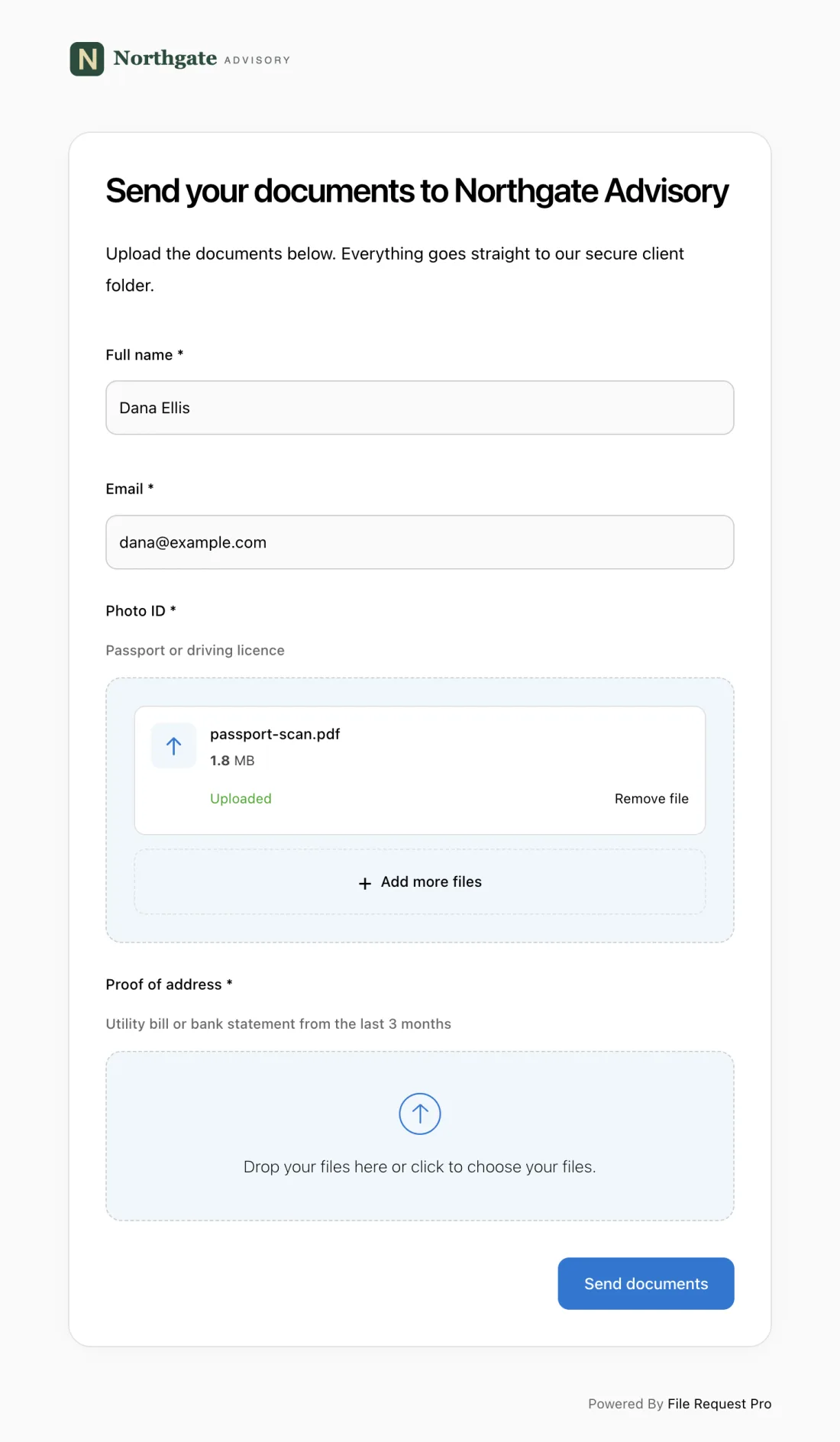
- One branded page replaces the email chain. Your logo, your colors, your instructions. Clients see a polished intake experience — not a generic Google Form.
- Form fields and file uploads live side by side. Ask "Do you have brand guidelines?" then include an upload zone for the file directly below.
- Automated reminders chase clients so you don't have to. Set a reminder sequence and stop writing "checking in on those files" emails.
- Files sync to Google Drive, OneDrive, SharePoint, or Dropbox. Submissions land in your cloud storage, organized by client — no downloading, no re-uploading.
- No client account needed. Send a link. Clients click and start filling in. No sign-ups, no passwords, no friction.
Tips for Better Project Intake Forms
Send the form within an hour of sign-off. Client motivation peaks the moment they commit. Wait a week and that momentum vanishes. Send the intake form the same day: "Complete by Friday so we can prepare for Monday's kickoff call."
Don't ask everything — ask what you need to start. A focused 15-20 question form gets completed in 10-15 minutes. A 40-question form gets abandoned at question 18.
Pair every asset request with an upload field. Don't ask "do you have brand guidelines?" without a place to upload them right there. Separating questions from file collection recreates the fragmentation you are trying to fix.
Use conditional logic. If a client selects "marketing campaign," show campaign-specific questions and hide web development fields. One smart form replaces multiple templates.
Review responses before the kickoff call. Read every answer before your first meeting. Flag gaps and contradictions. Walk in with targeted follow-ups instead of re-asking what the form already covered. Clients notice when you have done your homework.
Frequently Asked Questions
What is a project intake form?
A structured questionnaire you send to clients at the start of an engagement. It captures requirements, scope, budget, timeline, brand assets, and stakeholder details in one place. The completed form becomes the foundation for your statement of work and project plan.
How is a project intake form different from a creative brief?
The intake form collects raw information from the client. The creative brief is the strategic document your team writes after reviewing that information. The intake form asks "what do you need?" The brief answers "here is how we will approach it." A thorough intake form gives you most of the raw material for the brief.
Can I use a project intake form template in Excel?
You can, but spreadsheets hit a wall fast. They handle text but cannot accept file uploads, do not send reminders, and look generic. An Excel template works as an internal checklist. For client-facing intake, a dedicated form tool or client onboarding platform delivers higher completion rates and collects files alongside answers.
How many questions should a project intake form have?
Between 15 and 25 for most projects. Fewer than 15 and you miss details that come back as scope creep. More than 30 and completion rates drop. Use the 46-question template as a menu — select the sections that match your project type. A web development project needs the technical section; a graphic design project needs brand and design questions.
When should I send the project intake form?
The same day the client signs the proposal. Motivation is highest at the point of commitment. Include a deadline tied to a next step: "Complete by Thursday so we can finalize the project plan for Monday's kickoff." Use automated reminders to follow up if they haven't finished within a few days.
What's the best way to collect project briefs and files together?
Combine intake questions with file uploads on a single page. Email scatters information across threads. Google Forms and Typeform handle text but choke on large files. File Request Pro lets you build a branded intake page with form fields and upload zones. Files sync to your cloud storage, automated reminders follow up with clients who haven't finished, and no one needs to create an account. Start a free trial — set up your first intake page in under 10 minutes.
