You land a new SEO client, run a quick kickoff call, and start working. Three weeks in, you realize you've been targeting keywords for an audience they don't serve, in a market they've already abandoned. Their website runs on a CMS nobody told you about, and the "previous SEO agency" left behind a penalty that's tanking everything you build.
A structured SEO questionnaire prevents this. It captures what you need before you touch a single meta tag — the client's business model, competitive landscape, technical setup, and realistic goals. Below you'll find 40+ SEO onboarding questions organized by category, plus practical advice on sending your questionnaire and getting complete responses.
Why Use an SEO Client Questionnaire?
You stop wasting time on irrelevant keywords. Without a questionnaire, you're guessing at target keywords based on a 20-minute call. A structured intake reveals what the client sells, who they sell to, and what terms their customers use — so you build a strategy around their real business, not your assumptions.
You surface technical access issues early. Few things stall an engagement faster than discovering in week two that nobody has the Google Search Console credentials or the CMS doesn't allow custom meta tags. A questionnaire collects every login and access point upfront.
You set realistic expectations from day one. Clients who expect page-one rankings in 30 days need to hear the truth early. Asking about timelines and previous SEO experience gives you a clear picture of what the client believes is possible — and lets you correct misaligned expectations before they become cancellation conversations at month three.
You uncover hidden penalties and past SEO work. Clients don't always volunteer that their last agency built 10,000 spammy backlinks. Direct questions about SEO history surface problems you'd otherwise discover the hard way.
You look more professional than competitors. When your agency sends a thorough onboarding questionnaire while competitors say "send us your website URL," the client notices. A structured process signals you have a proven methodology — and makes the client confident they picked the right agency.
SEO Questionnaire: 40+ Questions by Category
Not every question applies to every client. Pick the sections that match each engagement and skip what doesn't apply.
Business and Brand Information
- What is your business name and website URL? — Confirm the exact domain, including www vs. non-www and any subdomains.
- What does your business do, and what products or services do you offer? — Get this in the client's own words. How they describe their business reveals the language their customers use.
- What industry or niche do you operate in?
- Who is your target market? — Demographics, company size (for B2B), geographic focus, and buying behavior.
- What is your unique selling proposition? — Differentiation drives content angles and helps you find keywords where the client can genuinely compete.
- Who are your top 3-5 competitors?
- Do you have brand guidelines or a style guide we should follow? — Content produced during SEO work needs to match the client's voice and terminology.
- How do you generate revenue? — E-commerce, lead generation, subscriptions, or foot traffic each require a different SEO approach.
Current Website and SEO Status
- What is your current estimated monthly organic traffic? — If they don't know, that tells you they haven't been tracking SEO performance.
- Do you have Google Analytics installed? Which version?
- Do you have Google Search Console set up and verified? — Search Console data is essential for your audit. If it's not set up, that becomes your first task.
- Has any previous SEO work been done — in-house or by another agency? — Understanding the history prevents you from building on a flawed foundation.
- Are there any current keyword rankings you're aware of?
- Has your site ever received a Google penalty or manual action? — Past penalties affect your entire strategy.
- What CMS or platform is your website built on? — WordPress, Shopify, Wix, custom — the platform determines what technical changes are possible.
- Have you done any link building in the past? If so, what kind? — Clients who bought links or used PBNs need cleanup before new link building begins.
Target Keywords and Audience
- What keywords or phrases do you most want to rank for? — Some will be realistic targets; others will be vanity terms. Either way, knowing their aspirations shapes your strategy conversation.
- Who is your ideal customer? Describe them in detail. — Go beyond demographics. What problems do they have? What questions do they ask before buying?
- Are you targeting a specific geographic area, or is your audience national/global? — This determines whether you need local SEO, Google Business Profile optimization, or hreflang tags.
- Are there seasonal patterns or peak periods in your business? — Seasonal content needs to be published months ahead to rank in time.
- Which pages on your website are most important for conversions? — Identify the money pages early for prioritization.
- Are there topics or keywords you specifically want to avoid?
- What questions do your customers most frequently ask before purchasing? — Each FAQ is a potential content topic or featured snippet opportunity.
Content Strategy
- Do you currently have a blog or resource section? — Existing content may need optimization rather than replacement, which can deliver faster results.
- How much content can your team produce per month? — A strategy calling for 12 posts per month won't work if the client can only produce two.
- Do you have subject matter experts available for interviews or review? — Google's E-E-A-T guidelines reward expertise. Access to experts makes content more authoritative.
- What does your content approval process look like? — Some clients approve in 24 hours. Others run through legal, compliance, and management. The timeline affects your entire content calendar.
- Are there competitor blogs or content hubs you admire?
- Do you have existing content assets — whitepapers, case studies, videos — that we can repurpose? — A single whitepaper can become five blog posts. Don't start from zero if you don't have to.
Technical Access and Credentials
Collecting credentials upfront prevents the back-and-forth of requesting logins one at a time. Ask clients to share credentials securely — not over plain-text email.
- Who is your hosting provider, and can we get access? — Server-level issues like page speed and redirects sometimes require hosting access.
- Can you provide CMS admin access? — Needed for on-page optimization, technical fixes, and schema markup.
- Can you provide Google Analytics access? — Specify the level you need: Viewer for reporting, Editor for goals and events.
- Can you provide Google Search Console access? — Full user access lets you submit sitemaps and request indexing.
- Do you have a Google Business Profile? Can you grant access? — Essential for local SEO clients.
- What social media accounts does your business have? — Social profiles affect brand SERP presence and content distribution.
- Are there third-party tools, CDNs, or integrations we should know about? — Cloudflare, caching plugins, and A/B testing tools can all affect crawling, indexing, or page speed.
Goals, Budget, and Timeline
- What are your primary SEO goals? — More organic traffic, more leads, local visibility, e-commerce revenue, brand authority — each demands a different strategy.
- What KPIs will you use to measure success? — Establish the scoreboard before the game starts.
- What is your monthly budget for SEO services? — Budget determines scope. A $1,000/month engagement gets a different strategy than $10,000/month.
- What is your expected contract length or engagement period? — SEO is a long-term investment. A one-month trial needs a different conversation than a 12-month commitment.
- What is your timeline for seeing results? — Most SEO takes 4-6 months to show meaningful movement. If the client expects results in 30 days, address that now.
- How often would you like to receive reports, and in what format?
- Who is the main point of contact for day-to-day communication? — The person who signed the contract isn't always the person you'll work with daily.
Competitors and Market Position
- Which competitor websites do you think have the best online presence? — Their perception reveals what they value: design, content depth, rankings, or user experience.
- Are there competitors ranking above you for important keywords? — This surfaces the frustrations driving the engagement.
- What do your competitors do better than you online? — An honest answer gives you a roadmap for strategic priorities.
- What do you do better than your competitors? — Strengths become content angles. Your SEO strategy should amplify existing advantages.
- Are there emerging competitors or new market entrants we should track? — New entrants investing heavily in content can blindside you if you're not watching.
How to Send Your SEO Client Questionnaire
The tool you use directly affects completion rates. SEO onboarding is more demanding than a basic survey — you need clients to share credentials, upload documents, and provide detailed business information. Pick the wrong tool and you'll spend more time chasing responses than doing SEO work.
Email or Google Forms
Emailing a list of questions works for simple projects, but SEO onboarding isn't simple. Clients reply inline, skip questions, and send credentials in plain text. Google Forms handles text responses well, but its file upload question only works for clients signed in to a Google account, so many send analytics screenshots, brand guidelines, and content calendars by email instead. You end up collecting the questionnaire in one tool and chasing files through email threads that get harder to follow with every reply.
A purpose-built file collection tool
File Request Pro lets you combine questionnaire fields with file upload zones on a single branded page. Your SEO client answers intake questions and uploads brand guidelines, analytics screenshots, and credential documents in one place.
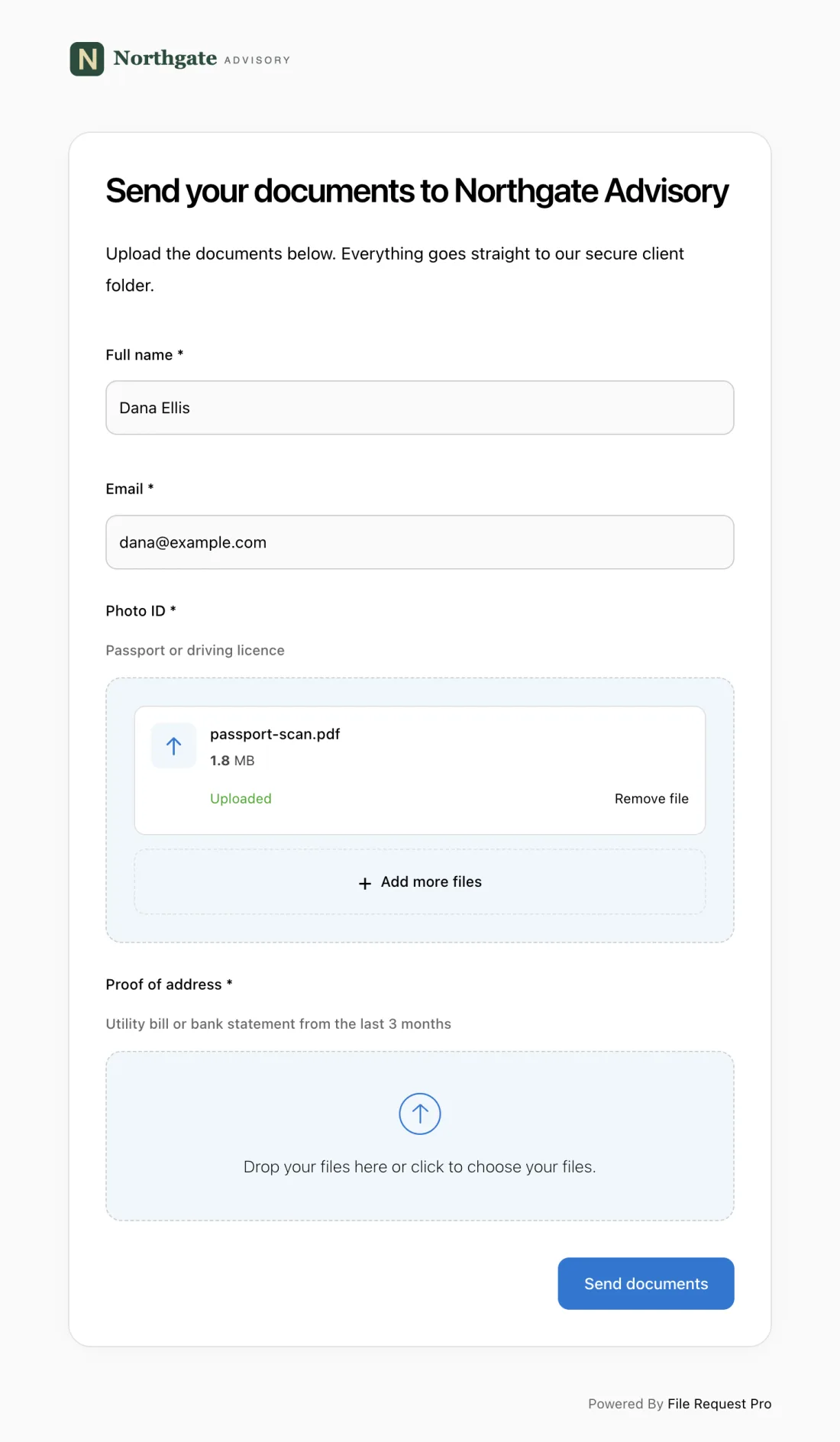
Key advantages for SEO agencies:
- Branded upload pages — Your logo, your colors (Lite and up), your domain (Business and Enterprise). Clients see your agency brand, not a generic form tool.
- Questions and file uploads together — Create separate upload fields for "Google Analytics screenshot," "brand guidelines PDF," and "content calendar" alongside your text questions.
- Automated reminders — Clients who haven't completed the questionnaire get nudged automatically. The sequence stops once they submit.
- Cloud storage sync — Responses and uploaded files are saved to Google Drive, OneDrive, or Dropbox, organized into client folders.
- No client account required — Clients click a link and start filling in. No login, no friction.
If you're onboarding multiple SEO clients per month, the time saved on follow-ups and file organization adds up fast. You can reuse the same client onboarding questionnaire template for each new engagement.
Tips for Getting Better Questionnaire Responses
Send it immediately after signing. The moment a client commits is when their enthusiasm is highest. Send the questionnaire within an hour of contract signing with a brief welcome message explaining what you need and why. Every day you wait, completion rates drop.
Explain the purpose. A short note — "Your answers help us build an SEO strategy tailored to your business. The more detail you provide, the faster we deliver results" — frames the questionnaire as a benefit, not homework.
Include examples for complex questions. "What is your unique selling proposition?" can stump business owners. Adding a brief example — like "We're the only organic bakery in Austin that delivers same-day" — helps clients understand what you're looking for.
Set a clear deadline. "Please complete this by Friday so we can have your audit ready for Wednesday's strategy call" ties the deadline to a tangible outcome.
Offer a call as a backup. Some clients prefer talking over typing. Offer to walk through the questionnaire on a 30-minute call and fill it in yourself. You still get the same information, and the client feels like they got a personal onboarding experience.
Frequently Asked Questions
How many questions should an SEO client questionnaire include?
Aim for 25-35 questions for a typical engagement. The full list above has 48 questions across seven categories, but you should select the sections relevant to each client. A local bakery doesn't need the same depth as an enterprise SaaS company.
When is the best time to send an SEO onboarding questionnaire?
Immediately after the client signs. Send it the same day while momentum is high. Waiting even a few days reduces completion rates and delays your ability to start meaningful work.
What if the client doesn't know the answers to technical questions?
That's common. Many business owners don't know their CMS version or whether Search Console is set up. Include a "not sure" option and a note: "Leave blank and we'll figure it out during the audit."
Should I use the same questionnaire for every SEO client?
Use the same template as your starting point, but customize for each client type. An e-commerce client needs questions about product categories and conversion tracking. A local service business needs questions about service areas and Google Business Profile. General sections apply to everyone; technical and strategy sections should be tailored.
How do I handle clients who give vague answers?
Use the questionnaire as a starting point for your kickoff call. If a client writes "we want more traffic" as their goal, ask: "More traffic to which pages? What would that traffic do — fill out a form, make a purchase, call your office?" The questionnaire captures initial answers; the strategy call refines them.
Can I combine an SEO questionnaire with a design questionnaire for full-service clients?
Yes, but keep them in separate sections with clear headings. A combined questionnaire that jumps between SEO and design topics feels disorganized. Use section headers to keep the flow logical, or use a tool that lets you create separate pages within one intake form.
Ready to streamline your SEO client onboarding? Start a free trial of File Request Pro and build a branded questionnaire that collects answers and files in one step. No credit card required, your clients don't need an account, and you can have your first intake page live in under 10 minutes.
