White glove onboarding is a premium, hands-on approach to bringing new clients into your business. Instead of handing someone a login and a help article, you walk them through every step personally — configuring their account, collecting their documents, answering questions in real time, and making sure they feel supported from day one.
This guide explains what white glove onboarding involves, when it makes sense (and when it does not), and how to build a repeatable process that delivers a premium client experience without overwhelming your team.
What Is White Glove Onboarding?
The term "white glove" comes from the idea of handling something with extreme care — the way a museum curator handles a rare artifact, or a luxury hotel attends to every detail of a guest's stay. In a business context, white glove onboarding means providing personalized, high-touch support to every new client during their first days and weeks with your firm.
A white glove onboarding process typically includes:
- A dedicated point of contact. The client has a named person — a customer success manager, account manager, or onboarding specialist — who owns their experience from signing through full adoption.
- Personalized setup and configuration. Rather than leaving clients to figure things out themselves, your team configures systems, imports data, and prepares everything before the client even logs in.
- Proactive communication. You reach out before the client has to ask. Progress updates, next-step reminders, and check-in calls happen on a set schedule, not only when something goes wrong.
- Customized training. Instead of sending a link to a generic knowledge base, you walk the client through the features and workflows that matter to their specific situation.
- Hands-on problem solving. When issues arise, the onboarding team takes ownership and resolves them directly, rather than routing the client through a support ticket queue.
Think of it this way: self-serve onboarding says "here are the instructions, let us know if you get stuck." White glove onboarding says "we will handle this together, and we will not move on until you are comfortable."
Why White Glove Onboarding Matters
The first interaction a client has with your business after signing sets the tone for the entire relationship. A disorganized or impersonal onboarding experience — missing documents, slow responses, unclear next steps — tells the client that the service itself might be just as chaotic. And once that impression forms, it is difficult to reverse.
A well-executed white glove onboarding process delivers measurable benefits:
- Higher retention rates. Clients who feel supported from the start are far more likely to stay. Across industries, firms that invest in structured onboarding programs consistently report lower churn rates within the first year compared to firms that leave clients to self-onboard.
- Faster time to value. When your team handles the setup and configuration, clients start seeing results sooner. They do not spend weeks trying to figure out how things work on their own.
- Stronger referrals. Premium experiences generate word of mouth. A financial advisor who personally walks a new client through their portfolio setup creates the kind of story that gets shared at dinner parties.
- Fewer support requests later. Investing time upfront to ensure the client understands your process means fewer confused emails and urgent calls down the road.
- Higher lifetime value. Clients who start strong tend to expand their engagement over time — adding services, increasing budgets, or upgrading plans — because they trust the relationship.
White Glove Onboarding in Professional Services
White glove onboarding looks different depending on the industry, but the core principle stays the same: take the burden off the client and make them feel like they are your most important account.
Legal firms
A law firm handling a new corporate client does not just send over an engagement letter and wait. A white glove approach involves a dedicated intake meeting where the attorney reviews the client's legal history, current contracts, and upcoming risks. The firm's paralegal collects all relevant documents — formation documents, existing agreements, insurance policies, IP filings — through a structured process rather than a string of email attachments. The attorney then prepares a legal roadmap and schedules a follow-up call to walk through it.
The result: the client feels understood, their documents are organized from day one, and the legal team can start substantive work immediately instead of spending weeks chasing paperwork.
Financial advisory
A wealth management firm onboarding a high-net-worth individual starts with a full discovery meeting. The advisor reviews the client's current portfolio, tax situation, insurance coverage, estate plan, and financial goals. An operations team member then collects account statements, tax returns, trust documents, and beneficiary designations — organizing everything into the firm's system before the second meeting.
By the time the advisor presents a financial plan, the client has not been asked the same question twice. Every detail has been captured, confirmed, and integrated into a cohesive recommendation.
Consulting firms
A management consulting firm starting an engagement with a mid-size company assigns a project lead who conducts stakeholder interviews during the first week. They collect internal reports, financial data, org charts, and strategic plans through a centralized intake process. A kickoff presentation then synthesizes everything the firm has learned, demonstrates that they understand the client's challenges, and outlines the engagement roadmap with clear milestones.
The client walks away from that first week thinking: "These people get it. They have done their homework."
Accounting firms
An accounting firm onboarding a new business client assigns a client manager who handles the entire setup: collecting prior-year tax returns, financial statements, payroll records, and entity documents. The manager configures the client in the firm's practice management software, sets up accounting software access, and reconciles opening balances — all before the first working meeting. The client receives a welcome package summarizing their service plan, key deadlines, and the team members they will interact with throughout the year.
The common thread across all these industries: the client never has to wonder what happens next. Someone owns the process, someone collects the documents, and someone follows up. That structure is what separates a white glove experience from a well-intentioned but disorganized one.
White Glove vs Self-Serve Onboarding: When to Use Each
White glove onboarding is not always the right answer. It demands significant time and personnel, and not every client or product warrants that investment. The decision depends on your client profile, the complexity of your service, and the economics of your business.
When white glove onboarding makes sense
- High-value engagements. If a client is paying thousands of dollars per month (or per engagement), they expect a premium experience. The onboarding investment is small relative to the lifetime value of the relationship.
- Complex products or services. When the service involves multiple systems, data migration, or regulatory requirements, clients need guided support. Leaving them to self-serve creates risk for both sides.
- Relationship-driven industries. Legal, financial, healthcare, and consulting clients choose providers based on trust. A personalized onboarding experience builds that trust early.
- High switching costs. If moving to a competitor is difficult, investing heavily in onboarding makes sense because you are protecting a long-term revenue stream.
- Document-heavy processes. When onboarding requires collecting dozens of documents, forms, and data points, a guided approach prevents delays and incomplete submissions.
When self-serve onboarding makes sense
- High-volume, low-touch products. If you serve thousands of users at a low price point, personalized onboarding is not economically viable. In-app tutorials, help centers, and automated email sequences scale better.
- Simple, intuitive services. If a new user can sign up and start getting value within minutes, adding a human to the process may slow things down rather than help.
- Tech-savvy audiences. Developers, designers, and other technical users often prefer to explore a product on their own terms. Forced calls and check-ins can feel like an obstacle.
- Early-stage companies. If you do not yet have the team to provide one-on-one onboarding, a well-designed self-serve experience is better than a poorly executed white glove process.
The hybrid approach
Many businesses find the best results with a tiered model: self-serve onboarding for standard clients, and white glove onboarding for premium accounts. This lets you direct your team's time toward the clients where personal attention makes the biggest difference, while still providing a solid experience for everyone.
For example, a SaaS company might offer automated onboarding for its starter plan, guided onboarding calls for its professional plan, and a fully dedicated customer success manager for enterprise accounts. Each tier matches the investment to the expected return.
White Glove Onboarding Checklist
Whether you work in professional services, SaaS, or any other field where client relationships matter, this checklist gives you a repeatable framework. Adapt the specifics to your industry, but keep the structure.
Before the client starts
- Assign a dedicated onboarding contact. One person owns the relationship during onboarding. The client should never wonder who to call.
- Send a welcome email within 24 hours of signing. Confirm the engagement, introduce the onboarding contact by name, and outline what happens next.
- Prepare a document collection list. Identify every piece of information and every document you will need. Group items by category so the client can work through them systematically.
- Set up internal systems. Create the client record in your CRM or practice management software, set up cloud storage folders, and prepare any templates you will use.
- Schedule the kickoff meeting. Book it within the first week. Waiting too long lets momentum fade.
During the kickoff
- Review the client's goals and expectations. Even if you covered this during the sales process, confirm it now. What does success look like for them?
- Walk through the onboarding timeline. Share a clear schedule: what happens this week, what happens next week, and when they can expect to be fully set up.
- Collect (or confirm receipt of) all required documents. Use this meeting to review what has been submitted and flag anything missing.
- Introduce the team. If other people will be involved in serving the client, make the introductions now so the client knows who does what.
- Set communication expectations. How often will you check in? What is the best way to reach you? How quickly should the client expect a response?
During the first two weeks
- Complete all setup and configuration. Do not wait for the client to do this. Handle account setup, data migration, software configuration, and integrations yourself wherever possible.
- Provide personalized training. Walk the client through the tools and workflows they will use day to day. Focus on their specific use case, not a generic demo.
- Follow up on missing items proactively. If documents or information are still outstanding, reach out before the client has to think about it. Automated reminders help here.
- Document everything. Keep a record of what was discussed, what was configured, and what is still pending. This protects both sides and makes handoffs easier.
At the end of onboarding
- Conduct a review meeting. Walk through everything that was set up, confirm the client is comfortable, and address any remaining questions.
- Transition to ongoing support. If the onboarding contact is different from the long-term account manager, make a formal introduction. Avoid the client feeling "dropped" after onboarding.
- Send a summary document. Recap what was completed, list any outstanding items, and provide contact information for ongoing support.
- Ask for feedback. A short survey or a direct question — "How was the onboarding experience?" — gives you data to improve the process for future clients.
Common White Glove Onboarding Mistakes
Even firms that invest in premium onboarding can undercut their own efforts. Watch for these patterns:
- Over-promising during sales, under-delivering during onboarding. If the sales team describes a white glove experience but the onboarding team is understaffed or disorganized, the gap destroys trust faster than no promise at all.
- No clear ownership. When multiple people are involved but nobody owns the onboarding process, tasks fall through the cracks and the client gets bounced between contacts.
- Relying on email for document collection. Asking clients to email documents leads to version confusion, missing attachments, files buried in inboxes, and repeated "did you get my email?" follow-ups. A centralized collection tool gives the client one place to upload everything and gives your team one place to check.
- Treating every client the same. White glove means personalized. If you use the same script and the same timeline for a solo entrepreneur and a 50-person company, neither gets an experience that fits.
- Disappearing after onboarding ends. The transition from onboarding to ongoing service is where many client relationships weaken. A structured handoff prevents the client from feeling abandoned.
Tools for White Glove Client Onboarding
A white glove experience does not mean doing everything manually. The best onboarding teams combine personal attention with tools that handle the repetitive work — so they can spend their time on the interactions that actually build relationships.
Document and information collection
Collecting client documents is one of the most time-consuming parts of onboarding, especially in professional services. Clients need to submit identity documents, financial records, signed agreements, questionnaire responses, and more — and firms need everything organized and accounted for.
File Request Pro is designed for exactly this. You create a branded upload page that lists every document and piece of information you need, organized by category. Clients see a clear checklist, upload files at their own pace, and everything routes automatically to your cloud storage — Google Drive, OneDrive, SharePoint, or Dropbox — organized by client name or any other field.
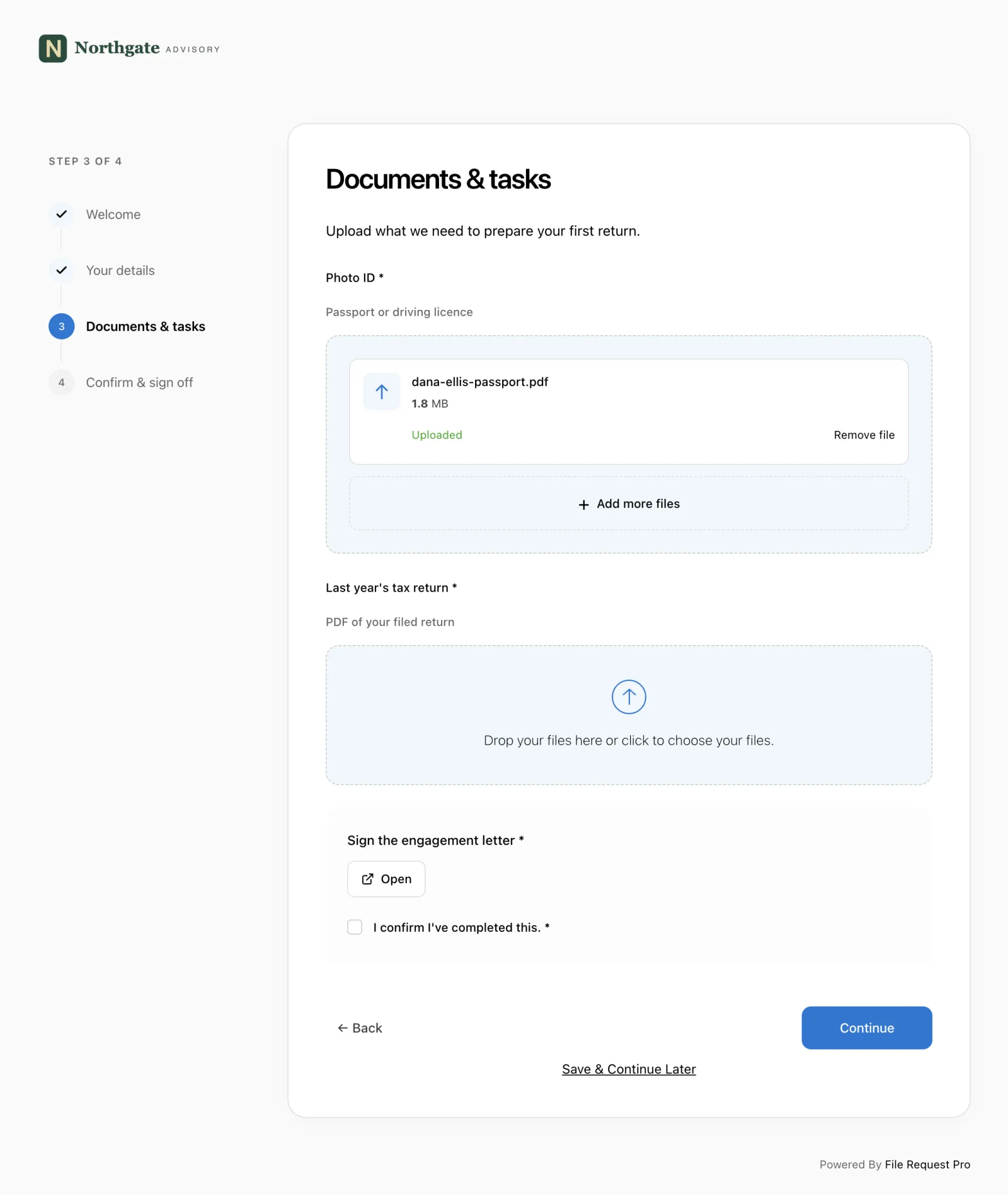
What makes this fit a white glove approach:
- Branded experience. Upload pages carry your logo and colors, so the client sees your brand — not a generic third-party tool.
- Form fields and file uploads combined. Collect text-based information (names, tax IDs, preferences) and documents (contracts, statements, IDs) in a single submission.
- Automated reminders. If a client has not submitted everything, File Request Pro sends follow-up emails on your behalf — so you do not have to chase.
- Progress tracking. See at a glance which clients have submitted their documents and which are still outstanding.
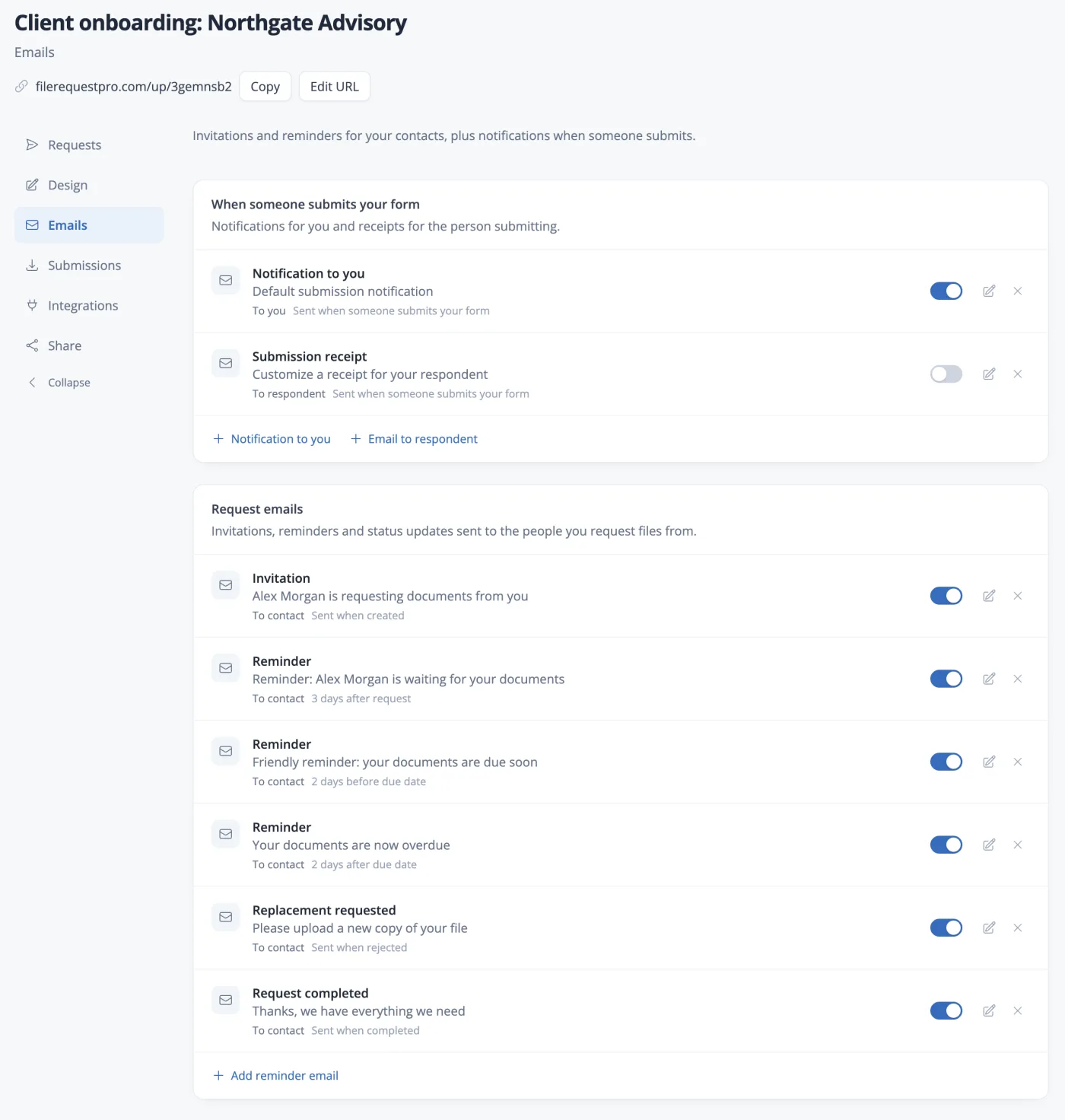
This replaces the scattered email threads and shared folder confusion that derail most onboarding processes. The client gets a clear, professional experience. Your team gets organized files without the manual follow-up.
For a premium onboarding experience, you can present that document request as a guided sequence rather than one long page. A multi-step upload page with a progress sidebar and sign-off mirrors the hands-on, walk-them-through-it feel of white glove service, letting clients finish one task step at a time and confirm they are done.
CRM and project management
Use your CRM (HubSpot, Salesforce, or similar) to track onboarding progress for each client. Create a standard onboarding pipeline with stages that mirror your checklist: welcome sent, kickoff scheduled, documents collected, setup complete, training delivered, handoff complete. This gives your team visibility into where every client stands and prevents anyone from falling through the cracks.
Communication and scheduling
Calendar scheduling tools (Calendly, Cal.com) eliminate the back-and-forth of booking onboarding calls. Video conferencing (Zoom, Google Meet) makes face-to-face meetings possible even for remote clients. The combination of scheduled check-ins and personal video calls creates the high-touch feel that defines white glove service.
E-signature
Engagement letters, contracts, NDAs, and consent forms all need signatures during onboarding. Tools like DocuSign or PandaDoc let you send, sign, and store agreements electronically — keeping the process moving without waiting for physical mail.
How to Scale White Glove Onboarding
The biggest objection to white glove onboarding is that it does not scale. One person can only personally onboard so many clients per month. But the right systems let you keep the experience personal while removing the manual work that slows things down.
Three strategies that help:
- Templatize everything that can be templatized. Your welcome email, onboarding timeline, document checklist, and summary document should all be templates. Personalize the details — the client's name, their specific goals, their industry — but do not write each one from scratch.
- Automate the follow-ups. Reminder emails, progress notifications, and scheduling links can all run automatically. Your team should spend their time on conversations, not on sending "just checking in" emails.
- Build a clear process with defined roles. When everyone on your team knows exactly who does what during onboarding, you avoid duplication, missed steps, and the confusion that comes from ad hoc processes. Document your onboarding process, assign ownership for each step, and review it quarterly.
The goal is not to remove the human touch. It is to remove the busywork so your team can focus on the moments that matter — the kickoff call, the training session, the first check-in — without drowning in administrative tasks.
Frequently Asked Questions
What does "white glove" mean in a business context?
White glove refers to a premium level of service characterized by personal attention, meticulous care, and hands-on support. In onboarding, it means a dedicated team member guides the client through every step of the setup process rather than leaving them to figure things out on their own.
How long should a white glove onboarding process take?
It depends on the complexity of the service. A simple professional services engagement might complete onboarding in one to two weeks. A complex enterprise software implementation or a high-net-worth financial advisory relationship might take 30 to 90 days. The key is setting clear expectations upfront so the client knows the timeline.
Is white glove onboarding only for enterprise or high-end clients?
Not necessarily. Any business that serves clients where the relationship matters — legal, accounting, consulting, financial advisory, healthcare — can benefit from a white glove approach. The investment should match the client's lifetime value. If a client will stay with you for years and generate significant revenue, the upfront onboarding cost is well justified.
What is the difference between white glove onboarding and regular onboarding?
Regular onboarding typically relies on automated emails, help articles, and self-service tools. The client drives their own experience. White glove onboarding flips this: your team drives the experience, proactively guiding the client, handling setup tasks, and providing direct access to a named contact throughout the process.
How do I collect documents from clients during onboarding without using email?
Use a dedicated document collection tool that provides a branded upload page with a clear checklist of required items. File Request Pro, for example, lets you create upload pages that list every document you need, accept file uploads and form responses in one place, and route everything to your cloud storage automatically. This replaces the scattered email attachments and shared folder confusion that slow down most onboarding processes.
How do I measure the success of my onboarding process?
Track these metrics: time to complete onboarding (from signing to fully set up), document collection completion rate, client satisfaction scores collected at the end of onboarding, retention rate at 90 days and one year, and the number of support requests during the first month. Improvements in these numbers tell you whether your onboarding process is working.
Can I offer white glove onboarding without a large team?
Yes. Solo practitioners and small firms offer white glove experiences every day. The key is using tools to automate the repetitive parts — document collection, reminders, scheduling — so you can focus your limited time on the personal interactions that define a premium experience. One person with good systems can deliver a better onboarding experience than a large team without them.
