A release of information form is the patient's signed authorization to release medical records to someone outside their care team, such as an attorney, a life insurer, or an employer. This release of information form template walks through it field by field, including the elements and statements HIPAA requires in 45 CFR 164.508. Leave one out and the authorization isn't valid. The request gets sent back, or worse, records go out under a defective form.
You'll also see when you need the form (and when you don't), how it changes for mental health, medical, and legal settings, and how to collect completed forms online.
What Is a Release of Information Form?
A release of information form is a written authorization that gives an organization — such as a healthcare provider, hospital, school, or employer — permission to share protected information with a named third party. When the law requires one, the patient, client, or student must sign it before the records leave the organization.
Different laws govern these authorizations:
- HIPAA (Health Insurance Portability and Accountability Act) — covers protected health information held by healthcare providers, health plans, and clearinghouses
- FERPA (Family Educational Rights and Privacy Act) — covers education records at schools that receive federal funding
- 42 CFR Part 2 — adds protections for substance abuse treatment records beyond what HIPAA requires
- State privacy laws — many states impose requirements beyond federal minimums, particularly for mental health records, HIV/AIDS status, and genetic information
The form serves two purposes. It protects the individual's right to control who sees their information, and it protects your organization from liability for unauthorized disclosure.
When Do You Need a Release of Information Form?
Under HIPAA, a provider or health plan can share records for treatment, payment, and health care operations without the patient's signature (45 CFR 164.506). Other exceptions include disclosures required by law, court orders, and workers' compensation (45 CFR 164.512). Outside those, the provider needs a signed authorization (45 CFR 164.508(a)). Common cases that need one:
- Requests from attorneys. A lawyer asking for records for a personal injury claim, a disability appeal, or a custody case needs the patient's signed authorization. A court order is an exception. So is a subpoena that comes with written assurances either that the patient was notified and the time to object has run out with any objections resolved, or that a qualified protective order was requested (45 CFR 164.512(e)).
- Life insurers and employers. Sharing records with a life insurer for underwriting, or with an employer asking about an employee's health, isn't treatment or payment, so the provider needs an authorization. If an exam is done only to produce a report for that third party, such as a pre-employment physical, the provider can make signing a condition of the exam (45 CFR 164.508(b)(4)(iii)).
- Psychotherapy notes. A therapist's separate session notes need the patient's authorization for almost any disclosure, including to another treating provider (45 CFR 164.508(a)(2)). Treatment summaries are not psychotherapy notes, but state mental health laws may still require written consent before you share them.
- Marketing and sale of data. Using protected health information (PHI) for marketing, or selling it, needs an authorization. If the organization is paid, the form must say so (45 CFR 164.508(a)(3) and (a)(4)).
- Student records. Under FERPA, schools generally need signed, dated written consent before releasing education records (34 CFR 99.30). A parent signs, or the student once they turn 18 or attend a postsecondary school (34 CFR 99.3).
- Employment verification. Background checks and government benefits often require a signed release for employment dates, salary, and position history.
Some everyday requests don't need this form under HIPAA. A new doctor asking for records to treat the patient falls under treatment. An insurer asking for records to process the patient's claim falls under payment (45 CFR 164.506(c)). When patients ask for their own records, they're using their right of access, which doesn't call for an authorization (45 CFR 164.524). State law can be stricter, so check yours before you skip the form.
Release of Information Form Template: Complete Field List
This template covers the fields you need for a HIPAA-compliant authorization for release of information form. Adapt it to your practice type, state requirements, and specific use case.
Patient / Client Information
- Full legal name
- Date of birth
- Street address, city, state, ZIP code
- Phone number
- Email address
- Last four digits of Social Security Number — for identity verification only. Collecting the full SSN is unnecessary and creates additional security obligations.
- Medical record number (if applicable)
Information to Be Released
Use checkboxes so the patient can select specific categories rather than signing a blanket authorization for "all records."
- Medical records (office notes, history and physical, discharge summaries)
- Mental health records (treatment plans, progress notes, psychological evaluations)
- Substance abuse treatment records — protected under 42 CFR Part 2; requires a separate authorization
- Psychotherapy notes — under HIPAA (45 CFR 164.508(a)(2)), these require a separate authorization because they are the therapist's personal notes kept apart from the clinical record
- Billing and insurance records
- Laboratory results
- Imaging and radiology reports
- Prescription and medication history
- Immunization records
- Educational records (transcripts, IEPs, disciplinary records) — for schools under FERPA
- Employment records
- HIV/AIDS testing and status — many states require separate written consent for HIV-related disclosures
- Genetic information — protected under GINA (Genetic Information Nondiscrimination Act) and many state laws
- Other (specify)
Release From / Release To
Both sections capture the same core fields:
- Name of provider or organization
- Department (if applicable)
- Street address, city, state, ZIP code
- Phone number
- Fax number
- Relationship to patient (for recipient: treating provider, attorney, insurance company, employer, self, other)
Purpose and Time Period
HIPAA requires that the authorization state the purpose of the disclosure.
- Purpose of release (check all that apply): continuing care, insurance claim or billing, legal proceedings, disability determination, personal request, workers' compensation, other (specify)
- From date — beginning of the date range for records to be released
- To date — end of the date range, to prevent over-disclosure
Authorization Details
- Patient/guardian signature — a parent or legal guardian signs for minors; a legally authorized representative signs for incapacitated patients
- Printed name of signer
- Date of signature
- Relationship to patient (if not the patient: parent, legal guardian, power of attorney, personal representative)
- Witness signature — not required by HIPAA, but many organizations include a witness line as a safeguard against disputes
- Expiration date or event — HIPAA requires an expiration date or event (such as "upon resolution of the legal claim"). Some states limit how long an authorization can last, so check your state's rules.
- Right to revoke statement — the patient can revoke in writing at any time; revocation does not apply to information already disclosed
- Ability to refuse statement — treatment, payment, and enrollment generally cannot be conditioned on signing
- Re-disclosure warning — disclosed information may be re-disclosed by the recipient and may no longer be protected by HIPAA
HIPAA Compliance: What Your Form Must Include
Under 45 CFR 164.508, a valid HIPAA authorization must contain six core elements and three required statements. If one is missing, the authorization is not valid (45 CFR 164.508(b)(2)). Any record released under it is then an unauthorized disclosure, which can draw civil money penalties (see the FAQ below).
The six required elements (45 CFR 164.508(c)): (1) specific description of information to be disclosed, (2) who is releasing the records, (3) who is receiving them, (4) the purpose, (5) an expiration date or event, and (6) the patient's signature and date. The three required statements: right to revoke, right to refuse signing without losing access to treatment, and a re-disclosure warning. All of these are built into the template above (fields 37-39).
State Law Considerations
HIPAA sets a federal floor, but many states add requirements: limits on how long an authorization lasts, specific language for mental health or HIV-related records, witness requirements, or translation into the patient's primary language. When state law is more protective, state law controls.
Practice-Specific Variations
Mental Health and Therapy
A release of information form mental health template must account for protections that do not apply to standard medical records.
- Psychotherapy notes need a separate authorization. The therapist's session analysis notes cannot be included in a general release form (45 CFR 164.508(a)(2)).
- Substance abuse records require 42 CFR Part 2 compliance. The consent must include every element listed in 42 CFR 2.31. A general medical release is not enough, and each disclosure must go out with a notice that limits what the recipient can do with the records (42 CFR 2.32).
- Minor consent creates ambiguity. In many states, minors can consent to their own mental health treatment — raising the question of who authorizes the release. Check your state's rules.
- Include a detail-level field. Let the client specify "diagnosis and treatment dates only" versus "full treatment summary including progress notes."
Healthcare and Medical
- Turnaround deadlines. When patients ask for their own records, HIPAA gives you 30 days to act, with one 30-day extension if you tell the patient in writing why (45 CFR 164.524(b)(2)). Some states set shorter deadlines. Build date tracking into your form and set it to whichever deadline is shorter.
- Fees for copies. HIPAA limits patient charges to a "reasonable, cost-based fee." State laws may set per-page caps. Include your fee schedule.
- EHR integration. Align form fields with your electronic health record system so requests can be tracked from receipt to fulfillment.
Legal Settings
- Privilege waiver risk. Releasing legal records may implicitly waive attorney-client privilege for the disclosed information. Advise clients carefully about scope.
- Litigation holds. Records under a preservation order cannot be destroyed regardless of the authorization's expiration. Flag these in your tracking system.
- Third-party subpoenas. The client or their attorney must authorize the release unless a court orders otherwise. For health records under HIPAA, a subpoena without a court order can also be enough. It must come with written assurances either that the patient was notified and the time to object has run out with any objections resolved, or that a qualified protective order was requested (45 CFR 164.512(e)).
Collecting Signed Release Forms at Scale
A solid template solves the content problem. But how you collect signed forms determines whether your process works in practice — or buries your staff in paper.
The problem with paper and email
Paper release forms create bottlenecks at every step. Patients forget to bring the form. Staff spend hours printing, scanning, and filing. Signatures are illegible, fields are blank, and forms disappear between the front desk and medical records. One missing checkbox means starting over — another phone call, another mailing, another two-week delay.
Email is faster but introduces compliance risk. Standard email is unencrypted, so sending an authorization with a patient's name, date of birth, and medical record number risks a HIPAA violation. Even encrypted email produces incomplete, hard-to-read forms that require multiple rounds of back-and-forth.
A better approach: digital collection with built-in compliance
File Request Pro lets you create a branded page where patients or clients fill out the release authorization and upload supporting documents in one visit. No account creation required, no app download, no login.
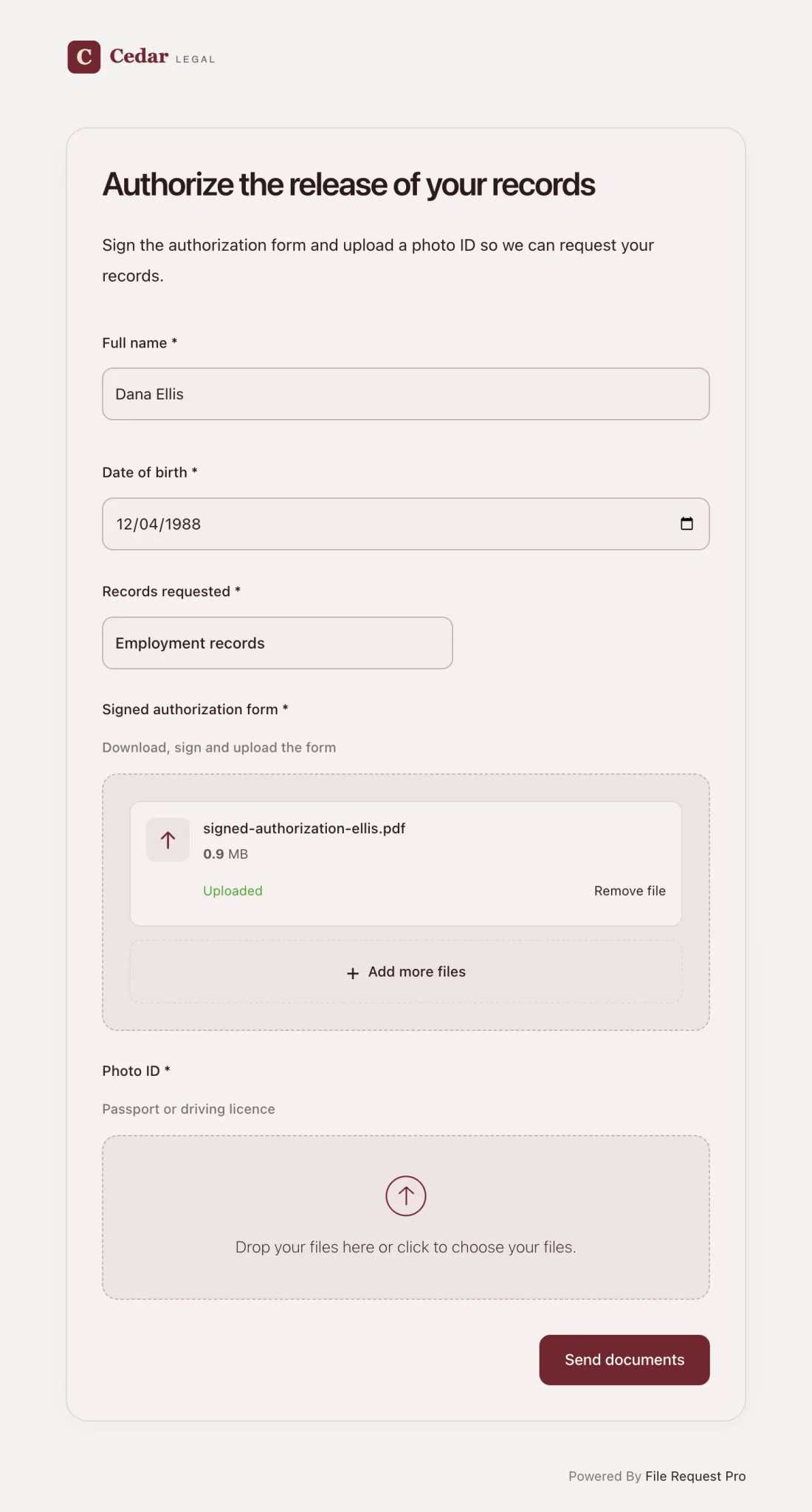
Here is how this works for release-of-information requests:
- Form fields and file uploads in one place. Build your release authorization with all the fields from the template above, plus file upload fields for court orders, insurance correspondence, or identification.
- Automated reminders. Patients who have not completed the form get follow-up emails on a schedule you set — no more phone calls chasing incomplete authorizations.
- Cloud storage sync. Completed forms sync to Google Drive, OneDrive, SharePoint, or Dropbox — organized by patient or date. No manual downloading or filing.
- Encryption for PHI. Files are encrypted in transit and at rest. The HIPAA Security Rule treats encryption as "addressable" (45 CFR 164.312). That means you use it unless you document why it isn't reasonable and use an equivalent measure where one is reasonable (45 CFR 164.306(d)(3)).
- Audit trail. The activity history logs uploads, downloads, and page changes with timestamps. You can export it to CSV for a HIPAA audit or a dispute. The audit log is included in the Enterprise plan.
- No patient account needed. The patient clicks a link, fills out the form, and submits. No registration, no password, no portal login — which removes the friction that causes patients to abandon the process.
- Secure document sharing. When you need to send records back to a referring provider, you can use encrypted file sharing instead of unencrypted email or fax.
Unlike a static PDF or a free printable release of information form filled out by hand, a digital workflow captures complete, legible data every time, routes it to the right storage location, and maintains the compliance documentation you need.
Best Practices for Release of Information Forms
Be specific about what you release
A blanket "release all records" authorization is poor practice even when technically valid. Specify record categories, date ranges, and the purpose of disclosure. This protects the patient, reduces your liability, and ensures the recipient gets only what they need.
Set a reasonable expiration date
Open-ended authorizations create risk. Match the expiration to the purpose: 90 days for an insurance claim, one year for ongoing care coordination, or a specific event like "upon resolution of the legal matter." When an authorization expires, require a new one.
Train staff on authorization exceptions
HIPAA permits disclosure without authorization for treatment, payment, healthcare operations, and certain public health and law enforcement purposes. Staff who know these exceptions avoid delaying legitimate requests — and avoid releasing information when authorization is required.
Track every request from receipt to fulfillment
Log every release request: date received, patient name, requesting party, records released, date fulfilled, who processed it. This log is your first line of defense in a HIPAA audit.
Review your form annually
Privacy laws change. State regulations get updated. New record categories emerge (telehealth records, for example). Review your form at least once a year to confirm it reflects current requirements.
FAQ
What must a HIPAA-compliant release of information form include?
Six core elements under 45 CFR 164.508: a description of the information, the releasing entity, the recipient, the purpose, an expiration date or event, and the patient's signature. Plus three required statements: right to revoke, notice that treatment cannot be conditioned on signing, and a re-disclosure warning.
Can a patient revoke a release of information authorization?
Yes. A patient can revoke at any time by submitting a written revocation. The revocation does not apply to information already disclosed while the authorization was in effect.
Do psychotherapy notes require a separate release form?
Yes. Psychotherapy notes — the therapist's personal session notes stored separately from the clinical record — require a standalone authorization under 45 CFR 164.508(a)(2) and cannot be included in a general release of information form.
What is the difference between a release of information form and a consent form?
A consent form authorizes treatment or a procedure. A release of information form authorizes disclosure of records to a third party. A patient might consent to treatment without consenting to share records outside the treating organization. Release authorizations for specific third parties always require a separate, signed form.
How long is a release of information authorization valid?
HIPAA does not set a maximum validity period but requires an expiration date or event. Some states set their own limits. Tie the timeframe to the purpose: 90 days for an insurance claim, one year for ongoing care coordination. Check your state's requirements.
Can I use a free printable release of information form I found online?
Proceed carefully. Many free templates are incomplete or outdated — missing the right-to-revoke statement, the re-disclosure warning, or state-specific requirements. Use one as a starting point, but have your compliance officer or legal counsel review it before putting it into use.
What happens if I release records without a valid authorization?
If the disclosure needed an authorization, it is a HIPAA violation. Civil penalties come in four tiers, based on what the organization knew and whether it fixed the problem within 30 days (45 CFR 160.404). HHS adjusts the amounts for inflation every year (45 CFR 102.3). In the current table, the first three tiers run from $145 to $73,011 per violation. Willful neglect not corrected in time runs from $73,011 to $2,190,294 per violation. Identical violations are capped at $2,190,294 per calendar year. Knowingly obtaining or disclosing health information in violation of HIPAA is also a federal crime, punishable at the top level by fines up to $250,000 and up to 10 years in prison (42 U.S.C. 1320d-6). The Office for Civil Rights publishes enforcement actions publicly.
A compliant release of information form template is the foundation — but the real gains come from how you collect signed authorizations. If your process still runs on paper forms and fax machines, start a free trial of File Request Pro — no credit card required — and see how digital collection with built-in encryption, automated reminders, and cloud storage sync can shorten your turnaround.
Free Client Onboarding Checklist
Get the complete document checklist for your industry — interactive, with progress tracking.
Use the Free Checklist Tool →