Every day, accounting firms, law practices, and financial advisors exchange sensitive client documents over email — tax returns with Social Security numbers, bank statements, legal agreements, and identity documents sent as unencrypted attachments. It's the most common method and the least secure. A single intercepted email can expose your clients' personal data and leave your firm facing regulatory penalties, lawsuits, and the kind of reputational damage that takes years to recover from.
This guide covers why secure document sharing matters for professional services firms, how the most common sharing methods compare, and the best practices that protect client data without slowing down your workflow.
Why Secure Document Sharing Matters
The stakes for professional services firms are higher than most industries. Accountants handle tax returns and Social Security numbers. Lawyers manage privileged communications. Mortgage brokers collect pay stubs and credit histories. Financial advisors work with complete pictures of client wealth. A single breach doesn't just expose data — it destroys the trust that took years to build. And once a client loses confidence that their information is safe with you, they don't come back.
According to IBM's 2024 Cost of a Data Breach report, the average breach in professional services costs $4.7 million. But for a 10-person accounting firm or a small law practice, you don't need a $4.7 million breach to be in trouble — a single compromised client file can trigger regulatory investigations, malpractice claims, and a wave of client departures that takes years to recover from.
Regulatory requirements make this a legal obligation, not just a best practice. The Gramm-Leach-Bliley Act (GLBA) requires accounting firms and tax preparers to safeguard client information. The ABA's Model Rule 1.6(c) requires lawyers to make "reasonable efforts" to prevent unauthorized access to client data. SEC and FINRA rules impose data protection requirements on financial advisors. These carry real penalties for non-compliance — fines, license suspensions, and mandatory breach notifications — and yet most firms still default to email.
Common Secure Document Sharing Methods Compared
Not every method offers the same level of security, usability, or compliance readiness. Here's how the most common approaches stack up.
Email attachments
Email remains the default because it's familiar. But standard email isn't encrypted end-to-end. Attachments sit in inboxes indefinitely, files get scattered across threads, and there's no way to track who sent what and when. If a regulator asks you to prove how a client's tax return was transmitted and stored, you won't have an answer.
Pros: Universal, no setup required.
Cons: Not encrypted, no audit trail, no expiration controls, impossible to organize at scale.
Password-protected files
Adding a password to a PDF or ZIP file is a step up, but the password itself usually gets shared over the same insecure channel — often in the very next email. Clients forget passwords, can't open files, and call your office for help. You end up spending 10 minutes on the phone walking someone through a process that was supposed to add security but mostly added frustration.
Pros: Better than unprotected attachments.
Cons: Passwords shared insecurely, client friction, no centralized tracking.
Cloud storage links (Google Drive, Dropbox, OneDrive)
Cloud storage is more secure than email when permissions are configured correctly. However, sharing a folder often requires clients to have an account on the same platform. Public links can be forwarded to anyone. And when clients need to send documents back to you, they need to understand folder structures and upload permissions — or you're back to email. These tools are built for internal team collaboration, not for collecting sensitive files from external clients.
Pros: Encryption in transit and at rest, version history.
Cons: Clients may need accounts, no built-in checklist or tracking, not designed for collecting files from external parties.
Client portal software
Dedicated portals offer a secure environment for document exchange with encryption, access controls, and audit trails. The downside is adoption. Every client needs to create an account, set a password, and learn the interface. Portal fatigue is real — your clients already juggle logins for their bank, insurance, healthcare, and half a dozen other services. Ask them to create one more, and many will simply email you the documents instead, defeating the entire purpose.
Pros: Strong security, audit trails, integrated with practice management.
Cons: Requires client account creation, onboarding friction, expensive.
File request links
File request tools send clients a branded upload link with a clear list of documents needed. Clients click the link, see what's required, and upload — all without creating an account. Files are encrypted, routed to your cloud storage, and tracked so you know exactly what's been received and what's still outstanding.
This approach is purpose-built for the core challenge professional services firms face: collecting documents from clients, not just sharing files to them. It removes the biggest adoption barrier — client accounts — while maintaining the encryption and audit trail features that compliance requires.
Pros: No client account required, encrypted, branded, audit trail, automatic organization, built-in reminders.
Cons: Requires tool setup, better suited for structured collection than ongoing two-way collaboration.
Best Practices for Secure Document Sharing
Whichever method you choose, these practices will reduce your risk of a breach and keep you on the right side of compliance requirements.
Use encryption in transit and at rest
Encryption should be non-negotiable. TLS 1.2 or higher for data in transit and AES-256 for data at rest are the current industry standards. Standard email fails this test by default — most providers don't encrypt attachments end-to-end. Any tool you use for secure document sharing or collection should encrypt files at every stage, from the moment a client uploads to long-term storage.
Eliminate client accounts as a barrier
The most secure system is useless if clients don't use it. When you require account creation and passwords, clients default to whatever's easiest — usually emailing attachments, which defeats the purpose entirely. The most effective workflows let clients upload through a simple link with no registration. Security happens on the backend, invisible to the client. They get a frictionless experience; you get encrypted, auditable document collection.
Set automatic expiration on shared links
Links to sensitive documents shouldn't live forever. Set expiration dates — 7 days for a quick document collection, 14 or 30 days for a longer engagement — so they become inaccessible after a defined period. This limits the window of exposure if a link is accidentally forwarded or compromised, and it's a straightforward requirement under most data protection frameworks.
Maintain audit trails for compliance
Every document exchange should be logged: who uploaded what, when, and from which IP address. Audit trails protect your firm in disputes and are a compliance requirement for firms subject to GLBA, ABA Rule 1.6, or SEC recordkeeping rules.
The value of that log depends on how much it captures. A record that ties every action on a file back to a person, a timestamp, and a device gives you something concrete to show a regulator or an insurer, and it covers anonymous uploads from clients who never logged in.
Use branded upload pages to build client trust
Clients are wary of clicking unfamiliar links — and they should be, especially when uploading sensitive financial documents. A branded upload page featuring your firm's logo, colors, and (on plans that include it) domain signals legitimacy and tells clients they're in the right place. It's the digital equivalent of walking into your office and seeing your name on the door.
Automate follow-up reminders
Incomplete document submissions are one of the biggest time drains in professional services — firms typically send 3-4 follow-up emails per client before collecting everything they need. Rather than manually chasing clients, use a system that sends automatic follow-up emails on a schedule you define. The best reminder systems only notify clients about documents that are still outstanding, so clients who've already submitted everything aren't bothered.
Organize received files automatically
Once documents arrive, they need to land in the right place — not in a generic downloads folder where someone has to manually sort them. Connect your document collection tool to your cloud storage (Google Drive, OneDrive, SharePoint, or Dropbox) so files are automatically organized into client-specific folders the moment they're uploaded. This saves hours of manual filing each week and strengthens compliance — documents are stored in a consistent, auditable structure from the start.
Train your team on secure sharing protocols
Your team needs clear, written policies on approved channels for client communication, what constitutes sensitive data, and what to do if a client sends documents through an insecure method (e.g., delete the email attachment and resend the secure upload link). Even a 15-minute quarterly refresher reduces the risk of someone defaulting to email with unprotected attachments — especially during busy periods like tax season when shortcuts are tempting.
Industry-Specific Requirements
While the best practices above apply broadly, each industry has specific regulations that shape document sharing obligations.
Accounting firms
Tax preparers fall under the GLBA Safeguards Rule, which requires a written information security plan covering how you collect, store, and transmit client data. IRS Publication 4557 provides specific guidance on encrypting client data and using secure transmission methods. During tax season, when you're collecting hundreds of W-2s, 1099s, and bank statements, these requirements aren't abstract — they're the difference between passing an audit and facing penalties.
Law firms
ABA Model Rule 1.6(c) requires attorneys to make "reasonable efforts" to prevent unauthorized disclosure of client information. State bar ethics opinions — including those in California, New York, and Texas — increasingly interpret this as requiring encryption for sensitive communications. Providing a secure, auditable method for clients to submit materials demonstrates the standard of care courts expect and gives you a defensible record if your practices are ever questioned.
Mortgage brokers
The FTC Safeguards Rule (updated June 2023) now requires mortgage brokers to implement encryption, access controls, and incident response plans. Borrower documents like bank statements, pay stubs, and Social Security numbers must be collected using methods that meet these requirements. Using unencrypted email for document collection and verification isn't just risky — it's a clear compliance violation that could result in FTC enforcement action.
Financial advisors
SEC-registered advisors must comply with Regulation S-P (privacy of consumer financial information) and Regulation S-ID (identity theft prevention). FINRA members face additional obligations under Rules 3110 and 4370. Both SEC and FINRA have made cybersecurity a top examination priority since 2023, specifically reviewing how firms share and store client documents. Having a documented, encrypted collection process can be the difference between a clean exam and a deficiency letter.
Secure Document Collection Without the Friction
The challenge for most firms isn't understanding the need for secure document sharing — it's finding a solution clients will actually use. Complex portals create friction that pushes clients back to email. Email is easy but leaves you exposed. You need something that's as simple as email for your clients but as secure as a dedicated portal for your firm.
File Request Pro is built for exactly this problem. Instead of asking clients to create accounts, remember passwords, or download apps, you send a branded upload link. Clients see exactly which documents are needed and upload in minutes — from any device, without logging in. Most clients complete their uploads in under 5 minutes.
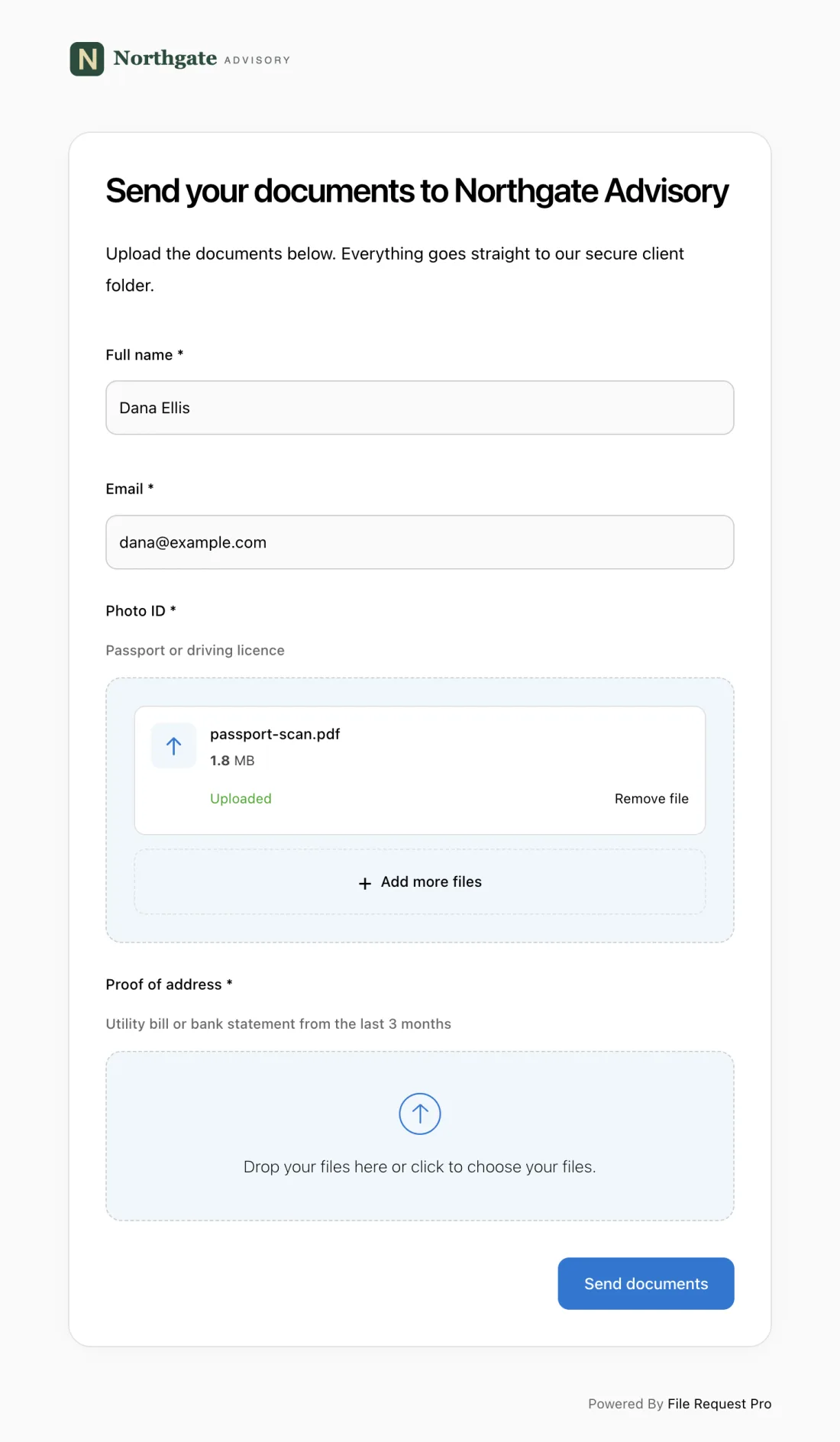
Here's what you get:
- Branded upload pages — Your firm's logo and colors, and on Business and Enterprise you can remove File Request Pro's branding. Clients know exactly who they're sharing documents with.
- Bank-level encryption — Files encrypted in transit (TLS 1.2+) and at rest (AES-256), meeting GLBA, ABA Rule 1.6, and FTC Safeguards Rule requirements.
- Automated reminders — Automatic follow-up emails go out on your schedule, targeting only clients with outstanding documents.
- Cloud storage integration — Uploaded files sync automatically to Google Drive, OneDrive, SharePoint, or Dropbox, organized into client folders.
- No client login required — Zero friction. No account creation, no passwords, no app downloads. Just a link and a clear list of what to upload.
- Full audit trail — Every upload is logged with timestamps and details, giving you the documentation you need for compliance audits and regulatory examinations.
File Request Pro offers a free trial of 15 days or 25 files with no credit card required — so you can test it with real clients before committing. Explore its secure document collection workflow and compare the current pricing plans.
Frequently Asked Questions
What is the most secure way to share documents with clients?
The most secure method uses encryption for files in transit and at rest, requires no client account creation, maintains an audit trail of all exchanges, and includes automatic link expiration. File request tools that combine these features with branded upload pages offer the strongest combination of security and usability for professional services firms.
Is email safe for sending sensitive documents?
Standard email isn't safe for sensitive documents. Most email services don't encrypt attachments end-to-end, meaning files can be intercepted during transmission. Attachments also remain in inboxes indefinitely, creating long-term exposure risk. For regulated industries like accounting, law, and financial services, email typically doesn't meet compliance requirements for handling sensitive client information.
Do clients need to create an account to upload documents securely?
Not with the right tool. File request platforms like File Request Pro allow clients to upload through a secure, branded link without creating an account or installing software. This no-login approach actually improves security outcomes — clients are far more likely to use the secure method when it's easier than emailing attachments.
What compliance standards apply to document sharing for professional services?
The standards depend on your industry. Accounting firms must comply with GLBA and IRS Publication 4557. Law firms are governed by ABA Model Rule 1.6(c). Mortgage brokers fall under the FTC Safeguards Rule. Financial advisors must meet SEC Regulation S-P and FINRA recordkeeping requirements. All frameworks require encryption, access controls, and documentation of security practices.
How can I ensure my firm has an audit trail for shared documents?
Choose a document collection tool that automatically logs every exchange — including who uploaded a file, the timestamp, file details, and IP address. Store logs centrally and retain them for at least five to seven years. Audit trails should be tamper-proof and accessible for your industry's retention requirements.
What is the difference between document sharing and document collection?
Document sharing refers to sending files from your firm to a client — a completed tax return or draft contract. Document collection is the opposite: gathering files from clients, such as W-2s, bank statements, or identification documents. Many firms secure outbound sharing but overlook inbound collection, which often involves the most sensitive materials. A complete secure document sharing strategy must cover both directions, with particular attention to how clients submit documents to you — because that's where the highest-risk data flows.
