"We want something modern." Then the client rejects three mockups because their version of modern means something entirely different from yours. That disconnect — born from skipping a structured intake process — is the fastest path to scope creep, blown deadlines, and margins eaten by unpaid revisions.
A web design questionnaire forces alignment before you open Figma. It captures goals, brand identity, content readiness, technical requirements, and timeline in writing — so disagreements surface before they cost you billable hours. Below: a battle-tested template with 38 questions, variations for different project types, best practices for higher response rates, and a method for collecting answers and brand assets in one step.
What Is a Web Design Questionnaire?
A web design questionnaire is a structured set of questions sent to clients before a website project begins. It captures the information behind every design and development decision — business goals, target audience, brand guidelines, content availability, and launch timeline.
Without one, you're designing on assumptions. With one, you hold a written record of what the client approved and what's in scope — a document you can reference when opinions shift mid-project. Agencies that use a website design checklist like this see fewer "surprise" revision requests because expectations were documented from day one. If you also handle branding, pair this with our graphic design questionnaire for logo, print, and packaging questions.
Project Overview and Goals
These questions establish the "why" behind the project. Skip them, and you'll find yourself redesigning a homepage because the client's real goal was lead generation — not the brand awareness you assumed.
- What does your business do, and who are your primary customers? — A B2B SaaS company needs a different visual hierarchy than a local bakery. Context drives direction.
- What is the primary goal of this website? — Lead generation, e-commerce, brand awareness, and portfolio showcase each demand a different layout and CTA strategy.
- What specific actions do you want visitors to take on the site? — Form submissions, bookings, purchases, or downloads. This dictates button placement and page flow.
- Is this a new website or a redesign? If redesigning, share the current URL. — Redesigns carry hidden scope: preserving SEO value, redirecting URLs, and migrating content.
- Who is your target audience? — A site for enterprise CFOs demands restrained typography. One for Gen Z needs bold visuals and mobile-first interaction.
- What is your project timeline? Is there a hard launch date? — An eight-week deadline requires phased delivery; an open timeline lets you ship fuller releases.
- What is your budget range for this project? — Ranges ($5K–$10K, $10K–$25K, $25K+) lower resistance. You cannot scope without knowing whether the budget supports a template or a custom build.
Branding and Visual Identity
Whether the client has a 40-page brand book or a logo saved as a blurry screenshot, you need to know what exists — and what doesn't — before the first mockup.
- Do you have existing brand guidelines or a style guide? — If yes, request the upload now. If not, you're building visual identity from scratch — and your quote should reflect that.
- Please upload your logo files in all available formats (SVG, PNG, EPS). — Collecting logos upfront prevents the week-two scramble when the client's only file turns out to be a 200px JPEG from their Facebook page.
- What are your brand colors? Do you have hex codes or Pantone values? — Some clients hand over a complete palette. Others say "we like blue." Pin down exact values before the first comp.
- Do you have preferred fonts or typography styles? — Existing brand fonts may need web-compatible alternatives. Knowing this early prevents rework.
- Can you share 3–5 websites you admire? What do you like about each? — Visual references beat descriptions. Asking "why" reveals whether they admire the layout, photography, or animations.
- Are there design styles or visual approaches you dislike? — Knowing what to avoid saves as much time as knowing what they want.
- Do you have a mood board or Pinterest board with visual preferences? — Mood boards translate subjective taste into concrete direction.
Content and Copy
Content readiness is the biggest timeline killer in web projects. You can finish a design in three weeks, but if copy doesn't arrive for months, the project — and your cash flow — stalls.
- Who is responsible for writing the website copy — your team, our team, or a third party? — This answer determines whether copywriting belongs in your scope, your quote, and your timeline.
- Do you have existing content that will carry over to the new site? — Migrating 200 blog posts is a different task than writing 10 fresh pages, and both affect timeline.
- Do you have professional photography or images? Please upload any existing assets. — Stock versus custom shoots changes the budget dramatically — $0 or $2,000+.
- What tone of voice should the website convey — formal, conversational, technical, playful? — Tone drives font choices and imagery. A playful brand gets illustration; a law firm gets restrained photography.
- How many pages or sections do you need? — A five-page brochure site is a fundamentally different project from a 50-page resource hub.
Functionality and Features
Functionality requirements drive platform selection, development hours, and budget. Uncover these now — not three weeks in when the client casually mentions "oh, we also need an online store."
- Do you have a CMS or platform preference? (WordPress, Webflow, Shopify, Squarespace, custom) — A Squarespace site won't support the same custom interactions as a headless CMS build.
- Do you need e-commerce functionality? If so, how many products? — Even a simple shop adds significant scope. Product count affects platform choice.
- What forms do you need? (contact, quote request, booking, application, file upload) — A multi-step intake form with conditional logic and file uploads takes 10x the development time of a five-field contact form.
- Do you need a blog or news section? — Blogs require content templates, category structures, and ongoing maintenance.
- Are there third-party tools that need to integrate? (CRM, email marketing, scheduling, payment gateways) — A site syncing with HubSpot, Calendly, and Stripe requires API work a brochure site never will.
- Do you need user accounts, login areas, or membership features? — Authentication adds security obligations and GDPR/privacy considerations that ripple through the entire project.
Technical Requirements
Technical details determine hosting costs, launch logistics, and whether the site performs well six months after you hand it over.
- Do you already have a domain name and hosting provider? — If yes, get credentials now. If not, factor registration and hosting setup into timeline and quote.
- Do you have an SSL certificate, or does one need to be set up? — SSL is non-negotiable. Browsers flag non-HTTPS sites as insecure and Google penalizes them.
- Do you use Google Analytics, Search Console, or other analytics tools? — Losing historical data during a redesign makes measuring the new site's impact impossible.
- Do you have SEO goals or existing rankings to preserve? — A redesign that tanks organic traffic turns a happy client into a furious one. For deeper coverage, see our SEO client questionnaire template.
- Are there accessibility requirements (WCAG compliance) you need to meet? — Retrofitting accessibility after launch costs two to three times more than building it in.
Competitor and Inspiration Research
Competitive research helps you design a site that stands out rather than blends in.
- Who are your top three competitors? Share their website URLs. — Competitor sites reveal conventions you must respect and gaps you can exploit.
- What do your competitors do well online? What do they do poorly? — Their perspective tells you what "better" means to them.
- Are there websites outside your industry that inspire you? — Cross-industry inspiration often produces the most distinctive designs.
Project Logistics
Organizational friction kills more web projects than bad design. These questions surface unclear approvals and missing stakeholders before they derail your timeline.
- Who is the primary point of contact for this project? — One decision-maker means clear feedback. Committee means paralysis.
- Who else needs to approve designs and content before launch? — "My partner hasn't seen this yet" has stalled more launches than any technical issue.
- How many rounds of revisions are you expecting? — Document this number. Open-ended revision cycles are where project margins go to die.
- Do you need ongoing maintenance or support after launch? — This determines whether you're quoting a one-time project or a monthly retainer.
- Is there anything else we should know about this project? — Open-ended questions catch details that structured questions miss.
Adapting the Questionnaire for Different Project Types
The 38-question core works for most projects. Add or swap questions based on what you're building.
E-commerce websites. Add questions about catalog size (50 products vs. 5,000), product photography, shipping zones, tax rules, payment gateways, and return policies. Clarify filtering, search, and review requirements early — each adds development scope.
Corporate and enterprise websites. Focus on stakeholder mapping, compliance (HIPAA, SOC 2), multi-language needs, and enterprise integrations (Salesforce, Microsoft Dynamics). Map the decision chain early — corporate projects routinely involve five or more approvers.
Portfolio and creative websites. Emphasize gallery layouts, case study templates, animation preferences, and whether the client will update the portfolio themselves.
Landing pages and microsites. Add questions about the offer, traffic sources (paid ads, email, organic), A/B testing, and conversion goals. Confirm content readiness — landing pages operate on two-week timelines with zero room for delays.
Best Practices for Web Design Questionnaires
Send it before the kickoff call. When clients complete the web design questionnaire first, your kickoff becomes a strategic conversation instead of a fact-gathering session you could have handled asynchronously.
Request file uploads alongside written answers. Clients need to share logos, brand guidelines, and content documents with their responses. A text-only form forces them to email assets separately — and suddenly you're hunting through three email threads for the correct logo file.
Keep it focused. A 60-question form intimidates clients into procrastinating. Select only sections that match the project — including e-commerce questions for a portfolio site signals a generic template, not a tailored process.
Set a clear deadline. "Please complete this by Friday so we can prepare for Monday's kickoff." Without a due date, questionnaires sit in inboxes for weeks — and your timeline slips before it starts.
Explain why you're asking. Add a note at the top: "Your answers help us design a site that matches your vision the first time — the more specific you are, the fewer revisions we'll need." Clients who understand the payoff give better responses.
Collect Project Requirements and Assets in One Step
Most designers email their questionnaire as a Word doc or PDF, then spend days chasing clients for logo files, brand guidelines, and content. Answers end up in one email thread, files scattered across another, and the shared folder stays perpetually incomplete.
File Request Pro eliminates that cycle. Combine form fields and file uploads on a single branded page. Clients answer intake questions and upload brand assets in one submission — no account required, no downloads, no back-and-forth.
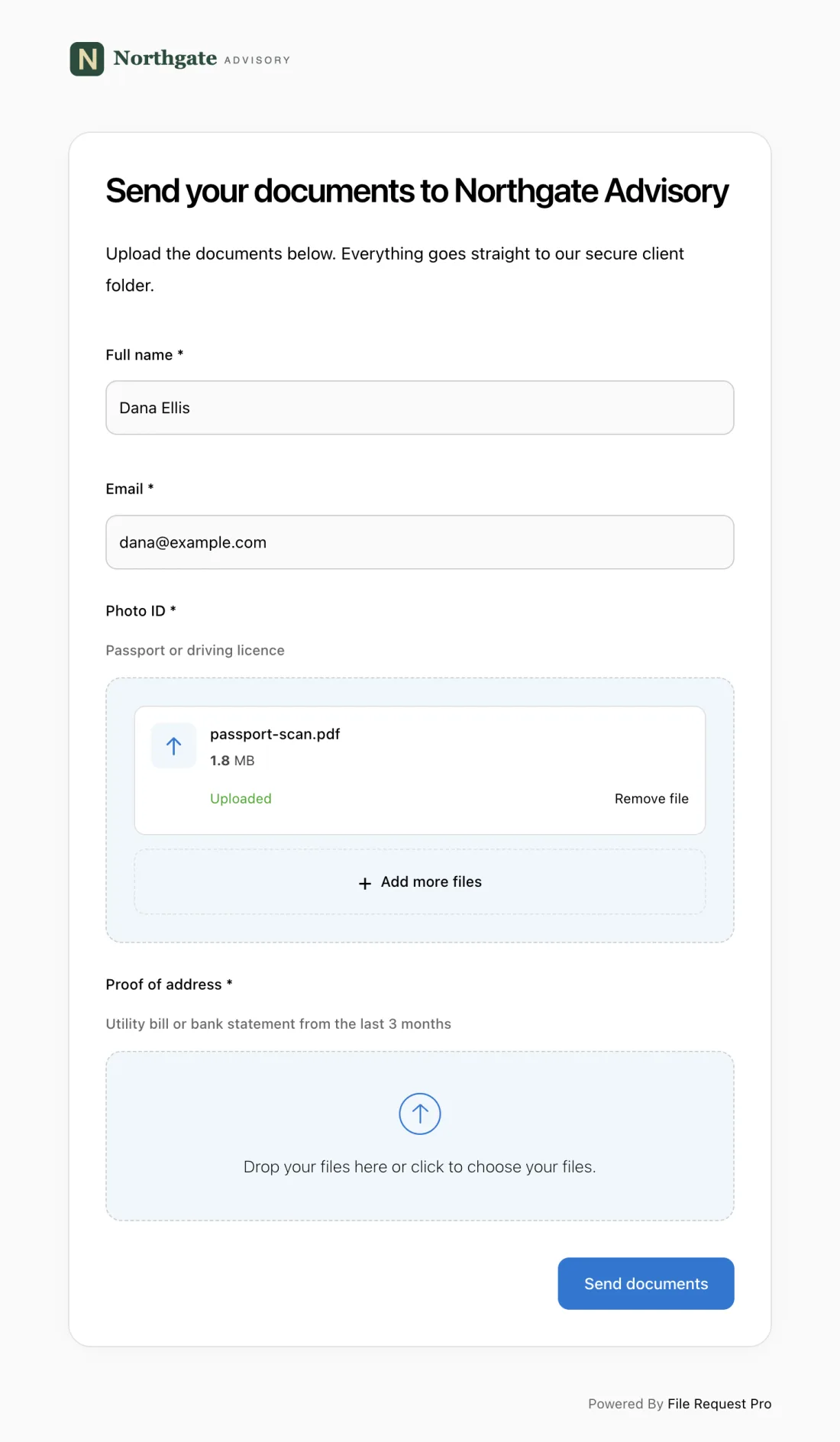
Here is what this looks like in practice for a web design agency:
- Branded intake page — your logo, colors, and domain. Clients see your brand, not a generic tool.
- Form fields + file uploads combined — collect answers and brand assets (logos, style guides, photography, content docs) in one submission. No separate emails, no "I'll send that later" delays.
- Automated reminders — clients who haven't responded get automatic follow-ups on a schedule you set. No more "just checking in" emails.
- Cloud storage sync — files and responses sync automatically to Google Drive, OneDrive, SharePoint, or Dropbox, organized into client folders.
- No client login required — clients click a link, answer questions, upload files, and submit. No accounts, no passwords.
One link, one submission, everything in the right place. For a broader look at structuring client intake beyond web design, see our project intake form template.
Frequently Asked Questions
How many questions should a web design questionnaire include?
Aim for 25–40 questions depending on project complexity. Use the core sections for every project, then layer in specialized questions for e-commerce, enterprise, or portfolio builds. A well-structured questionnaire takes clients 15–20 minutes — thorough enough to be useful, short enough to actually get finished.
When should I send the questionnaire to clients?
After the client signs the proposal but before the kickoff meeting. Reviewing answers in advance lets you use the kickoff to explore strategic topics rather than collecting basic facts. Some agencies send a shorter five-question version during sales to scope proposals more accurately.
What if a client gives vague answers like "make it look modern"?
Dig deeper on the kickoff call with visual comparisons. Pull up two or three websites and ask "which is closer to what you mean?" Side-by-side comparisons resolve ambiguity in seconds where email threads fail over days.
Should I use a different questionnaire for every project type?
Use one core questionnaire as your base and add project-specific questions as needed. The overview, branding, and logistics sections apply universally. E-commerce, corporate, and portfolio builds each need a few targeted additions. One flexible website design checklist beats maintaining five separate forms.
How do I handle clients who skip the questionnaire entirely?
Frame it as a benefit: "This helps us build a site that matches your vision the first time — fewer revisions, faster launch." If they still resist, use the questionnaire as your interview guide during the kickoff and fill in responses yourself. Either way, the questions get answered.
Should the questionnaire include questions about budget?
Yes. Budget determines scope, platform, and how much custom work is feasible. Ranges ($5K–$10K, $10K–$25K, $25K+) lower resistance. $5,000 gets a template customization; $50,000 gets a fully custom build. Discovering this mismatch after hours on a proposal wastes everyone's time.
