One missed detail on a client intake — a nut allergy, a load-in window that ends at noon, a stakeholder with veto power nobody mentioned — and your entire event timeline unravels. The fix that follows is never cheap: rush fees, apologetic phone calls, a client who wonders whether they hired the right planner.
A structured event planning questionnaire eliminates those surprises by capturing every requirement before you book a single vendor. Below you'll find a ready-to-use template with 38 questions organized across eight categories, plus guidance on adapting it for different event types and best practices for sending it.
What Is an Event Planning Questionnaire?
An event planning questionnaire is a structured form you send to clients at the start of every engagement. It collects the information needed to plan a corporate conference, wedding, fundraiser, or any other gathering — before the first site visit or vendor call. Instead of piecing together requirements from scattered emails and phone calls, your team gets one organized submission with every detail in one place.
Event Basics
Every downstream decision — venue shortlist, vendor contracts, budget allocation — depends on nailing these answers first.
- What type of event are you planning? — Corporate conference, wedding, gala, fundraiser, trade show, product launch, holiday party, retreat, or other.
- What is the name or working title of the event? — Lock down the theme or brand identity early so proposals, vendor briefs, and signage stay consistent.
- What is your preferred date or date range? — Ask for a first choice and at least one backup. Venue availability often forces adjustments.
- What time should the event start and end? — Include arrival time and any pre-event activities like registration or cocktail hour.
- How long should the event last? — Duration affects venue rental costs, staffing, and catering.
- Will the event be indoor, outdoor, or a combination? — Outdoor events require weather contingency plans, permits, and equipment (generators, tenting, portable restrooms) that can add 15-30% to costs.
Guest and Audience
Who shows up determines everything — venue capacity, menu, entertainment, even the language on signage. These questions replace assumptions with facts.
- How many guests do you expect? — Get a range if the final count is unknown. The difference between 75 and 150 guests changes venue, catering, and seating entirely.
- What is the general demographic of your guests? — Age range, professional background, and relationship to the host (colleagues, family, industry peers, donors).
- Will there be VIP guests who need separate arrangements? — Reserved seating, private rooms, security, gift bags, transportation. VIP logistics discovered two weeks out almost always mean rush fees.
- Are there accessibility requirements? — Wheelchair access, hearing assistance, sign language interpretation, service animals. Accessibility should be designed in, not bolted on.
- Will children attend? If so, what ages and how many? — Children affect menu options, entertainment, and whether you need a kids' area or childcare.
Venue and Logistics
Venue decisions lock in your biggest logistical constraints — capacity, catering options, AV infrastructure, rental windows. Ask these before you tour a single property.
- Do you have a venue in mind, or would you like recommendations? — Knowing upfront whether you're booking one property or curating a shortlist saves hours of wasted research.
- What geographic area or city should the venue be in? — Factor in where guests are traveling from and proximity to airports, hotels, or public transit.
- Are there specific venue requirements? — Capacity, kitchen facilities, outdoor space, AV infrastructure, stage, dance floor, breakout rooms.
- What are the parking and transportation needs? — On-site parking, valet, shuttle buses, rideshare coordination.
- What time is needed for setup and teardown? — Vendors often need three to six hours for setup and one to three hours for teardown. This affects rental windows and costs.
Catering and Hospitality
Food and beverage typically consumes 30-50% of an event budget. A wrong assumption — plated service when the client expected stations, or a missed kosher requirement — means rebooking caterers under pressure and absorbing the cost difference.
- What type of food service do you prefer? — Plated dinner, buffet, food stations, passed hors d'oeuvres, family-style, or a combination.
- Are there dietary restrictions or allergies we need to accommodate? — Vegetarian, vegan, gluten-free, kosher, halal, nut-free. Also ask whether to include dietary preference options on guest RSVPs.
- Do you want bar service? If so, what type? — Open bar, cash bar, limited bar (beer and wine only), signature cocktails, or non-alcoholic only.
- Will there be a cake or dessert service? — Outside vendor desserts require caterer coordination and refrigeration. Some venues also charge a cake-cutting fee of $1-3 per guest.
- Do you have a preferred caterer, or should we source options? — Some venues require in-house catering. Knowing preferences before venue selection avoids conflicts.
Entertainment and Program
The program is what guests talk about the next day. These questions define the experience you're building — and every answer directly affects AV requirements, staging, and your minute-by-minute run-of-show.
- Will there be speakers or presenters? If so, how many and who? — Speaker requirements drive AV needs, stage design, and scheduling. If speakers are still being confirmed, get a target number.
- Will there be live entertainment or performers? — Band, DJ, comedian, dancers, or specialty acts. Each has different space, power, sound, and green room requirements.
- What audiovisual equipment is needed? — Microphones, projectors, screens, lighting rigs, live streaming, recording. For conferences with 200+ attendees, dedicated Wi-Fi bandwidth is non-negotiable.
- Do you have a draft schedule or agenda? — Even a rough outline helps. If not, ask about key moments (welcome remarks, keynote, awards, toasts) and build from there.
- Are there any interactive activities or experiences you want to include? — Photo booths, live polls, auctions, breakout workshops, or team-building activities. If you're also managing sponsor logistics, speaker submissions, or venue coordination, a clear picture of the program helps you align all moving parts.
Design and Atmosphere
Design questions translate a vague "we want it to feel elegant" into actionable direction for florists, lighting designers, rental companies, and your decor team.
- Do you have a theme, style, or overall aesthetic in mind? — Rustic, modern, black-tie, tropical, vintage, minimalist. If clients struggle to articulate it, ask for Pinterest boards or photos from events they admire.
- Are there specific colors or a color palette? — Brand colors for corporate events, wedding colors for ceremonies, campaign colors for fundraisers. Always request hex codes or Pantone references — "blue" means something different to every client.
- What are your floral and decor expectations? — Centerpieces, arches, stage dressing, table linens, signage. The gap between "simple greenery" and "full floral installations" can be $5,000 or $50,000.
- Do you have lighting preferences? — Uplighting, string lights, pin spots, gobos, candles, LED effects. Lighting transforms a venue more than almost any other element.
- Is there a dress code for the event? — Dress code affects atmosphere and should be communicated to guests well in advance.
Budget and Payment
Budget conversations are easier in writing than face-to-face. A questionnaire lets clients share financial parameters honestly — so your first proposal lands in the right range instead of triggering an awkward recalibration.
- What is your total budget for the event? — A range is fine if the client isn't ready to commit. Even a range helps you prioritize spending and avoid proposing options that are out of reach.
- How would you like the budget allocated across categories? — Some clients want 50% on catering and 10% on decor. Others want show-stopping design with a simpler menu. Without this answer, your proposal hits the right number but misses the client's priorities.
- What are your payment terms and deposit schedule? — Deposit timing, payment cadence, and final deadline. Aligning early prevents cash-flow surprises.
- Are there sponsorships, ticket sales, or other revenue sources offsetting the budget? — Revenue sources change the net budget picture significantly for conferences, galas, and fundraisers.
Communication and Approvals
The most common source of planning delays is not a missing vendor or a late delivery — it is unclear decision-making authority. These questions prevent the approval bottleneck that stalls timelines.
- Who are the key decision makers for this event? — Identify every stakeholder with approval authority. Nothing derails a timeline faster than presenting a finished proposal to a veto-holder you did not know existed.
- What is your preferred communication method? — Email, phone, video calls, or project management tool. Also ask about response time expectations.
- Who is the emergency contact on event day? — Name, phone number, and backup contact. On event day, you need someone who can make immediate decisions.
Adapting the Questionnaire for Different Event Types
The 38-question template above covers universal planning needs. For specialized events, add category-specific questions so nothing falls through the cracks.
Corporate Conferences and Summits
Add questions about breakout session formats, sponsor booth logistics, attendee registration platforms, badge printing, Wi-Fi bandwidth, and post-event content distribution (recorded sessions, slide decks).
Weddings
Add questions about ceremony details (officiant, readings, processional order, vows), rehearsal dinner logistics, bridal party size, cultural or religious traditions, photography shot lists, first dance song, and day-of timeline preferences.
Fundraisers and Galas
Add questions about fundraising goals, auction items (live and silent), donation processing, major donor recognition, and post-event follow-up communication with donors.
Trade Shows and Exhibitions
Add questions about booth allocation, exhibitor registration, load-in scheduling, electrical and internet infrastructure per booth, and lead retrieval technology. Ask whether exhibitors need their own intake forms for company information and booth requirements.
Best Practices for Sending Your Event Planning Questionnaire
Send it within hours of the initial inquiry. Client engagement peaks right after first contact. Wait three days and completion rates drop sharply — the client has moved on to other priorities.
Explain why each section matters. A brief note — "Your answers help us plan an event that matches your vision and budget from day one" — increases response quality because clients understand the purpose behind each question.
Allow file uploads alongside answers. Clients have inspiration photos, mood boards, and vendor contracts ready to share. A text-only questionnaire forces them to send files separately — recreating the scattered-email problem you are trying to solve.
Set a clear deadline. Tie it to a planning milestone: "Please complete this by Friday so we can begin venue research next week."
Use automated reminders. A polite sequence — three days after sending, then five, then seven — recovers most incomplete submissions without a single manual follow-up from your team.
Collect Event Requirements and Inspiration Files in One Step
Most event planners email the questionnaire as a Word document or PDF, then chase clients for inspiration photos, venue contracts, and floor plans separately. The answers land in your inbox. The files land somewhere else. You spend the next hour sorting instead of planning.
File Request Pro eliminates that split. Clients answer your questionnaire questions and upload mood boards, vendor contracts, inspiration photos, and floor plans — all on a single branded page, in one submission.
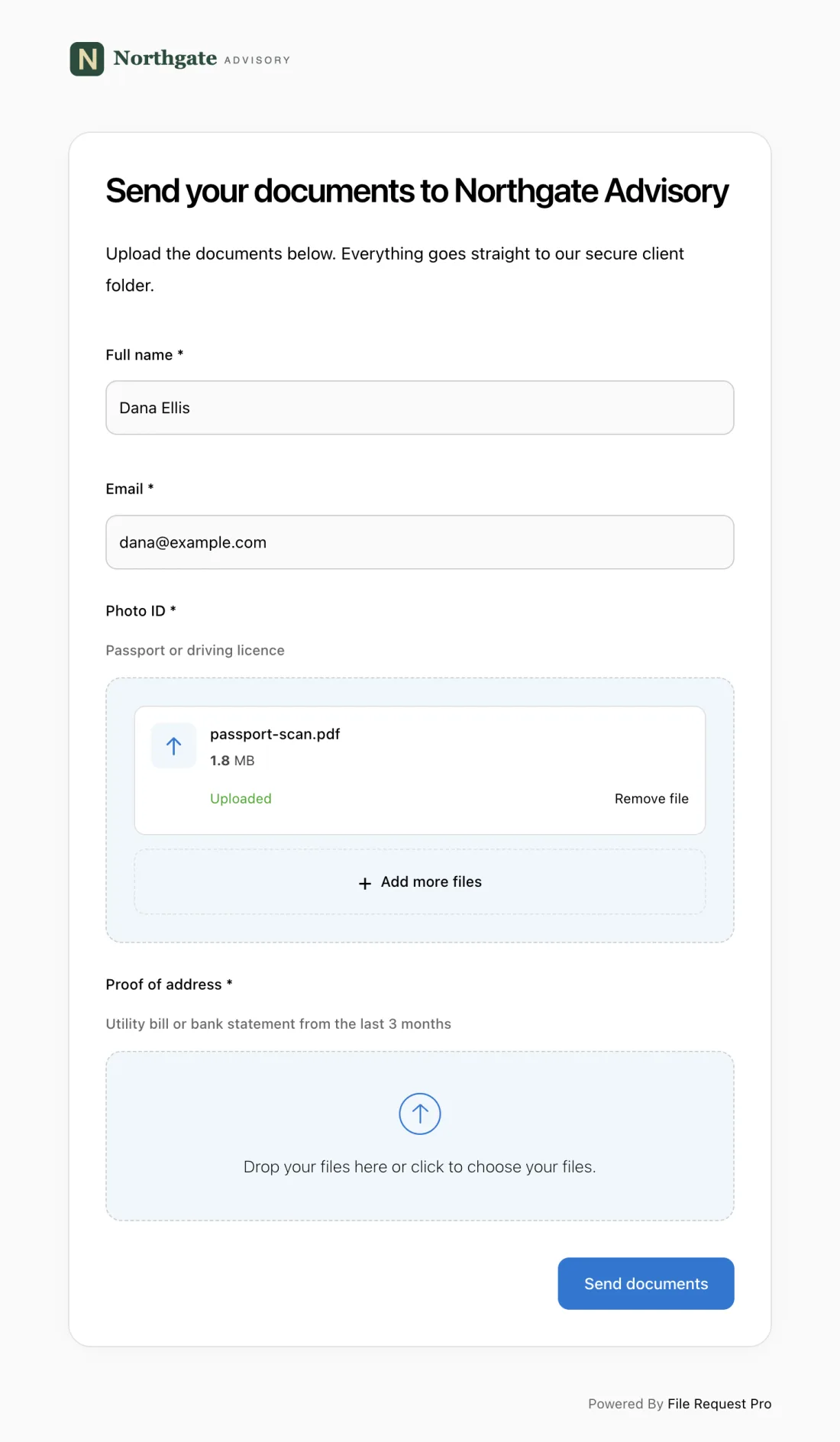
Here is what this looks like for event planners:
- Branded intake page — Your logo, colors, and domain. Clients see your brand, not a generic form tool.
- Form fields + file uploads combined — Collect questionnaire answers, inspiration photos, mood boards, vendor contracts, and floor plans in one submission.
- Automated reminders — Clients who haven't completed the questionnaire get automatic follow-up emails on a schedule you set. Reminders stop once the client submits.
- Cloud storage integration — Submitted files and form data sync to Google Drive, OneDrive, SharePoint, or Dropbox, organized into event folders automatically.
- No client login required — Clients click a link, fill in the form, upload files, and submit. No accounts, no passwords, no friction.
One link, one submission, one organized result — and you reclaim hours every week that used to disappear into file management.
Frequently Asked Questions
How many questions should an event planning questionnaire include?
Aim for 30 to 40 questions covering all major planning categories. Add more for complex events like multi-day conferences; trim to 20-25 for straightforward ones like cocktail receptions. The litmus test: if an answer would not change a single planning decision, cut the question.
When should I send the questionnaire to a new client?
Within 24 hours of the initial inquiry or first phone call. Clients are most engaged right after they reach out, and early information means you walk into the first planning meeting with venue options ready — not starting from scratch. Attach a deadline tied to your next milestone.
Should I use a different questionnaire for weddings versus corporate events?
Start with the same core template and add event-specific sections. The foundational categories — budget, guest count, venue, catering, communication — apply universally. Layer in wedding-specific questions (ceremony details, bridal party) or corporate-specific ones (breakout sessions, sponsor logistics) as needed.
What if the client doesn't know the answers to some questions yet?
Completely normal. Encourage clients to answer what they can and mark uncertain fields with "TBD." Partial answers are far more useful than no answers. Revisit incomplete sections during your first planning meeting and treat the questionnaire as a living document.
How do I collect inspiration photos and vendor documents alongside the questionnaire?
Use a tool that combines form fields with file uploads. File Request Pro lets clients answer questions and upload inspiration images, mood boards, and venue contracts in a single submission — no more answers in one place and reference files scattered across email threads.
How do I handle multiple decision makers who need to contribute to the questionnaire?
Identify the primary contact and ask them to consolidate input before submitting. For events with committees, suggest the group reviews questions together and designates one person to submit final answers. This prevents conflicting responses and gives your team a single source of truth.
