You are organizing a conference with 20 sponsors, 35 speakers, a virtual summit track, and three hotel venues. Each party needs to send you different information -- logos, headshots, session abstracts, room block confirmations, catering preferences, A/V requirements. Your inbox turns into a graveyard of half-finished email threads. Attachments vanish. Deadlines pass. And you spend your evenings copy-pasting details into spreadsheets instead of doing the work you were hired for: planning the event.
Another spreadsheet will not save you. The right forms will. When every sponsor, speaker, applicant, and venue coordinator has a clear place to send exactly what you need -- with a deadline and a reminder -- your inbox stops being your filing cabinet.
Below are four event planning form templates covering the collection scenarios you run into most: sponsor commitments, speaker submissions, virtual summit applications, and hotel/venue coordination. Each template lists the fields you need and explains why they matter.
1. Sponsor Information and Commitment Form
Sponsors fund most events -- and create most of your logistical headaches. You need their logos in the right format, payment confirmations before booth assignments, and marketing copy approved before the program goes to print. Now multiply that by 10, 20, or 50 companies, each with their own internal approval process and timeline.
Key Fields
- Company name and primary contact -- Get both the signatory and the day-to-day contact, with a direct email and phone number. You will email the wrong person at least once without this.
- Sponsorship tier selected -- Gold, Silver, Bronze (or your tiers). A dropdown determines booth size, logo placement, and benefits so there is no confusion later.
- Company logo (high-resolution upload) -- Request vector files (SVG, EPS) for print and PNG for digital. Specify minimum resolution so you do not discover a 200-pixel logo the week before print.
- Company description (50-100 words) -- For the program, website, and app. Set a word limit so every sponsor gets the same space -- otherwise someone will send you 400 words.
- Website URL and social media handles -- For sponsor directories and cross-promotion.
- Booth requirements -- Electricity, tables, display dimensions, internet, and special setup requests. Missing one of these means a fire drill on setup day.
- Marketing materials upload -- Banners, flyers, promo videos. Set file size limits and accepted formats up front.
- Payment method and PO number -- Invoice, credit card, wire, or purchase order. Your finance team will thank you for collecting this on day one.
- On-site representative names -- For badge printing, Wi-Fi access, and security clearance.
- Dietary restrictions and accessibility needs -- For VIP dinners and catered sessions. One missed allergy is one too many.
- Shipping address for booth materials -- Venue receiving dock address, instructions, and arrival window.
- Terms acknowledgment -- Checkbox confirming the sponsor has read the agreement, cancellation policy, and deadlines.
2. Speaker Information and Submission Form
You need headshots for the website, bios that fit your layout, session abstracts that match the event theme, and A/V specs your production team can act on. Multiply that by 30 or 40 speakers, and managing submissions becomes a full-time job -- on top of the full-time job you already have.
Key Fields
- Full name, title, and organization -- Exactly as it should appear in the program. Ask for the definitive version upfront or you will get five variations across five email threads.
- Professional headshot upload -- Minimum 800x800 pixels, JPEG or PNG. Specify background preference to save your design team from requesting replacements two days before launch.
- Speaker bio (75-150 words) -- Set a word count range and include a sample bio. Without an example, half will send a LinkedIn summary and the other half will send a single sentence.
- Presentation title -- The working title for the program listing. Note whether it is final or subject to review.
- Session abstract (100-200 words) -- What the talk covers and what attendees walk away with. Written for the audience, not the speaker's resume.
- Session format preference -- Keynote, breakout, panel, workshop, fireside chat, or lightning talk.
- Target audience and difficulty level -- Beginner, intermediate, or advanced. This helps attendees pick sessions and helps you balance the schedule.
- A/V and technical requirements -- Own laptop or provided? Clicker, lavalier mic, handheld? Live demos, video playback, polling tools?
- Presentation file upload -- Slides, handouts, supplementary materials. Set a deadline and accepted formats (PPTX, PDF, Google Slides link).
- Travel and accommodation needs -- Departure city, dates, flight preferences, hotel preferences, and dietary restrictions.
- Social media handles and website -- For pre-event promotion and live tagging.
- Recording consent and release -- Permission to record, use likeness, and share post-event. Get this signed before you hit record.
3. Virtual Summit / Event Application Form
Virtual summits add a screening layer. You are vetting applicants and managing technology requirements for presenters joining from anywhere in the world. An application form gives you enough to evaluate fit, expertise, and technical readiness before you commit a slot on your schedule.
Key Fields
- Applicant name, email, and organization -- Assess credibility and catch duplicates. Three speakers from the same company is a red flag, not a feature.
- Proposed topic or session title -- A specific topic signals a prepared speaker. Vague proposals like "leadership lessons" signal they have not thought it through.
- Topic description (150-250 words) -- Your primary evaluation tool. Ask for three concrete takeaways -- this separates real proposals from filler.
- Target audience -- Ideal attendee by role, experience level, and industry. Helps you curate a balanced program without five talks on the same subject.
- Presentation format -- Solo, interview/Q&A, panel, workshop, or pre-recorded. Each has different production requirements and scheduling needs.
- Previous speaking experience -- Links to past talks or recordings. A two-minute YouTube clip tells you more than a self-description paragraph ever will.
- Technical setup -- Camera quality, microphone type, internet speed, platform familiarity. Virtual events live or die on audio quality -- one echo-filled presentation tanks your attendee ratings.
- Availability and time zone -- Collect time zone and date/time windows to avoid scheduling a keynote at 3am for the speaker.
- Promotional commitment -- Will they promote to their audience? Ask for email list size or social following to estimate reach.
- Headshot and bio upload -- Same specs as the speaker form. You need these the day speakers are confirmed, not two weeks later.
4. Hotel and Venue Coordination Form
Venue coordination involves more back-and-forth than most planners expect. Room blocks, catering menus, A/V setups, parking, and liability -- each involves a different hotel department and a different contact person. A coordination form gives the venue team one structured reference instead of a chain of 40 emails that nobody can find when it matters.
Key Fields
- Event name, dates, and expected attendance -- Include setup and teardown dates if they differ from event dates. Venues price differently based on total room-days, not just event days.
- Room block details -- Rooms per night, room types, check-in/out dates, group rate, and cutoff date for the block.
- Meeting room requirements -- Number of rooms, capacity, and setup style (theater, classroom, U-shape, banquet, boardroom).
- A/V equipment needs -- Projectors, screens, microphones, recording gear, live-streaming setup. Note whether you are using your own A/V vendor or in-house -- this affects pricing and logistics.
- Catering requirements -- Meals per day, headcount per meal, dietary accommodations, bar service, and per-person budget range.
- Internet and connectivity -- Bandwidth needs, expected devices on network, and whether you need a dedicated production line. Hotel Wi-Fi is not conference Wi-Fi -- plan accordingly.
- Signage and branding placement -- Allowed locations for banners, directional signs, sponsor displays, and registration desks.
- Parking and transportation -- Capacity, valet options, shuttle service, public transit access, overflow plans.
- Insurance and liability documents -- Certificate of insurance, indemnification requirements, and security deposit details. Upload fields keep these out of email threads where they get lost.
- Venue contact and escalation path -- Primary contact, backup contact, and after-hours emergency number for event day. When the projector dies at 8:47am, you need a name and number, not a general inbox.
How to Collect Event Planning Information from Multiple Parties
The pattern across all four forms is the same: you are collecting structured information and files from people outside your organization. Sponsors, speakers, applicants, and venue contacts will not create an account on your platform. They need a link, a clear form, and a deadline.
Email attachments get lost in threads. Google Forms cannot handle file uploads well. Shared drives require logins external parties will not set up. You end up with information scattered across six tools and no clear picture of who has submitted what.
File Request Pro gives you a branded upload page with form fields for structured data (company name, bio, session title) and file upload fields for assets (logos, headshots, slides, insurance certificates). Each party gets a link, fills in the form, uploads their files, and submits. Done.
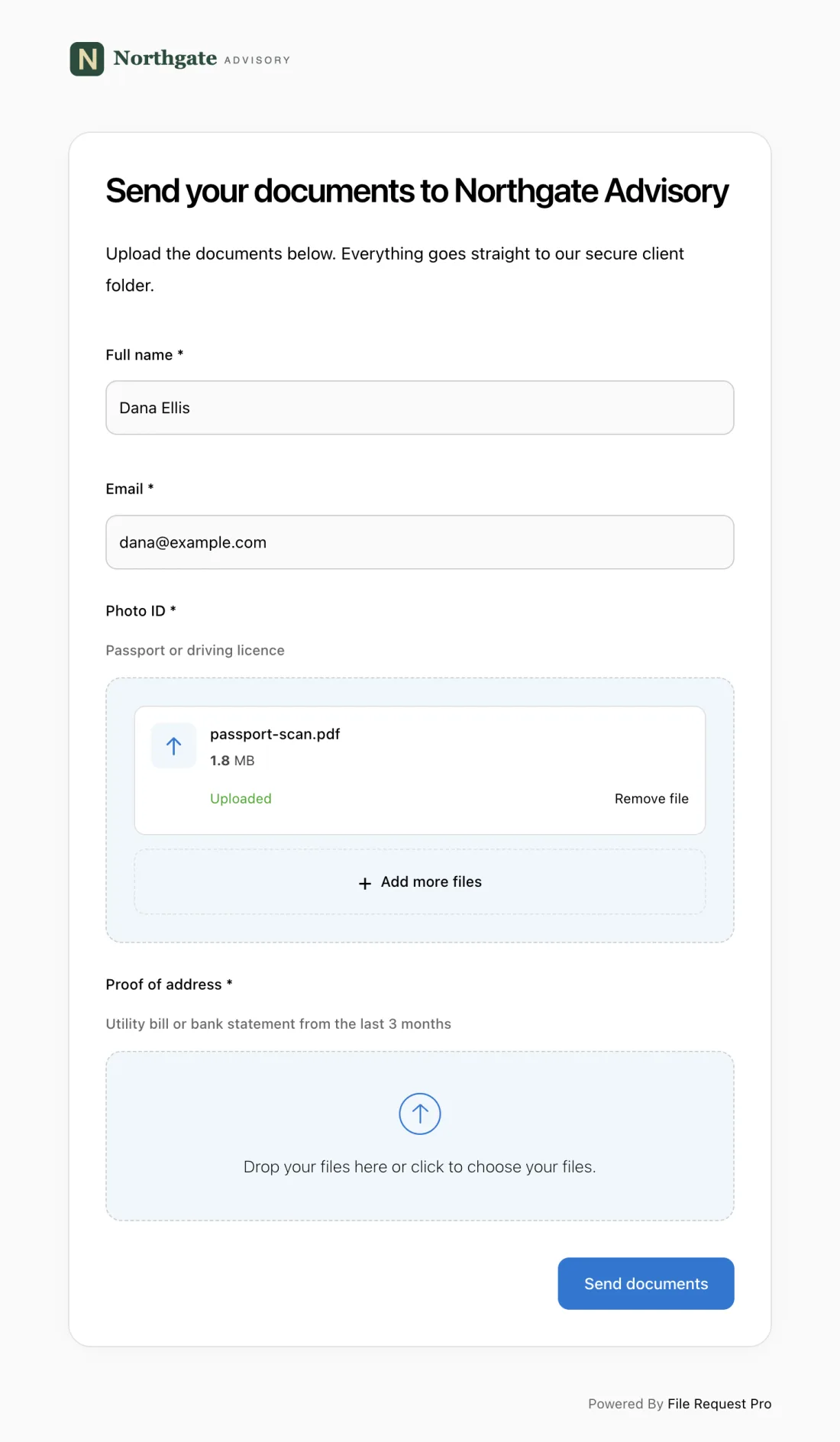
Here is what that looks like for event planning:
- Separate forms per stakeholder type -- Create different upload pages for sponsors, speakers, and venue contacts. Each page collects exactly the fields and files that group needs, nothing more.
- Automated reminders -- Set a deadline and let automatic follow-up emails chase people who have not submitted. You stop sending "just checking in" emails to 40 sponsors one by one.
- Cloud storage sync -- Files and form data are saved to Google Drive, OneDrive, SharePoint, or Dropbox in organized folders. No downloading from email, no manual sorting.
- No account needed -- Sponsors and speakers click a link and submit. No signups, no passwords, no "I can't log in" emails from your keynote speaker the night before.
- Branded pages -- Your event branding, logo, and instructions. External parties see a polished, professional experience -- not a generic form tool.
- Submission tracking -- See who has submitted and who has not at a glance. No more updating a spreadsheet by hand or asking your assistant "has Acme sent their logo yet?"
Best Practices for Event Planning Forms
Set deadlines with a buffer
If your program prints March 1, set your speaker bio deadline for February 10. Build a two-week buffer into every deadline so you have time to chase late submissions before the information becomes a bottleneck. Automated reminders at one week, three days, and one day before the deadline do the chasing for you.
Specify file formats and dimensions
Say "SVG or PNG, minimum 1200 pixels wide" for logos. Say "JPEG, 800x800 minimum, solid background" for headshots. Vague requests guarantee you will receive a 150-pixel thumbnail cropped from a website footer -- and you will spend an hour tracking down the right file.
One form per stakeholder type
Do not build one mega-form for sponsors, speakers, and venues. Each group has different fields, different files, and different deadlines. Separate forms keep submissions organized and let you set different reminder schedules for each group.
The client who hired you gets their own form too. An event planning questionnaire covers their goals, guest count, budget and venue preferences before you start booking anything.
Include examples and word limits
Show a sample bio or session abstract directly on the form. People write better responses when they can see what "good" looks like. Word limits keep your program layout consistent and prevent 500-word bios when you need 100.
Test the form yourself
Fill it out start to finish before you send it to anyone. If it takes more than 10 minutes, you are asking too much. Check that uploads accept the right formats, dropdowns have every option, and required fields are marked. A broken form makes your event look disorganized before it starts -- and gives people an excuse to delay submitting.
FAQ
What information should an event planning form collect?
It depends on who is filling it out. Sponsor forms capture company details, tier, logos, booth needs, and payment info. Speaker forms need bios, headshots, abstracts, and A/V requirements. Venue forms cover room blocks, catering, setup, and insurance. Match the form to the audience -- one generic form for everyone means more time sorting responses than you saved.
How far in advance should I send event planning forms?
Send sponsor forms 8-12 weeks before the event, speaker forms 6-8 weeks before, and venue forms as early as possible after signing the contract. Build in a two-week buffer between your stated deadline and when you need the information for production.
How do I collect files like logos and headshots alongside form responses?
Most basic form tools only handle text fields. For event planning, you need form fields and file uploads in one step. File Request Pro lets you create a single page with both -- submitters fill in fields and upload files together, and everything syncs to your cloud storage automatically.
What is the best way to track who has submitted their information?
Use a tool with a built-in dashboard instead of tracking in a manual spreadsheet. File Request Pro shows submission status at a glance, and automated reminders go out to anyone who has not submitted yet. This replaces the weekly "who still owes us a bio?" email chain that eats up your Monday mornings.
How do I handle late submissions without delaying the event?
Set internal deadlines two weeks before your actual production deadlines. Use automated reminders at three intervals -- one week before, three days before, and the day of the deadline. If someone still has not submitted after the deadline, you have a buffer before it blocks your printer, your designer, or your production team.
How do I make sure external parties actually complete the form?
Three things drive completion rates. First, keep the form focused -- only ask for what you need at this stage. Second, set a clear deadline and explain what happens if they miss it ("Your bio must be submitted by March 1 to appear in the printed program"). Third, use automated reminders so people get a nudge without you writing individual follow-ups. Structured collection processes with deadlines and reminders consistently outperform ad-hoc email requests.
