Onboarding a new merchant should take 3 to 5 days, not 3 weeks. But when compliance documents arrive in scattered email attachments and nobody can confirm whether the beneficial ownership form was ever submitted, a straightforward process turns into a bottleneck — and every extra day of delay is a day your platform isn't earning on that merchant's transactions.
Below you'll find a ready-to-use merchant onboarding form template with 38 fields organized into seven categories, guidance on adapting the form for payment processors, marketplaces, SaaS platforms, and e-commerce aggregators, and a practical way to collect every document digitally — without chasing merchants through email.
What Is a Merchant Onboarding Form?
A merchant onboarding form is a structured intake document that payment platforms use to collect business information, identity verification, banking details, and compliance documentation before a merchant can begin accepting payments. It is the foundation of your KYC (Know Your Customer) and AML process for business accounts — and getting it right determines whether onboarding takes days or drags on for weeks.
The form typically covers four areas:
- Business identification — legal name, tax ID, business type, formation documents
- Ownership verification — beneficial owners, government-issued IDs, PEP screening
- Banking and settlement — where funds are deposited, verified through bank documents
- Risk assessment — transaction volumes, industry classification, chargeback history, prior terminations
Some platforms handle this entirely through an online application portal. Others email a PDF checklist and ask merchants to send everything back piecemeal. The format matters less than getting complete, verified information before processing a single transaction — not after a fraud loss or regulatory audit forces the question.
Business Information
These fields establish who the business is, where it operates, and how it is legally structured.
- Legal business name — the exact name registered with the state or jurisdiction of incorporation.
- DBA (Doing Business As) name — the trade name customers see at the point of sale.
- Business type / entity structure — sole proprietorship, LLC, corporation, partnership, or nonprofit.
- EIN / Tax Identification Number — Employer Identification Number (US) or equivalent tax ID for international merchants.
- Date of formation / incorporation — newer businesses may face additional underwriting scrutiny.
- State / jurisdiction of incorporation — for verifying formation documents against the correct Secretary of State database.
- Principal business address — primary physical location. PO boxes typically do not satisfy KYC requirements.
- Business phone number — a verified number for the business.
- Business website URL — underwriting teams review product offerings, pricing, and refund policies before approving applications.
Ownership and Beneficial Owners
The Corporate Transparency Act and FinCEN's beneficial ownership rules require platforms to identify every individual who owns 25% or more of a business, plus anyone with significant management control.
- Primary owner / authorized signer full legal name — the person authorized to sign agreements on behalf of the business.
- Owner date of birth — for identity verification and sanctions list screening.
- Owner SSN or government ID number — SSN for US owners, passport or national ID for international owners.
- Owner residential address — home address, not business address. Required for identity verification.
- Ownership percentage — required for all individuals owning 25% or more.
- Government-issued photo ID upload — passport, driver's license, or national ID. Part of your document verification process.
- PEP (Politically Exposed Person) status — whether the owner holds or has held a prominent public function. Triggers enhanced due diligence.
If the business has multiple beneficial owners meeting the 25% threshold, collect fields 10 through 16 for each individual.
Banking and Settlement Details
These fields determine where processed funds are deposited. Unverified or mismatched banking information is one of the most common causes of onboarding delays — and if caught after activation, can result in misdirected settlements.
- Bank name — the financial institution where the merchant's business account is held.
- Bank routing number (ABA) — nine-digit routing number. For international merchants, collect the SWIFT/BIC code.
- Bank account number — the deposit account for settlement.
- Account type — checking or savings. Most processors require business checking.
- Voided check or bank letter upload — confirms account holder name, routing number, and account number belong to the merchant entity.
Business Operations
Understanding what the merchant sells and at what volume helps your underwriting team assess risk, set appropriate processing limits, and flag merchants that need enhanced monitoring.
- Industry / MCC code — Merchant Category Code classifying the business. Determines interchange rates and flags high-risk industries.
- Products or services description — specific description of what the merchant sells. "Retail" is insufficient; ask for detail.
- Average transaction amount — a merchant averaging $25 has a different risk profile than one averaging $5,000.
- Estimated monthly processing volume — projected total monthly sales. Used to set processing limits and reserves.
- Refund and return policy — vague or missing refund policies are a red flag for chargeback risk.
- Sales method — card-present, card-not-present, mobile, or mixed. CNP transactions carry higher fraud risk.
Compliance and Documentation
Missing documents are the most common cause of onboarding delays. When even one required file is absent, the entire application stalls while your team sends follow-up emails and waits for the merchant to respond.
- Business license or permit upload — current license to operate. Some industries require specific permits.
- Articles of incorporation or organization upload — formation documents confirming the business entity and structure.
- Certificate of good standing — proves the business is active and current with state filings.
- Proof of business address — utility bill, lease agreement, or bank statement showing the business name and address.
- PCI DSS compliance status — whether the merchant has completed a Self-Assessment Questionnaire or achieved PCI certification.
Risk and Fraud Prevention
These questions surface risk factors that determine whether a merchant is approved, declined, or approved with conditions such as rolling reserves or lower processing caps.
- Chargeback history — current ratio and whether the merchant has exceeded card network thresholds (typically 1%) with any previous processor.
- Previous processor terminations — whether the merchant has been terminated by a prior processor, and the reason.
- MATCH / TMF list status — whether the merchant appears on the Member Alert to Control High-Risk Merchants list. Requires enhanced review.
- History of fraud or legal action — past fraud investigations, regulatory actions, or payment-related lawsuits.
Agreement and Authorization
The final section formalizes the merchant's consent before the application is submitted for review.
- Terms and conditions acceptance — the merchant confirms they agree to your terms of service, acceptable use policy, and processing agreement.
- Authorized signer name, title, and date — the individual legally authorized to bind the business. Must match the primary owner or an officer in the formation documents.
Adapting the Form for Different Platforms
The 38 fields above cover the core requirements, but every platform type has specific data needs. Here is how to tailor the form for your business model.
Payment processors and acquirers
Emphasize underwriting data: chargeback history, MATCH list status, processing volumes, and PCI compliance. Add fields for reserve account terms and processing fee acknowledgment.
Marketplaces
Simplify for sole proprietors by combining owner and business fields. Add seller category, fulfillment method, and tax document collection (W-9 for US sellers, W-8BEN for international) for 1099-K reporting.
SaaS platforms with embedded payments
If you use Stripe Connect or Adyen for Platforms, your merchant onboarding form feeds into the provider's KYC flow. Add fields for subscription pricing, recurring billing details, and API integration readiness so you can pass structured data directly to your payment provider and reduce manual re-entry.
E-commerce aggregators
Payment facilitators take on the compliance burden for sub-merchants, which means your form needs to capture enough detail to manage that risk. Add fields for shopping cart platform, digital vs. physical goods, shipping methods, and cross-border selling.
Best Practices for Merchant Onboarding
Verify before activating
Never enable processing before every required document is submitted and reviewed. The pressure to activate fast is real — sales teams push, merchants grow impatient. But the cost of activating a merchant with unverified banking details or a missing business license is far higher: misdirected funds, regulatory exposure, and potential fines that dwarf the revenue from a single account.
Automate the routine, review the risk
Use automated tools for EIN verification, MATCH list checks, and sanctions screening. Save manual review for document authenticity, beneficial ownership, and risk assessment — the judgments that actually need a human eye. This lets your compliance team spend time on the cases that matter instead of copy-pasting tax IDs into verification databases.
Set clear timelines
Tell merchants upfront: "Most applications are reviewed within 3 business days of receiving complete documentation." The word "complete" matters — most delays come from missing documents, not slow reviewers.
Collect everything in one step
If your form collects business details but requires a separate process for document uploads, you've created two steps where one would do — and doubled the chances a merchant drops off mid-process. Combine form fields and file uploads into a single intake so merchants complete everything in one sitting.
Track expiring documents
Business licenses, insurance certificates, and PCI attestations expire. An expired license discovered during an audit can force you to suspend a merchant's account mid-operation. Record every expiration date during onboarding and set alerts 60 and 30 days before each deadline so renewals happen before they become emergencies.
How to Collect Merchant Onboarding Documents
Emailing a Word document or PDF checklist creates predictable problems. The merchant fills in half the fields, attaches three of seven documents, and sends it back. Your team replies asking for the rest. The merchant responds four days later with one of the four missing files. Another follow-up. Another wait. Two to three weeks pass before the application is finally complete — and your compliance team has spent more time chasing paperwork than reviewing it.
File Request Pro eliminates this back-and-forth. You build a branded intake page that combines form fields for structured data (business name, EIN, processing volumes) with file upload fields for each required document (articles of incorporation, government ID, voided check, business license). The merchant opens one link, fills in the form, uploads everything, and submits — all in a single session, with no account creation or software to install.
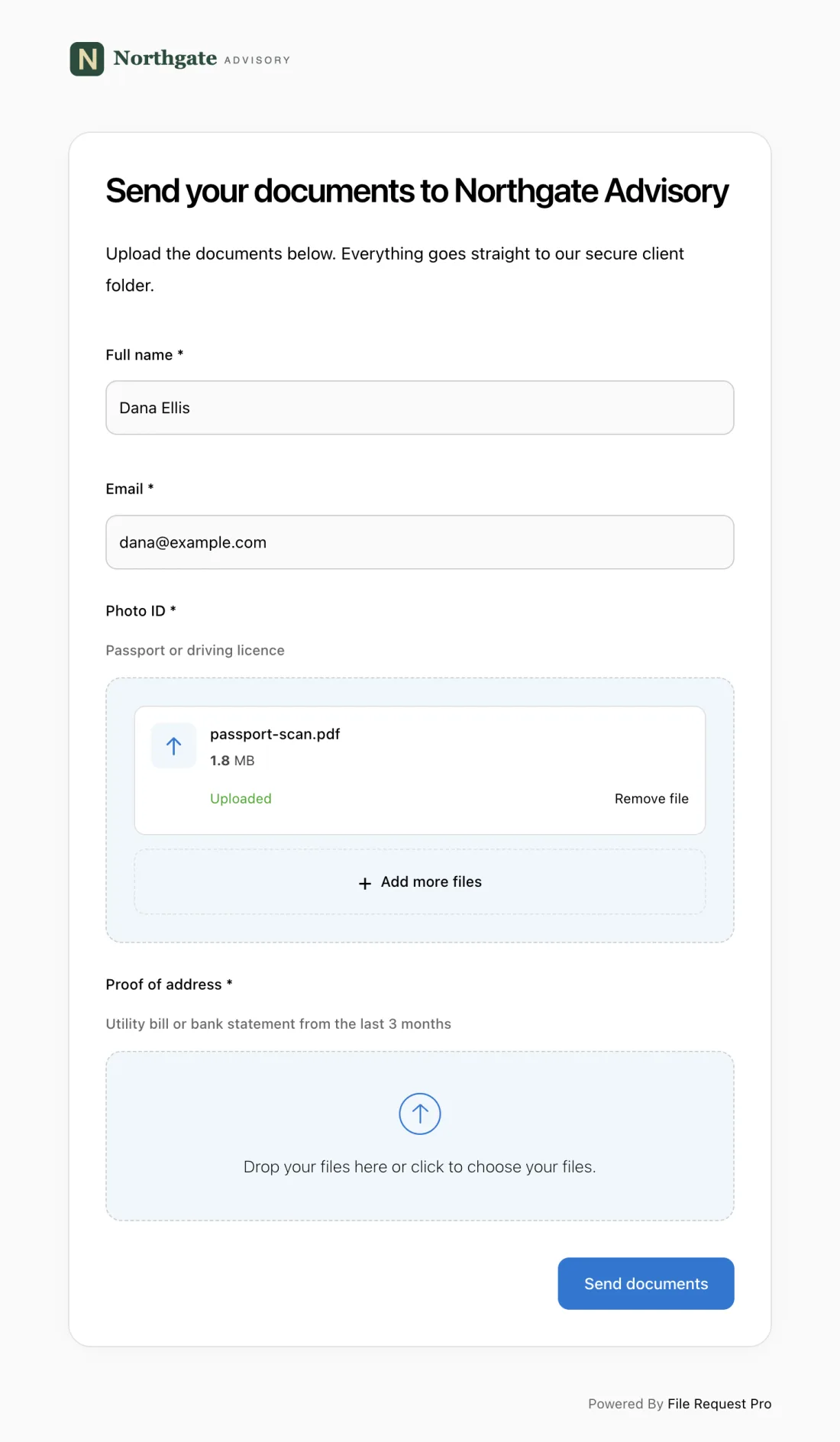
Here is what this looks like in practice:
- Branded intake page — your platform's logo, colors, and domain. Merchants see your brand, not a generic form tool.
- Form fields and file uploads combined — collect business details, banking information, and compliance documents in one submission. No separate emails for missing files.
- Automated reminders — merchants who haven't completed their application receive automatic follow-up emails on your schedule — for example, 3 days and 7 days after the initial request. Your team stops chasing and starts reviewing.
- Cloud storage integration — submitted files sync to Google Drive, OneDrive, SharePoint, or Dropbox, organized into merchant folders automatically.
- No merchant login required — merchants click a link, complete the form, upload documents, and submit. No accounts to create, no passwords to remember, no friction that causes drop-off.
- Encryption for sensitive financial data — bank account numbers, tax IDs, and government IDs are encrypted in transit and at rest with TLS and AES-256 encryption.
This works whether you are a payment processor onboarding 50 merchants a month, a marketplace scaling to thousands of sellers, or a fintech platform adding sub-merchants through embedded payments. You can see how it works or start a free trial — no credit card required. Similar approaches apply to driver onboarding and other compliance-heavy intake processes.
Frequently Asked Questions
What is a merchant onboarding form?
A merchant onboarding form is a structured document that payment platforms use to collect business information, identity verification, banking details, and compliance documents from new merchants before activating their accounts. It serves as the foundation for KYC and AML compliance.
What documents are required for merchant onboarding?
Most platforms require a government-issued photo ID for each beneficial owner, EIN or tax ID document, articles of incorporation, voided check or bank verification letter, proof of business address, and current business license. High-risk industries may also require PCI compliance attestation and processing history.
How long does merchant onboarding typically take?
With complete documentation, most platforms review and approve applications within 2 to 5 business days. The biggest delay is almost always missing documents — merchants who submit everything in one step typically get approved in half the time compared to those who submit piecemeal over multiple emails.
What is the MATCH list and why does it matter?
The MATCH (Member Alert to Control High-Risk Merchants) list is a database maintained by Mastercard tracking merchants terminated by a previous acquirer. Reasons include excessive chargebacks, fraud, and illegal activity. Being listed does not automatically prevent getting a new account, but it triggers enhanced review and many processors will decline the application.
Do I need to collect beneficial ownership information?
Yes. Under FinCEN's Customer Due Diligence (CDD) Rule and the Corporate Transparency Act (CTA), platforms must identify every individual who owns 25% or more of a business entity, plus anyone with significant management control. Non-compliance can result in civil penalties up to $500 per day per violation under the CDD Rule, with additional penalties possible under the CTA.
How do I handle merchant onboarding for international businesses?
International merchants require additional fields: passport or national ID instead of SSN, SWIFT/BIC code instead of ABA routing number, country of incorporation, and local business registration documents. Screen against OFAC sanctions lists and foreign PEP databases. Many platforms use a tiered approach with a simplified form for low-risk domestic merchants and an extended form for international applicants.
Free Client Onboarding Checklist
Get the complete document checklist for your industry — interactive, with progress tracking.
Use the Free Checklist Tool →