A strong client intake form does more than collect names and phone numbers. It screens for conflicts of interest, captures the facts your attorneys need before the first consultation, and sets expectations about fees, communication, and next steps. When intake works well, your team spends less time chasing basic information and more time on billable legal work.
Below you'll find a complete law firm client intake form template with 50+ questions organized by category, practice-area-specific sections for family law, personal injury, criminal defense, and estate planning, plus guidance on legal ethics considerations and how to send your intake form digitally. If you handle family or immigration matters, see our dedicated divorce questionnaire and immigration intake form templates.
What Is a Law Firm Client Intake Form?
A law firm client intake form is a structured questionnaire that new clients complete before or during their first consultation. It collects personal details, case background, and the information your firm needs to run a conflict check, assign the right attorney, and prepare for the initial meeting.
Most intake forms cover four areas:
- Client identification — name, contact details, date of birth, government ID
- Case overview — type of legal matter, opposing parties, key dates and deadlines
- Conflicts screening — names of all parties involved so the firm can check for conflicts
- Engagement terms — fee structure acknowledgment, referral source, communication preferences
Some firms use paper forms handed out in the waiting room. Others send a digital form by email before the appointment. The format matters less than getting complete, accurate information upfront — before attorney time gets billed.
General Client Information Questions
Every intake form starts here. These questions apply regardless of practice area.
Personal and Contact Details
- Full legal name
- Preferred name or nickname
- Date of birth
- Social Security Number (last four digits, if needed for court filings)
- Home address
- Mailing address (if different from home)
- Primary phone number
- Secondary phone number
- Email address
- Preferred contact method (phone, email, text, mail)
- Best times to reach you
- Employer name and occupation
- Emergency contact name, relationship, and phone number
Referral and Marketing
- How did you hear about our firm?
- Were you referred by someone? If so, who?
- Have you worked with our firm before? If yes, which attorney and what matter?
Case Details Questions
These questions help your team understand the legal issue before the first meeting, so the assigned attorney can prepare and the consultation is productive.
- What type of legal matter do you need help with? (dropdown: family law, personal injury, criminal defense, estate planning, business/corporate, real estate, immigration, other)
- Briefly describe your legal situation (open text field)
- When did this issue begin?
- Is there a court date, filing deadline, or statute of limitations approaching? If so, what date?
- Have you filed any documents with a court regarding this matter?
- Are there any pending legal proceedings?
- Have you consulted or hired another attorney for this matter? If yes, who and why did the representation end?
- Name(s) of the opposing party or parties
- Name of the opposing party's attorney (if known)
- Do you have any documents related to this matter? (contracts, police reports, correspondence, court papers)
- What outcome are you hoping to achieve?
Family Law Intake Questions
Family law cases involve sensitive personal details. These questions help the attorney understand the family structure, financial picture, and any safety concerns before the consultation.
- What type of family law matter? (divorce, custody, child support, spousal support, adoption, prenuptial agreement, domestic violence protection)
- Spouse or partner's full legal name
- Date of marriage or domestic partnership
- Date of separation (if applicable)
- Names and dates of birth of all minor children
- Current custody and visitation arrangement (if any)
- Are there any existing court orders related to custody, support, or protection?
- Is there a history of domestic violence or abuse? (This information is kept strictly confidential.)
- List significant marital assets: real estate, vehicles, retirement accounts, business interests
- List significant marital debts: mortgages, student loans, credit card balances
- Is either party's income or employment situation in dispute?
- Is either party currently receiving government benefits?
Personal Injury Intake Questions
Time-sensitive details matter in personal injury cases. The sooner you capture what happened, who was involved, and what evidence exists, the stronger the case foundation.
- Date and time of the incident
- Location where the incident occurred
- Describe how the incident happened (open text)
- Was a police report or incident report filed? If so, do you have a copy?
- Names and contact information of any witnesses
- Did you seek medical treatment? If so, where and when?
- Describe your injuries (broken bones, soft tissue, head injury, etc.)
- Are you still receiving medical treatment?
- Have you missed work due to your injuries? If so, how many days?
- Name of your health insurance provider
- Were any other insurance claims filed? (auto, homeowner's, worker's comp)
- Have you been contacted by the other party's insurance company?
- Do you have photos, video, or other evidence of the incident or your injuries?
Criminal Defense Intake Questions
Criminal defense intake needs to establish the charges, timeline, and the client's current legal status quickly — especially if the client is in custody or facing an imminent hearing.
- What charges have been filed or are expected? (list all)
- Date of arrest or citation
- Arresting agency (police department, sheriff, state police, federal)
- Case number or citation number (if known)
- Are you currently in custody, on bail, or released on own recognizance?
- Bail amount (if applicable)
- Date of next court appearance
- Name of the court and judge (if assigned)
- Were you read your Miranda rights at the time of arrest?
- Did you make any statements to law enforcement?
- Do you have any prior criminal convictions or pending charges?
- Are you currently on probation or parole?
Estate Planning Intake Questions
Estate planning requires a clear picture of the client's assets, family situation, and wishes. These questions give the attorney enough detail to recommend the right documents — whether that's a simple will or a more complex trust structure.
- What estate planning documents do you need? (will, revocable living trust, power of attorney, healthcare directive, all of the above, not sure)
- Do you have any existing estate planning documents? If so, when were they last updated?
- Marital status and spouse's full legal name
- Names, dates of birth, and relationships of intended beneficiaries
- Do you want to name a guardian for minor children? If so, who?
- Who would you like to name as executor or trustee?
- List your major assets: real estate, bank accounts, investment accounts, retirement accounts, life insurance policies, business interests
- Approximate total estate value
- Do you own property in more than one state?
- Are there any specific gifts or charitable donations you want included?
- Do you have concerns about any beneficiary's ability to manage an inheritance? (spending habits, disability, substance abuse, minor children)
- Healthcare preferences: Do you want to specify end-of-life care wishes?
The Law Firm Client Intake Process, Step by Step
The form is one piece of a longer intake process. Most firms run some version of these six steps, whether they've written them down or not:
- Initial contact. A call, referral, or website inquiry. Capture the name, contact details, opposing parties, and a one-line matter description. Nothing more yet.
- Conflict check. Before anyone hears the details, run the names against your client and matter database. Skipping this step, or running it after the consultation, is how firms end up disqualified from cases.
- Intake form. The prospective client completes the full form for their matter type. Send it before the consultation so you walk into the meeting already knowing the basics.
- Consultation and screening. Assess whether the case has merit and whether the client is someone your practice can actually serve. Declining early is cheaper than withdrawing later.
- Engagement letter. Scope, fees, and responsibilities in writing, signed before work begins. Most fee disputes trace back to a letter that never got signed.
- Matter opening. Open the file, set up billing, request the initial documents, and tell the client what happens next and when.
Firms that lose clients during intake usually lose them between steps 3 and 5, when days pass with no visible progress. Automating the form and the follow-up reminders (and the document requests that come after) closes that gap without adding staff.
Legal Ethics and Intake Forms
Intake forms carry real ethical obligations under the rules of professional conduct. Getting this wrong can lead to malpractice claims, disciplinary action, or disqualification from a case.
Confidentiality starts at intake
Information a prospective client shares during intake is protected by the duty of confidentiality — even if the firm never takes the case. Under ABA Model Rule 1.18, a person who consults with a lawyer about the possibility of forming a client-lawyer relationship is a "prospective client," and the information they provide must be kept confidential.
This means your intake form and the data it collects need the same protections as active client files. Paper forms should be stored securely. Digital forms should use encryption. Staff who handle intake information should be trained on confidentiality obligations.
Conflict-of-interest screening
Your intake form is your first line of defense against conflicts of interest. ABA Model Rules 1.7 and 1.9 require firms to check whether representing a new client would conflict with duties to a current or former client.
This is why intake forms should always ask for:
- Full names of all opposing parties
- Names of opposing counsel
- Names of witnesses or other involved parties
- Whether the prospective client has previously consulted any attorney at the firm
Run this information against your conflict database before the first substantive consultation. Catching a conflict after you've heard case details creates a much bigger problem — potentially disqualifying the entire firm.
Informed consent and fee agreements
The intake form is a natural place to set expectations about fees. Include a brief description of your fee structure (hourly, flat fee, contingency) and a checkbox acknowledging the client has read and understood the terms. This does not replace a formal engagement letter, but it starts the conversation early and avoids surprises later.
Data security obligations
ABA Model Rule 1.6(c) requires lawyers to make "reasonable efforts" to prevent unauthorized access to client information. If you collect intake data through a digital form, the tool you use matters. Look for end-to-end encryption, secure cloud storage, and access controls that limit who in your firm can view the submissions.
How to Send Your Legal Intake Form
The intake form is only useful if clients complete it. How you send the form affects completion rates, data security, and how much follow-up your staff needs to do.
Common approaches and their limitations
Paper forms in the office. Clients fill them out in the waiting room. This works for walk-in consultations, but the data stays in a paper file until someone types it into your practice management system. Fields get skipped. Handwriting gets misread. Important details fall through the cracks.
Email attachments. You send a Word or PDF form. The client downloads it, fills it in (sometimes by hand), and sends it back. Email is not encrypted by default, which creates a confidentiality risk for sensitive information like Social Security numbers and criminal history.
Generic form builders. Google Forms or Typeform can collect text-based responses, but most lack the security features law firms need. They also cannot handle file uploads well — and legal intake often requires clients to submit documents alongside the form (court papers, police reports, identification).
Combining intake questions with document collection
The strongest intake process collects form responses and supporting documents in one step. Instead of sending a form by email and then chasing clients separately for documents, everything arrives in a single submission.
File Request Pro is built for this. You create a branded intake page with form fields for the text-based questions (name, case details, conflict-check information) and file upload fields for the documents you need (identification, court filings, medical records, police reports). Clients open a link, fill in the form, upload their files, and submit — no account or login required.
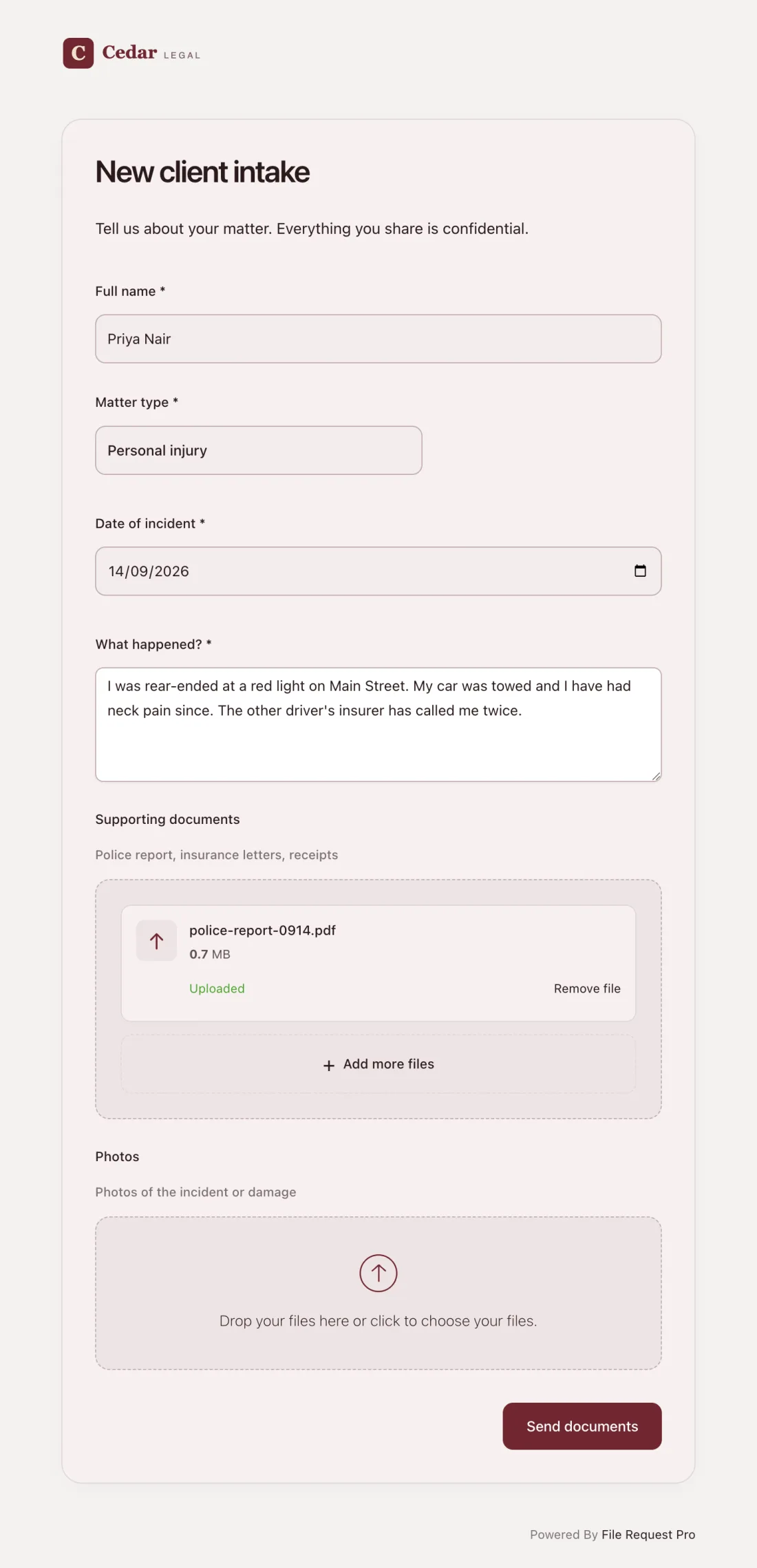
Here is what this looks like in practice for a law firm:
- Branded intake page — your firm's logo, colors, and custom domain. Clients see your brand, not a third-party tool.
- Form fields + file uploads combined — collect case details and supporting documents in a single form. No separate emails or follow-up requests for missing files.
- Automated reminders — clients who haven't submitted their intake form get automatic follow-up emails on a schedule you set. Your staff stops chasing people manually.
- Cloud storage integration — submitted files and form data go straight to Google Drive, OneDrive, SharePoint, or Dropbox, organized into client folders automatically.
- Encryption and security — bank-level encryption protects sensitive client data in transit and at rest, helping your firm meet its ethical obligations under Rule 1.6(c).
- No client login required — clients click a link, complete the form, and submit. No accounts, no passwords, no friction that delays the intake process.
This approach works well for any practice area where intake involves both structured questions and document collection — personal injury firms requesting medical records and accident photos, family law attorneys collecting financial statements and existing court orders, or criminal defense lawyers gathering police reports and prior case documents.
Sending Intake Forms in Bulk
Class actions, mass torts, and immigration practices face a different problem: the same intake form has to reach dozens or hundreds of people, and someone has to track who responded. Email attachments collapse at that scale.
What works instead is one reusable intake link. Every claimant gets the same URL. Each submission arrives labeled with the person's name, files land sorted into your storage, and reminders go out automatically to whoever hasn't finished. Your intake list becomes a dashboard rather than a spreadsheet you reconcile by hand.
Best Practices for Law Firm Intake Forms
Keep it focused
Every extra question reduces the chance a client finishes the form. Ask only what you need before the first consultation. You can always gather more details during the meeting or in follow-up forms for specific practice areas.
Explain why you need sensitive information
Clients hesitate when asked for Social Security numbers, financial details, or criminal history without context. A brief note next to sensitive fields — "Required for court filings" or "Used for conflict-of-interest screening only" — builds trust and gets the form completed.
Use conditional logic
A personal injury client does not need estate planning questions. If your form tool supports conditional logic, show practice-area-specific questions only when the client selects the relevant case type. This keeps the form short and relevant for each client.
Set a submission deadline
Intake forms without a deadline sit in inboxes. Set a clear due date: "Please complete this form at least 48 hours before your scheduled consultation so your attorney can prepare." Automated reminders reinforce the deadline without manual follow-up.
Run the conflict check immediately
Don't wait until the consultation to check for conflicts. As soon as the intake form arrives, run the opposing party names and related parties through your conflict database. If a conflict exists, you need to know before the attorney hears case details — not after.
Secure the data from day one
Intake forms contain some of the most sensitive information your firm handles. Store submissions in encrypted systems with access controls. Don't leave intake data in email threads or unprotected shared drives. Your ethical obligations apply to prospective clients, not just retained ones.
FAQ
What should a law firm client intake form include?
At minimum, a legal intake form should collect the client's full name, contact details, a description of the legal matter, names of opposing parties (for conflict checks), any relevant deadlines or court dates, and referral source. Most firms also include practice-area-specific questions, fee structure acknowledgment, and file upload fields for supporting documents.
When should clients complete the intake form?
Before the first consultation. Sending the intake form in advance — ideally with a 48-hour deadline before the meeting — gives the attorney time to review the facts, run a conflict check, and prepare relevant questions. This makes the consultation more productive for both the attorney and the client.
Is information on an intake form confidential?
Yes. Under ABA Model Rule 1.18, information shared by a prospective client is protected by the duty of confidentiality, even if the firm declines the case. Your intake process should use the same security measures you apply to active client files — encrypted storage, access controls, and staff training on confidentiality obligations.
How do I handle intake for clients who contact the firm but never retain us?
You still owe them a duty of confidentiality under Rule 1.18. Keep their intake information secure and do not disclose it. If the firm later represents an opposing party in the same matter, the information the prospective client shared could create a conflict. This is why conflict-check data from declined matters should be retained in your conflict database.
Should I use a different intake form for each practice area?
The most efficient approach is a single intake form with a general section that applies to everyone, followed by conditional practice-area sections that appear based on the client's case type. This avoids maintaining multiple forms while still collecting the specific details each practice area needs.
What is the best tool for creating a law firm intake form?
It depends on your needs. If you only collect text-based information, a form builder like Google Forms works. But if your intake process also requires clients to upload documents — identification, court papers, police reports, medical records — you need a tool that combines form fields with secure file uploads. File Request Pro handles both in a single branded form with encryption, automated reminders, and cloud storage integration.
How long should a legal intake form be?
Aim for 15-25 questions in the general section, plus 8-12 practice-area-specific questions. Most clients can complete a well-organized intake form in 10-15 minutes. If your form regularly takes longer than 20 minutes, you're probably asking questions that can wait until the consultation.
Free Client Onboarding Checklist
Get the complete document checklist for your industry — interactive, with progress tracking.
Use the Free Checklist Tool →