You just wrapped a two-hour portrait session. The light was perfect, the subject nailed every pose, and you have at least thirty shots ready for a brand campaign. Then you check your files and realize nobody signed a model release. Every one of those photos is now legally unusable beyond your personal portfolio. Two hours of work, gone — because of one missing form.
Below you will find a free model release form template covering adult and minor subjects, a breakdown of which release type fits your situation, and a step-by-step guide to collecting signed releases digitally so this never happens to you again.
What Is a Model Release Form?
A model release form is a signed document where your subject gives you written permission to use their likeness in photos, video, or other visual media. It spells out what the images can be used for, how long that permission lasts, and whether compensation is involved.
Without a signed release, you cannot legally use a person's image for commercial purposes — advertising, product packaging, social media campaigns, stock photography, or brand content. Editorial use (news reporting, education, commentary) is generally protected, but the line between editorial and commercial blurs fast. A signed release removes the guesswork and protects both you and your subject.
Model Release Form Template
This template covers every field you need for a legally sound model release. Adjust the language for your jurisdiction and use case, but do not skip fields to save time. Each one exists because someone, somewhere, got sued over the missing detail.
Subject Information
- Full legal name of model — Must match their government-issued ID. Nicknames and stage names will not hold up in court.
- Date of birth — Confirms the subject is 18 or older. If they are under 18, the minor release section below applies.
- Home address — Street address, city, state, and zip code. You need this for legal correspondence if a dispute arises.
- Phone number — Primary contact for follow-up.
- Email address — For sending copies of the signed release and any future usage notifications.
- Government-issued photo ID type and number — Driver's license, passport, or state ID. This proves the person signing is who they say they are.
Photographer/Company Information
- Full legal name of photographer or authorized representative — The person or company receiving the usage rights.
- Business name — If you operate under an LLC, studio name, or agency. Rights transfer to the business entity, not you personally.
- Business address — Your registered business address.
- Phone number — Business contact line.
- Email address — Official business email for anything related to the release.
Grant of Rights
- Description of the shoot or project — Date, location, and nature of the session (e.g., "Studio portrait session on March 15, 2026 at XYZ Studio, Chicago, IL for spring product campaign").
- Types of media covered — Photograph, video, audio recording, digital composite, AI-generated derivative. Be specific. If you might use footage for both stills and video, list both.
- Scope of the grant — Exclusive or non-exclusive. Exclusive means only you can use the images. Non-exclusive means the model can sign releases with other photographers for similar work.
- Duration of the grant — Perpetual (no expiration) or time-limited (e.g., "two years from the date of signing"). Perpetual grants are standard for stock photography and advertising.
- Territory — Worldwide or limited to specific regions. If your images will appear online, you almost certainly need worldwide rights.
Usage Terms & Restrictions
- Permitted uses — Check all that apply: advertising, social media, website content, print publications, stock photography/video, editorial, packaging, billboards/outdoor advertising, trade shows, internal corporate use.
- Prohibited uses — Any restrictions the model requests. Common exclusions: adult content, political campaigns, tobacco or alcohol advertising, defamatory contexts. Write these out explicitly so there is no room for argument later.
- Right to modify or alter — Permission to crop, retouch, composite, or digitally alter the images. Without this clause, even basic skin retouching could be challenged.
- Right to sublicense or assign — Whether you can transfer or license the images to third parties (stock agencies, clients, publishers). If you license work to brands or submit to stock libraries, you need this.
Compensation
- Compensation type — Paid (flat fee, hourly rate, royalty) or unpaid (TFP — time for prints/portfolio use). If paid, state the exact dollar amount.
- Payment terms — When and how you will pay (upon signing, upon publication, net 30). Include method: check, bank transfer, PayPal.
- Additional compensation for extended use — Whether the model gets extra payment if images are used beyond the original scope. Spell this out now or argue about it later.
Minor Release (Parent/Guardian Section)
- Full legal name of parent or legal guardian — The adult who has legal authority to consent on behalf of the minor.
- Relationship to minor — Parent, legal guardian, or court-appointed custodian.
- Parent/guardian home address — Must match legal records.
- Parent/guardian phone number and email — For sending signed copies and any follow-up.
- Parent/guardian consent statement — A clear declaration: "I am the parent/legal guardian of the above-named minor and have the legal authority to sign this release on their behalf."
Signatures & Dates
- Model's signature — Handwritten or legally valid electronic signature.
- Date of model's signature — Must be on or before the shoot date. A release signed after publication is much harder to enforce.
- Witness signature — Not legally required in most jurisdictions, but adds credibility. Worth having for high-value commercial work.
- Photographer's signature — Confirms both parties agree to the terms.
- Date of photographer's signature — Completes the agreement.
Types of Model Releases
Not every shoot needs the same release. Using the wrong type — or skipping one altogether — opens you up to legal trouble you do not want.
Standard Adult Release
The most common type. You use this whenever you photograph or film someone over 18 for commercial purposes. The subject signs for themselves, grants usage rights, and acknowledges compensation terms. This covers headshots, product campaigns, lifestyle shoots, and any session where a recognizable person appears in images you plan to sell or license.
Minor Release
Required when the subject is under 18. A parent or legal guardian must sign on the minor's behalf. The release should identify both the minor and the signing adult, include proof of guardianship, and state that the guardian understands how the minor's likeness will be used. Some states have additional protections for minors — look up your state's rules before the shoot, not after.
Property Release
Not a model release, but photographers mix these up constantly. A property release grants permission to use images of recognizable private property — a building, a vehicle, artwork, a pet, or an interior space. If private property is prominent in a commercial image, you need the owner's written permission. Public landmarks are generally exempt, but privately owned buildings (even famous ones) often are not.
Group or Crowd Release
Used for events, concerts, festivals, or any shoot where individual signatures are not practical. Typically posted as signage at the entrance: "By entering this event, you consent to being photographed and the use of your likeness for promotional purposes." Group releases offer weaker legal protection than individual ones. If anyone is prominently featured or individually identifiable in the final images, get a separate signed release from that person.
How to Collect Signed Model Releases with File Request Pro
Paper releases work until they do not. They get crumpled in gear bags, left on set, or buried in a folder you cannot find two years later when a licensing dispute shows up in your inbox. Going digital is not about convenience — it is about knowing you have a signed, organized, instantly retrievable release for every subject you have ever shot.
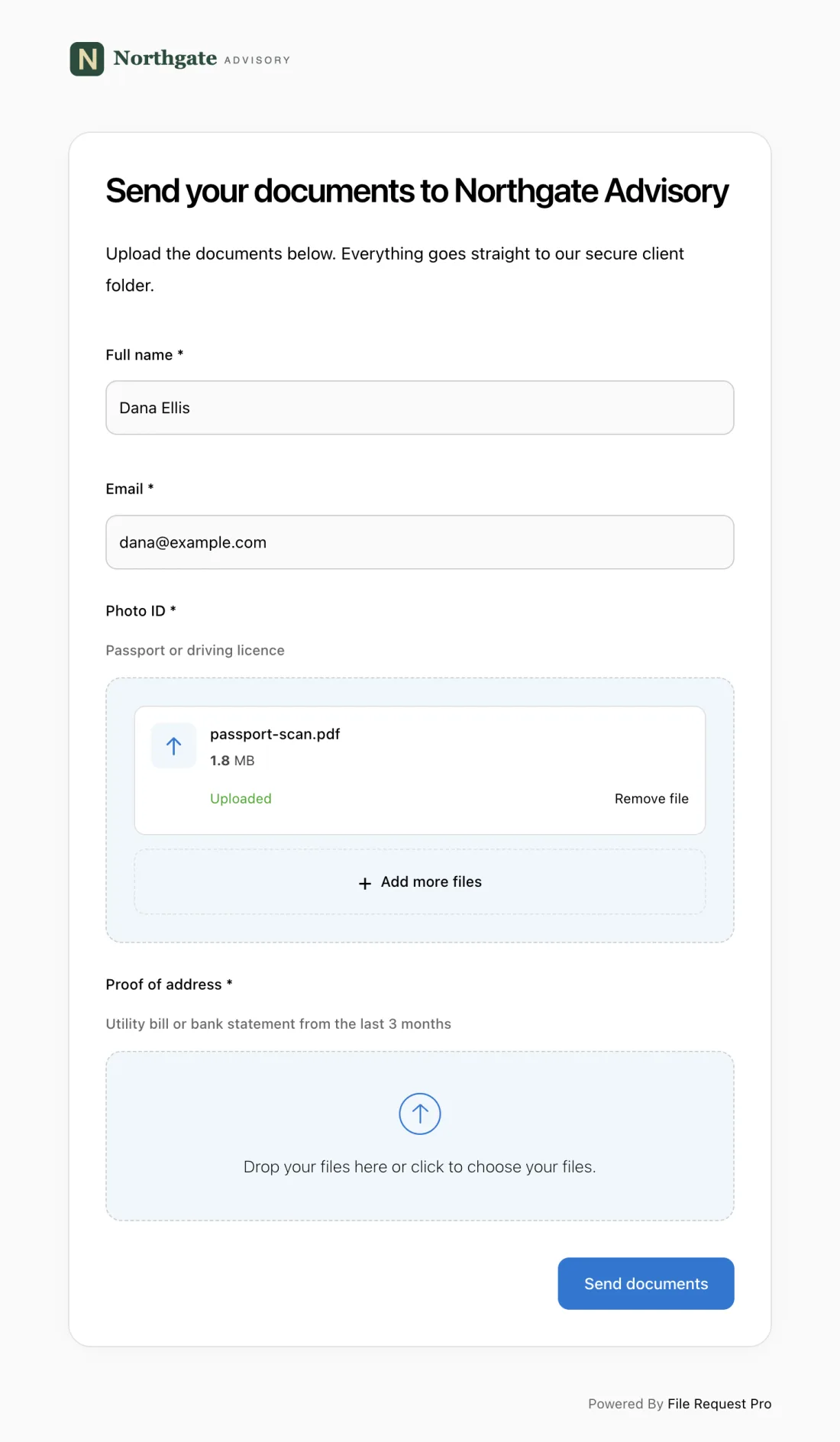
File Request Pro lets you build a branded release page that combines form fields (subject name, shoot details, usage permissions, compensation terms) with file uploads (government ID, signed PDF, reference photos) in one submission. Send the link before or after the shoot, and talent completes everything from their phone or laptop — no app to download, no account to create.
Here is why photographers and agencies handling volume rely on this workflow:
- No account required for talent — Your model clicks the link, fills out the form, uploads their ID, and signs. Zero friction means higher completion rates. You stop chasing people and start getting releases back the same day.
- Automated reminders — Set a deadline and File Request Pro sends automatic follow-up emails to anyone who has not submitted. No more "Hey, did you sign that release?" texts at 11 PM.
- Cloud storage sync — Signed releases land in your Google Drive, Dropbox, OneDrive, or SharePoint, organized by project or shoot date. Two years from now, when a client asks for proof, you find it in seconds — not buried in email attachments.
- Encryption and security — Government IDs and personal data are protected with encryption in transit and at rest. You are collecting sensitive information — the platform handles security so you do not have to.
- Audit trail — Every submission is timestamped and logged. If a subject later claims they never signed, you have a record showing exactly when they submitted, what they agreed to, and what they uploaded.
- Branded experience — Your logo, your colors, your domain. Talent sees a professional page that matches your brand, not a generic form builder that undercuts your credibility.
For agencies managing dozens of shoots per month, this replaces scattered PDFs and unanswered emails with one organized system. For solo photographers, it means more time behind the camera and less time chasing paperwork.
Best Practices for Model Release Forms
Get the release signed before the shoot starts
The single most important habit you can build. Send the release in advance, collect it before you pick up the camera, and confirm you have a completed copy before the subject leaves. Chasing a signature after the shoot puts you in a weaker position — and some subjects stop responding once they have their photos.
Be specific about usage rights
"All media purposes" sounds like it covers everything, but vague language invites disputes. List specific channels and formats: social media, print advertising, stock licensing, website banners, packaging. If you plan to sublicense images to clients, say so explicitly. The more specific your release, the harder it is to argue the usage was not covered.
Keep copies organized and accessible
A release you cannot find is as good as no release at all. Store digital copies in a consistent folder structure — by client, project, or date — and back them up. Cloud storage with automatic syncing (like the Google Drive and Dropbox integrations in File Request Pro) means one hard drive failure does not wipe out years of legal protection.
Use separate releases for separate projects
A release signed for a brand's spring campaign does not cover their holiday campaign six months later — unless the release explicitly says so. When in doubt, get a new release. It takes five minutes and removes any ambiguity about which images are covered for which uses.
Consult a lawyer for high-value or sensitive work
Templates cover most situations, but if you are shooting a national ad campaign, working with minors, or creating content for regulated industries (pharmaceutical, alcohol, firearms), have an attorney review your release. A one-time legal review costs far less than a licensing dispute.
FAQ
Do I need a model release for every photo I take of a person?
No. You need a release for commercial use — advertising, product promotion, stock photography, brand content. Editorial use (news coverage, educational material, documentary work, artistic expression) generally does not require one, though the exemption has limits. Simple test: if the image sells or endorses something, you need a release.
What happens if I use a photo commercially without a model release?
The subject can sue for unauthorized use of their likeness, and courts have awarded damages from thousands to hundreds of thousands of dollars. You may also face claims from the client or brand that licensed the image, since most commercial licensing agreements require the photographer to guarantee proper releases are on file. Stock agencies will reject submissions outright without valid releases.
Can a model revoke their release after signing?
It depends on the release language. Most well-drafted releases include an "irrevocable" clause, meaning the model cannot withdraw consent after signing. However, if you use images in ways not covered by the release — or the release was signed under pressure — a court may allow revocation. This is exactly why specificity in your usage terms matters.
What is the difference between a model release and a talent release?
The terms are often used interchangeably, but a talent release covers more ground — voice, performance, likeness, and biographical information — and is more common in video, film, and broadcast. A model release focuses on the use of a person's visual likeness in still or moving images. For most photography work, "model release" is the right term.
Do I need a model release for street photography?
For personal or artistic use, generally no — people in public spaces have a lower expectation of privacy. For commercial use, yes. If you photograph someone on the street and later sell that image to a brand, you need their signed release. Where you took the photo matters less than how you use it.
Is a digital signature on a model release legally valid?
Yes, in most jurisdictions. In the United States, the ESIGN Act and UETA give electronic signatures the same legal weight as handwritten ones. Three requirements: the signer intended to sign, agreed to do so electronically, and the signature is tied to the specific document. A timestamped submission through a platform like File Request Pro checks all three boxes.
