A well-organized tax return checklist saves you and your clients hours of back-and-forth during tax season. Without one, you spend your busiest weeks chasing missing W-2s, hunting down receipts, and sending follow-up emails that go unanswered.
This checklist covers every document category your clients need to gather — income, deductions, credits, business records, and supplementary paperwork. It also explains how to collect those documents efficiently so nothing slips through the cracks.
Use this as a reference to share with clients before their tax appointment, or as the foundation for your own firm's accounting client onboarding process. To collect the documents through one secure request, use secure file requests for accountants.
Why Every Accounting Firm Needs a Tax Return Checklist
Tax preparation involves dozens of documents per client. Miss one form, and you face amended returns, delayed filings, or penalties. A standardized checklist solves three problems at once:
- Fewer follow-ups. Clients know exactly what to gather before their appointment, which means fewer rounds of "Can you also send me your 1099-INT?"
- Faster turnaround. When you receive all documents upfront, you can prepare the return in one sitting instead of pausing to wait for missing records.
- Reduced errors. A structured list ensures deductions and credits are not overlooked because neither you nor the client remembered to ask about them.
The checklist below is organized by category so clients can work through it section by section.
Personal Information
Start with the basics for everyone included on the return:
- Full legal names and Social Security numbers (or ITINs) for the taxpayer, spouse, and all dependents
- Dates of birth for the taxpayer, spouse, and all dependents
- Current mailing address (note any address changes from the prior year)
- Bank account and routing numbers for direct deposit of refunds
- Copy of the prior year's tax return
- Identity Protection PINs issued by the IRS (if applicable)
Income Documents
Income is where most of the paperwork lives. Clients often have income from multiple sources, and each one comes with its own form. Make sure they gather all of these:
Employment and wages
- W-2 forms from every employer during the tax year
- W-2G forms for gambling or lottery winnings
Freelance, contract, and gig income
- 1099-NEC for non-employee compensation ($600 or more)
- 1099-MISC for rents, royalties, prizes, and other miscellaneous income
- 1099-K for payment card and third-party network transactions
- Records of any freelance or side income not reported on a 1099
Investment and retirement income
- 1099-INT for interest income from banks and financial institutions
- 1099-DIV for dividend income
- 1099-B for proceeds from broker and barter exchange transactions
- 1099-R for distributions from pensions, annuities, IRAs, or retirement plans
- SSA-1099 for Social Security benefits received
- K-1 forms from partnerships, S corporations, estates, or trusts
Other income
- 1099-G for government payments such as unemployment compensation or state tax refunds
- 1099-S for proceeds from real estate transactions
- 1099-C for cancellation of debt
- 1099-SA for distributions from HSAs, Archer MSAs, or Medicare Advantage MSAs
- 1099-LTC for long-term care insurance payments
- Rental property income and expense records
- Alimony received (for agreements executed before 2019)
Deduction Documents
Deductions reduce taxable income, and they are where clients leave the most money on the table. A thorough checklist helps clients remember deductions they might otherwise overlook.
Homeownership
- Form 1098 for mortgage interest paid
- Property tax statements
- Records of points paid on a mortgage origination or refinance
- Home equity loan interest statements
Medical and health
- Medical and dental expense receipts (unreimbursed amounts exceeding 7.5% of AGI)
- Health insurance premium statements
- Long-term care insurance premiums paid
- HSA contribution records (Form 5498-SA)
Charitable giving
- Cash donation receipts and bank statements
- Written acknowledgments for donations of $250 or more
- Non-cash donation records with fair market value estimates
- Mileage logs for volunteer driving
Education expenses
- Form 1098-T for tuition and fees paid
- Form 1098-E for student loan interest paid
- Receipts for books, supplies, and required course materials
- Records of contributions to 529 plans
State and local taxes
- State and local income tax payments (or state and local sales tax records if electing to deduct sales tax)
- Vehicle registration fees (the deductible portion based on value)
Other common deductions
- Retirement account contributions (IRA, SEP-IRA, SIMPLE IRA)
- Educator expenses (up to $300 for qualifying teachers)
- Alimony paid (for agreements executed before 2019)
- Moving expenses (military personnel only)
- Unreimbursed employee expenses (check current eligibility)
Credits
Tax credits reduce the amount owed dollar-for-dollar, making them more valuable than deductions. Help your clients claim every credit they qualify for:
- Child Tax Credit: Birth certificates or Social Security cards for qualifying children under 17
- Child and Dependent Care Credit: Name, address, and tax ID of care providers, plus total amounts paid
- Earned Income Tax Credit (EITC): Income documentation and qualifying child information (if applicable)
- Education Credits (American Opportunity / Lifetime Learning): Form 1098-T and records of qualified education expenses
- Adoption Credit: Adoption expense records and legal documentation
- Energy Credits: Receipts for qualifying home energy improvements (solar panels, insulation, heat pumps, windows)
- Premium Tax Credit: Form 1095-A from the Health Insurance Marketplace
Business Income and Expenses
Clients who own a business or work as independent contractors need to provide additional documentation. This section typically generates the most questions, so be specific about what you need:
Business basics
- Employer Identification Number (EIN)
- Prior year's business tax return
- Partnership or operating agreements (if applicable)
- Any changes in ownership structure during the tax year
Income records
- Profit and loss statement or income summary
- 1099-NEC and 1099-K forms received
- Records of all business income, including cash transactions
Expense records
- Office supplies, equipment, and software purchases
- Vehicle mileage logs or actual expense records for business use
- Travel, meals, and entertainment expenses (with documentation)
- Rent or lease payments for business property
- Utilities and internet costs (business portion)
- Professional services (legal, accounting, consulting fees)
- Insurance premiums (business liability, professional, health for self-employed)
- Advertising and marketing costs
- Contractor payments (with 1099-NEC forms issued)
Home office
- Total square footage of the home and the office space
- Date the home office was first used for business
- Utility expenses, mortgage interest, property taxes, and insurance (for calculating the home office deduction)
Estimated tax payments
- Dates and amounts of all estimated tax payments made during the year (federal and state)
- Prior year's total tax liability (for safe harbor calculations)
Supplementary Documents
Depending on your client's situation, you may also need:
- Health insurance: Forms 1095-A, 1095-B, or 1095-C
- Foreign income: Records of income earned abroad, foreign tax paid, and FBAR reporting information for foreign bank accounts exceeding $10,000
- Cryptocurrency: Records of all crypto transactions, including purchases, sales, exchanges, and mining income
- Disaster losses: Documentation of casualty or theft losses in a federally declared disaster area
- Life changes: Marriage or divorce records, records of a new baby or adopted child, death certificate of a spouse or dependent
- IRS correspondence: Any notices, letters, or audit communications received from the IRS during the year
How to Collect Tax Documents from Clients
Having a checklist is one thing. Getting clients to actually send you everything on it is another.
During tax season, the biggest bottleneck for most accounting firms is not the preparation itself — it is waiting for clients to submit their documents. You send the checklist, and then you wait. A week passes. You send a reminder. They reply with half the documents. You follow up again. The cycle continues until the filing deadline starts breathing down your neck.
Here are the most common approaches, ranked from least to most effective.
Email (the worst option for tax documents)
Email is familiar, but it creates real problems for tax document collection. Financial records contain Social Security numbers, income details, and bank account information — data that should never sit unencrypted in an inbox. Beyond the security risks, email makes it difficult to track which clients have submitted their documents and which have not. You end up searching through threads, downloading scattered attachments, and manually organizing files into client folders.
Shared cloud folders
Sharing a Google Drive or Dropbox folder with each client is a step up from email. Files are encrypted in transit and at rest, and you get some structure. But this approach puts the organizational burden on the client: they need to know which files go where, how to name them, and how to navigate your folder system. Many clients find this confusing, which leads to misplaced files and more follow-up.
Secure upload pages and document collection tools
The most efficient approach is a dedicated document collection tool that gives each client a clear, guided experience. Instead of asking clients to figure out where to put their W-2 or how to share a folder, you send them a link to a branded upload page that lists exactly which documents you need.
This is the approach used by tools like File Request Pro. You create an upload page with labeled file request fields — "W-2 forms," "1099s," "Mortgage Interest Statement (1098)," and so on — and share the link with your client. The client uploads each document to the right slot, and everything lands in the correct folder in your Google Drive, OneDrive, Dropbox, or SharePoint automatically.
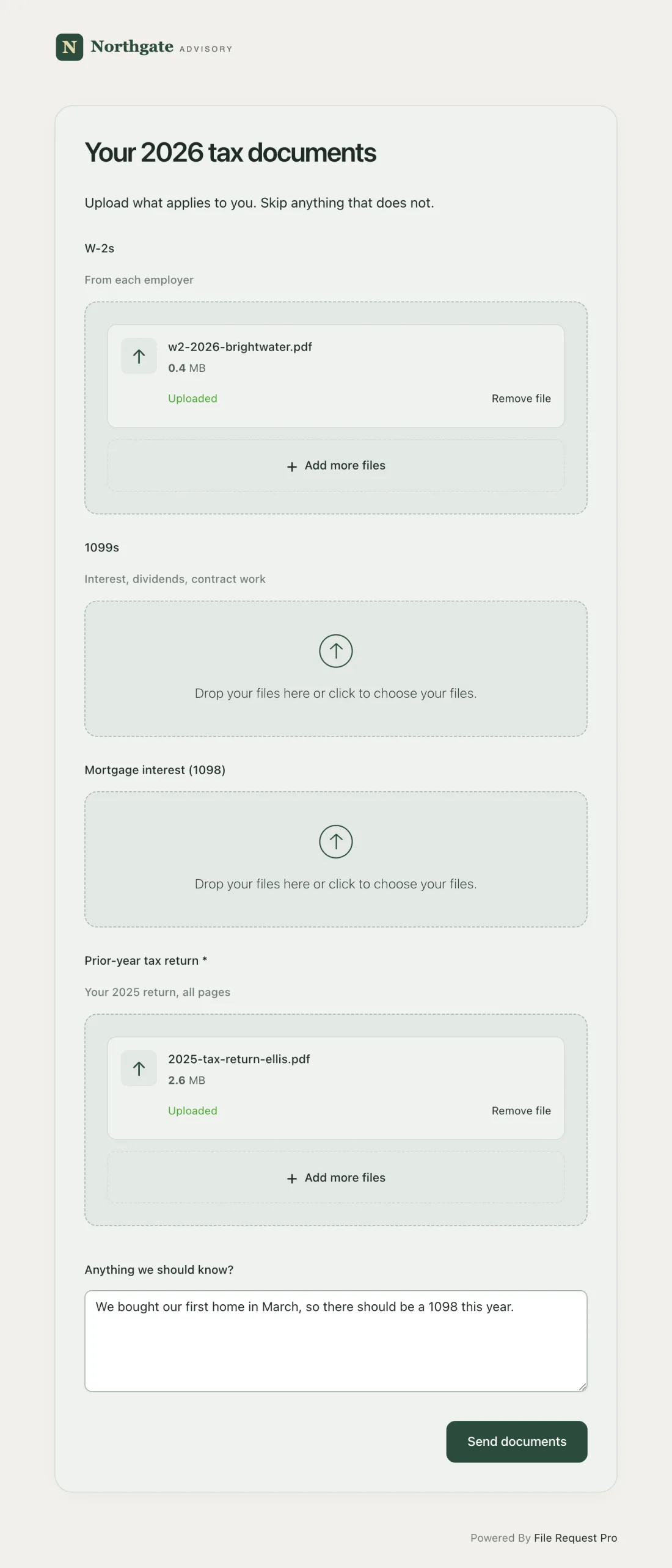
Why this approach works well for tax season:
- Clients know exactly what to send. Labeled upload fields act as a built-in checklist. There is no guessing about which documents you need.
- Automatic reminders. You can schedule follow-up emails that stop automatically once the client submits their files. No more manual chasing.
- Files land in the right folder. Uploaded documents route to your cloud storage, organized by client name. No downloading from email, no manual sorting.
- Security is built in. All data is encrypted at rest using AES 256-bit encryption, and clients do not need to create an account or learn new software.
- Professional branding. The upload page carries your firm's logo and colors (colors on Lite and up), so clients trust the process.
Whatever method you choose, the key is reducing friction for your clients. The easier you make it to submit documents, the sooner you receive them — and the sooner you can get to work.
Tips for Sending the Checklist to Clients
A checklist only helps if your clients actually use it. Here are a few practical tips:
- Send it early. Share the checklist as soon as W-2s and 1099s start arriving — typically late January. Clients who receive it early are more likely to gather documents before the rush.
- Keep the language simple. Not every client knows what a 1099-DIV is. Add brief descriptions next to technical form names so clients can identify what applies to them.
- Personalize where possible. If you know a client has rental income or runs a business, highlight those sections so they do not skip them.
- Set a deadline. A clear submission date gives clients a reason to act. Something like "Please submit all documents by March 1st so we can prepare your return before the filing deadline" works well.
- Follow up once, then automate. One personal follow-up is reasonable. After that, let automatic reminders handle the rest. Your time is better spent on preparation than on chasing paperwork.
- Look ahead to next year. Clients who want to lower next year's bill need more than a document list. Once the return is filed, send them a tax planning questionnaire.
Frequently Asked Questions
What documents do clients need for a tax return?
At minimum, clients need their W-2s from all employers, 1099 forms for any freelance, interest, dividend, or investment income, and their prior year's tax return. Depending on their situation, they may also need mortgage interest statements (Form 1098), student loan interest forms (Form 1098-E), charitable donation receipts, medical expense records, business income and expense documentation, and health insurance forms (1095-A/B/C). Use the category-by-category checklist above to make sure nothing is missed.
When should I send my tax checklist to clients?
Send it in late January, as soon as employers and financial institutions begin issuing W-2s and 1099s. Most of these forms are required to be sent by January 31st, so your clients can start gathering documents immediately. Early distribution gives clients more time to collect everything, which means fewer last-minute scrambles for you.
How do I collect tax documents from clients securely?
The safest method is a secure document collection tool or client portal that encrypts files during upload and saves them to your cloud storage. Tools like File Request Pro provide branded upload pages with labeled file fields, so clients know exactly what to submit. Avoid collecting tax documents via standard email — it is not encrypted by default, and attachments sit in inboxes indefinitely. If email is unavoidable, always use password-protected files and share the password through a separate channel.
What is the difference between a tax deduction and a tax credit?
A deduction reduces your taxable income. If you are in the 22% tax bracket and claim a $1,000 deduction, you save $220 in taxes. A credit reduces the actual tax you owe, dollar-for-dollar. A $1,000 credit saves you $1,000 regardless of your tax bracket. Credits are more valuable, which is why it is important to identify every credit your client qualifies for — especially refundable credits like the Earned Income Tax Credit, where the client can receive more back than they owe.
Do I need a different checklist for business clients?
Yes. Business clients need to provide additional documentation beyond personal tax forms, including their EIN, prior year's business return, profit and loss statements, expense records, and details about any changes in ownership. The Business Income and Expenses section of this checklist covers the main items. For clients with complex structures like partnerships or S corporations, you may also need K-1 forms and partnership agreements.
What happens if a client forgets to send a document?
If a document is missed before filing, you may need to file an amended return (Form 1040-X) after the original return is submitted. Amended returns can take several months for the IRS to process. This is why a thorough checklist matters — it catches missing documents before the return is filed, saving both you and your client time, cost, and potential penalties. Setting up automatic reminders through a document collection tool also helps ensure nothing falls through the cracks.
Make Tax Document Collection Easier
A good tax return checklist gives your clients clarity about what they need to send. But the checklist alone does not solve the logistics of collecting those documents. If you are still relying on email threads and manual follow-ups, you are spending time on administration that could go toward billable work.
Here is how to get started with a better process:
- Sign up for a free trial of File Request Pro.
- Connect the software to your cloud storage (Google Drive, OneDrive, SharePoint, or Dropbox).
- Create a tax document upload form with labeled fields for each item on your checklist.
- Share the upload link with your clients via email or embed it on your website.
Setup takes about 15 minutes. From there, your clients upload documents to a branded page, files land in the right folders, and automatic reminders handle the follow-ups — so you can focus on preparing returns instead of chasing paperwork.
Free Client Onboarding Checklist
Get the complete document checklist for your industry — interactive, with progress tracking.
Use the Free Checklist Tool →