A client intake form collects the information you need from new clients before work begins. It replaces the scattered emails, phone calls, and follow-up messages that slow down every engagement. Send one form, get everything back in one place, and start working instead of chasing details.
This guide includes a copy-paste intake form template, industry-specific field lists for legal, accounting, marketing, and real estate, a step-by-step automation walkthrough, and a complete checklist you can use for every new client. For other practice types, see our dedicated coaching intake form and immigration intake form, and tax preparation intake form templates.
What Is a Client Intake Form?
A client intake form is a structured document that collects essential information from a new client at the start of a working relationship. It covers the basics — contact details, business information, project scope — and often includes requests for files like contracts, identification, or financial records. (For a broader reference document that captures ongoing client information beyond intake, see our client information sheet guide.)
There are two common ways to use intake forms:
- Post-sale onboarding. Your sales team has already closed the deal. The intake form is the first step in your onboarding process, gathering the details your delivery team needs to get started.
- Lead qualification. The intake form is embedded on your website or linked in your outreach. Potential clients fill it out to request your services, giving you enough context to decide if there's a fit — without a back-and-forth discovery call.
Either way, the goal is the same: collect what you need upfront so you can move straight into productive work.
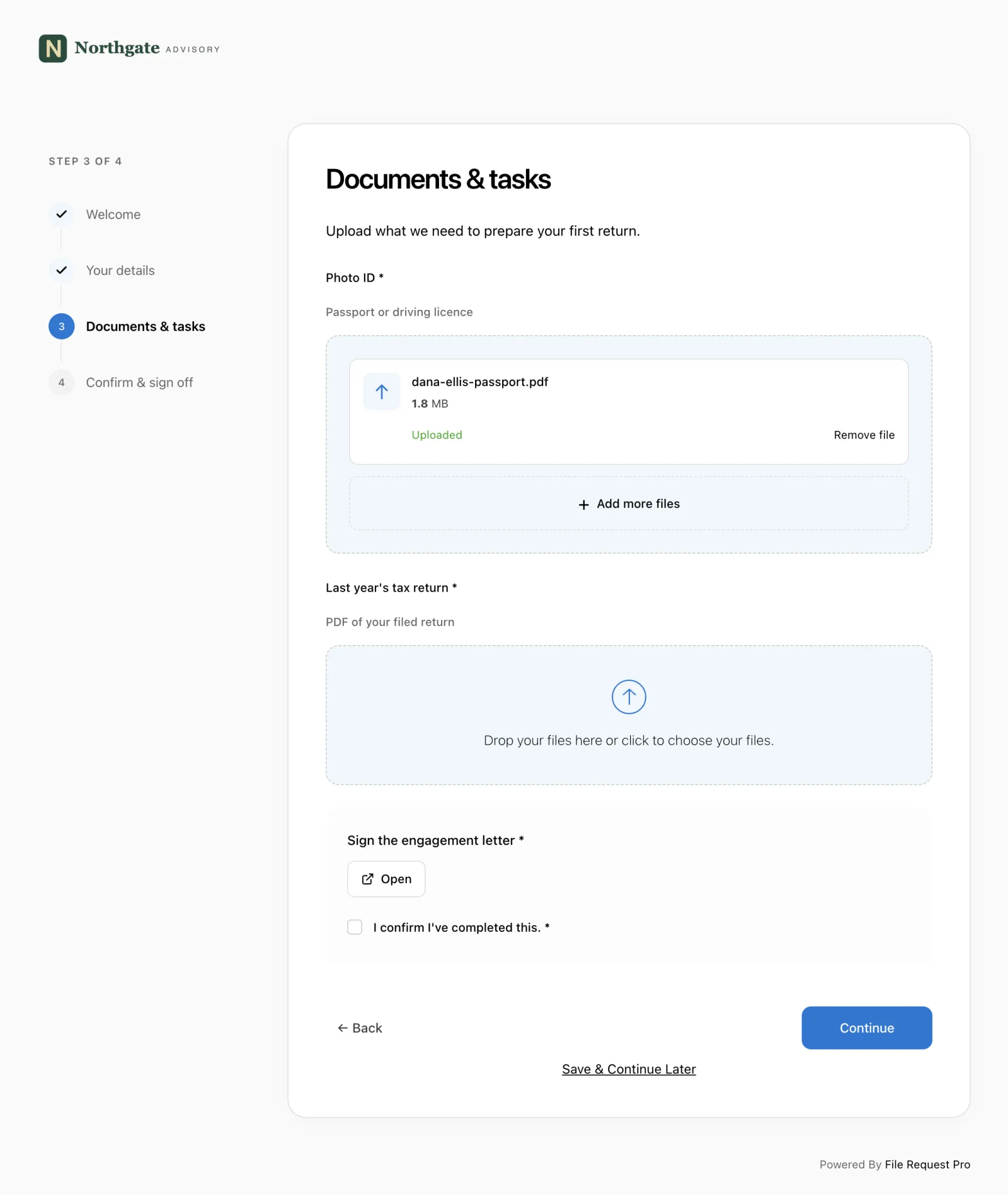
If intake includes identity or compliance checks, use the KYC checklist to decide which information and evidence to request. Then use a document verification form to record what was reviewed, who checked it, and whether anything still needs follow-up before onboarding proceeds.
Why Use a Client Intake Form?
Without an intake form, onboarding becomes a string of emails, phone calls, and reminders that drags on for days or weeks. An intake form fixes this by getting everything in one request. The specific benefits:
- Saves time. One form replaces dozens of back-and-forth emails. Clients provide what you need in a single submission instead of sending details one piece at a time over weeks.
- Keeps everything organized. Client data and files land in one place — not buried across email threads, chat messages, and shared drives.
- Reduces errors. Everyone on your team works from the same information, which means fewer mistakes in billing, communication, and service delivery.
- Sets expectations. The form tells clients exactly what you need and when, which creates clarity from day one.
- Looks professional. A branded, well-organized intake form signals that you run a tight operation — the kind of first impression that builds client confidence.
- Improves security. Purpose-built forms use encrypted connections, unlike email attachments that travel unprotected across mail servers.
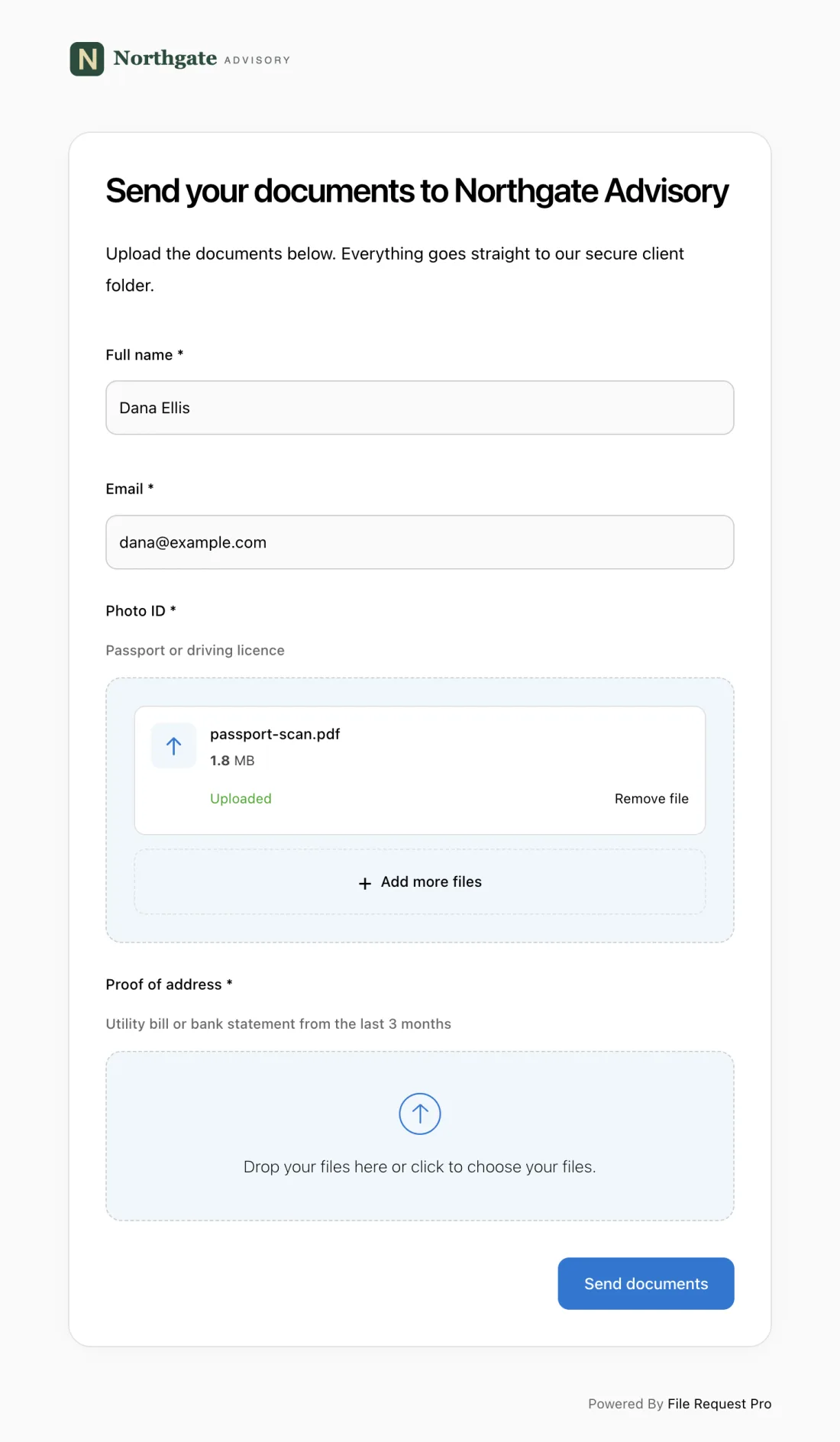
Client Intake Form Template
This template covers the fields most professional service firms need. Copy the sections that apply to your business, remove the rest, and add any industry-specific fields from the sections below.
Contact Information
| Field | Details |
|---|---|
| Full Name | |
| Preferred Name | |
| Email Address | |
| Phone Number | |
| Mailing Address | |
| Preferred Contact Method | Email / Phone / Text |
| Best Time to Reach You |
Business Information
| Field | Details |
|---|---|
| Company / Organization Name | |
| Industry | |
| Company Website | |
| Company Size (employees) | |
| Tax ID / EIN / VAT Number | |
| Year Established | |
| Secondary Contact Name | |
| Secondary Contact Email |
Service Requirements
| Field | Details |
|---|---|
| Services Requested | |
| Project Description / Goals | |
| Desired Start Date | |
| Estimated Budget Range | |
| How Did You Hear About Us? | |
| Previous Provider (if any) | |
| Reason for Switching |
Documents Required
| Document | Status |
|---|---|
| Signed Engagement Letter / Contract | Received / Pending |
| Government-Issued ID | Received / Pending |
| Proof of Business Registration | Received / Pending |
| Previous Provider Records | Received / Pending |
| Other: ___________________ | Received / Pending |
Industry-Specific Intake Form Fields
The general template covers the basics. Depending on your industry, you will need additional fields to collect the information that matters for your specific service. Below are field lists for four common professional services.
Legal Client Intake Form
Law firms need case details and conflict-of-interest data from the first interaction. Collecting this upfront avoids delays from conflict checks surfacing weeks into an engagement. Add these fields to the general template:
- Case Type — litigation, corporate, family, estate, immigration, criminal, intellectual property
- Brief Description of Legal Matter — what happened and what outcome the client wants
- Opposing Party Name(s) — for conflict-of-interest screening
- Court or Jurisdiction — where the matter is filed or expected to be filed
- Key Deadlines or Statute of Limitations — dates that cannot be missed
- Prior Attorney / Legal Representation — previous counsel and reason for change
- Government ID / Passport Number — for identity verification
- Retainer Agreement Status — signed, pending, or not yet sent
Tip: ask clients to upload any existing court documents, correspondence with opposing parties, or prior legal opinions alongside the intake form. Having these files from the start saves your team hours of follow-up.
Accounting Client Intake Form
Accountants and bookkeepers need financial and tax details to scope the engagement correctly. Missing information at this stage leads to inaccurate estimates and surprises during tax season. Add these fields:
- Tax Filing Status — individual, married filing jointly, S-corp, LLC, C-corp, partnership
- Fiscal Year End Date — not all businesses follow the calendar year
- Accounting Software — QuickBooks, Xero, FreshBooks, spreadsheets, or none
- Bank Account Information — institution name and account type
- Prior Year Tax Preparer — name and contact for requesting records
- Estimated Annual Revenue — for engagement scoping
- State Tax Obligations — states where the client has nexus
- Payroll Provider — ADP, Gusto, in-house, or none
Ask clients to upload their most recent tax return, profit and loss statement, and balance sheet. These documents let you assess their financial position before the first meeting.
Marketing Client Intake Form
Marketing agencies and consultants need to understand the client's brand, audience, and goals before creating any strategy or content. Skipping this step leads to work that misses the mark and erodes client trust. Add these fields:
- Brand Guidelines — upload logo files, color codes, fonts, and style guides
- Target Audience Description — who the client's customers are (demographics, interests, pain points)
- Primary Marketing Goals — lead generation, brand awareness, sales, retention
- Current Marketing Channels — website, social media, email, paid ads, events
- Competitors — 3-5 competitors the client wants to differentiate from
- Past Campaign Results — what has worked, what has not, and any analytics access
- Content Assets — upload existing photos, videos, brochures, or presentations
- Monthly Marketing Budget — for scoping channel recommendations
Collecting brand assets and past performance data during intake eliminates the "can you send me your logo?" emails that derail project kickoffs.
Real Estate Client Intake Form
Real estate agents and brokers need to qualify clients and understand their buying or selling timeline quickly. Missing financial pre-approval status or property preferences wastes time showing unsuitable properties. Add these fields:
- Transaction Type — buying, selling, renting, or investing
- Property Type Preference — residential, commercial, land, multi-family
- Budget / Price Range — maximum purchase price or expected listing price
- Pre-Approval Status — pre-approved, pre-qualified, not yet started
- Lender / Mortgage Broker — name and contact details
- Preferred Neighborhoods — specific areas, school districts, or commute requirements
- Move-In Timeline — when the client needs to be settled
- Current Property Details — address, ownership status, outstanding mortgage balance
For sellers, ask clients to upload property photos, existing appraisals, and any inspection reports. For buyers, request the pre-approval letter upfront to avoid delays when making offers.
How to Create a Client Intake Form
You can build an intake form using free tools or specialist software. The right choice depends on whether you need file uploads, automated reminders, and secure data handling — or a basic set of questions.
Free form builders
Tools like Google Forms let you create a basic intake form and share it as a link. Google Forms is free for personal use and part of Google Workspace for businesses. You can add text fields, dropdowns, checkboxes, and multiple-choice questions.
The main limitation: people outside your organization can only upload files if they have a Google account. If you need clients to send documents alongside their form responses, this becomes a barrier.
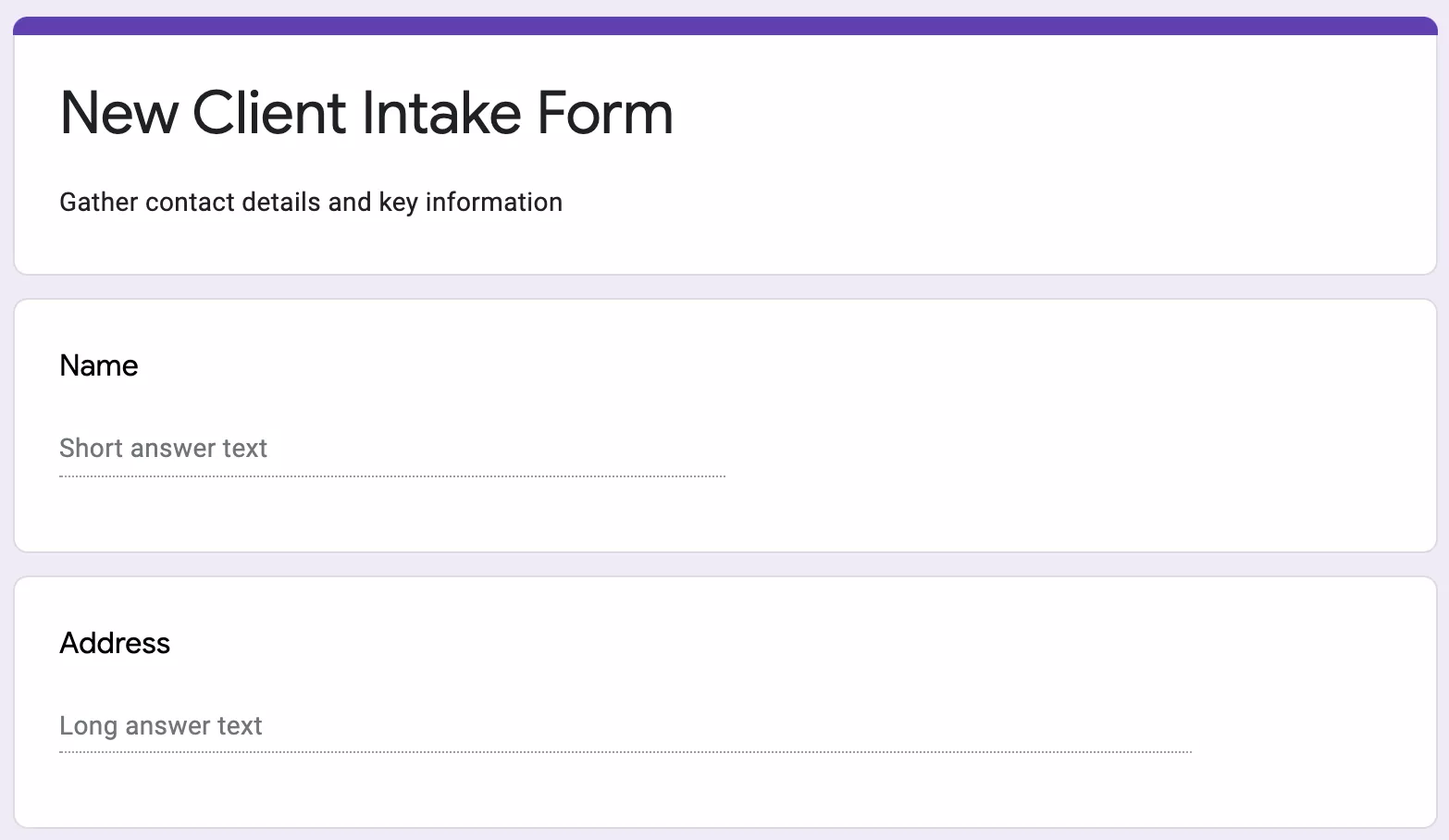
You could also use Word or Excel to create a form and email it to clients. But email has well-documented security problems for sharing sensitive data.
Email accounts can be compromised by attackers using phishing attacks or otherwise, exposing your email communications to cyber criminals. Email messages and attachments can also be intercepted as they travel over the email network. By default, emails are not encrypted as they travel from your email servers to the recipient. Expert Insights
Content and file collection software
If your intake process requires both form fields and file uploads — which it does for most professional services — you need a tool designed for this.
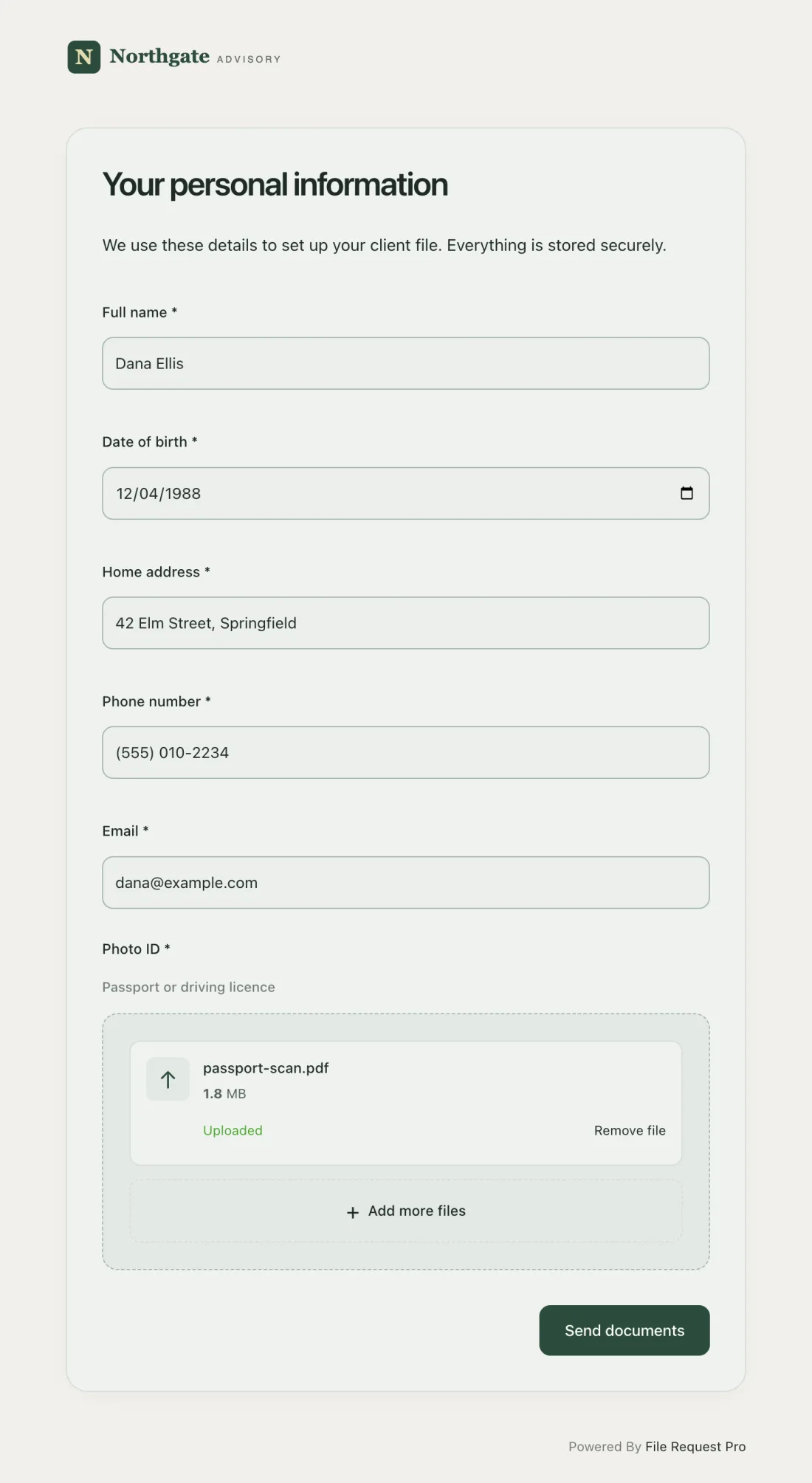
Document collection software like File Request Pro lets you create a branded upload page that combines form fields (text inputs, dropdowns, checkboxes) with drag-and-drop file uploads. Clients fill in their details and upload documents in a single submission. Everything routes to your cloud storage automatically.
Which do you need?
If you only collect text-based information — names, emails, short answers — a free form builder works fine. If you also need clients to upload files (contracts, tax returns, ID documents, brand assets), and you want automated reminders and encrypted file transfer, a purpose-built tool will save you hours on every new engagement.
REQUESTING SENSITIVE INFORMATION: If you collect data from people living in the EU, you must comply with GDPR requirements for data collection and storage. Similar regulations apply in other jurisdictions — check your local requirements.
How to Automate Client Intake
Creating the form is the easy part. The real time drain is the follow-up: reminding clients to complete the form, tracking who has submitted and who hasn't, organizing the responses, and filing uploaded documents in the right folders.
Here's how to automate the entire workflow so intake runs itself.
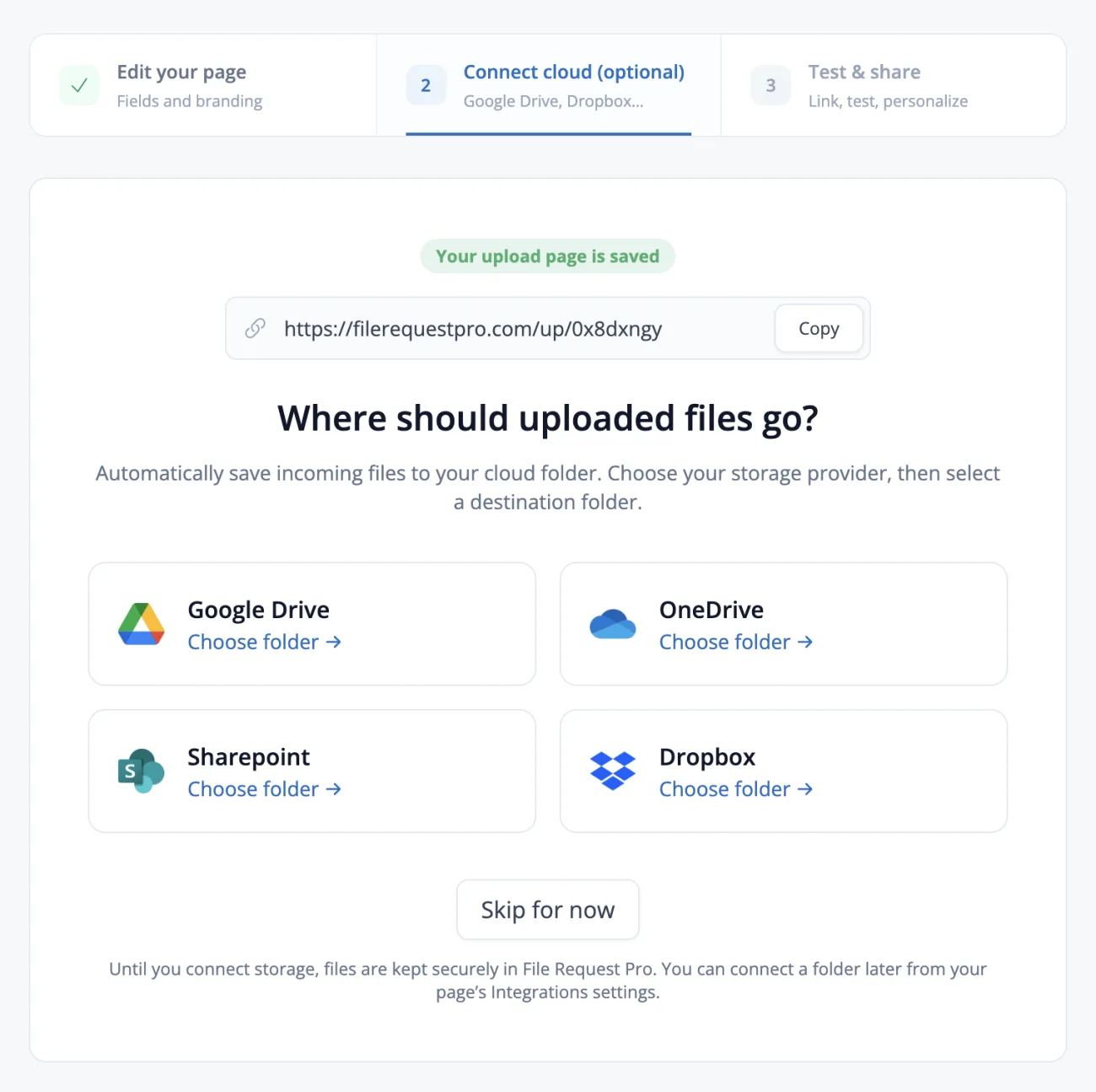
Step 1: Connect your cloud storage
Link your intake tool to the cloud drive your team already uses — Google Drive, OneDrive, SharePoint, or Dropbox. This way, every submission is saved to your storage without manual downloading and uploading.
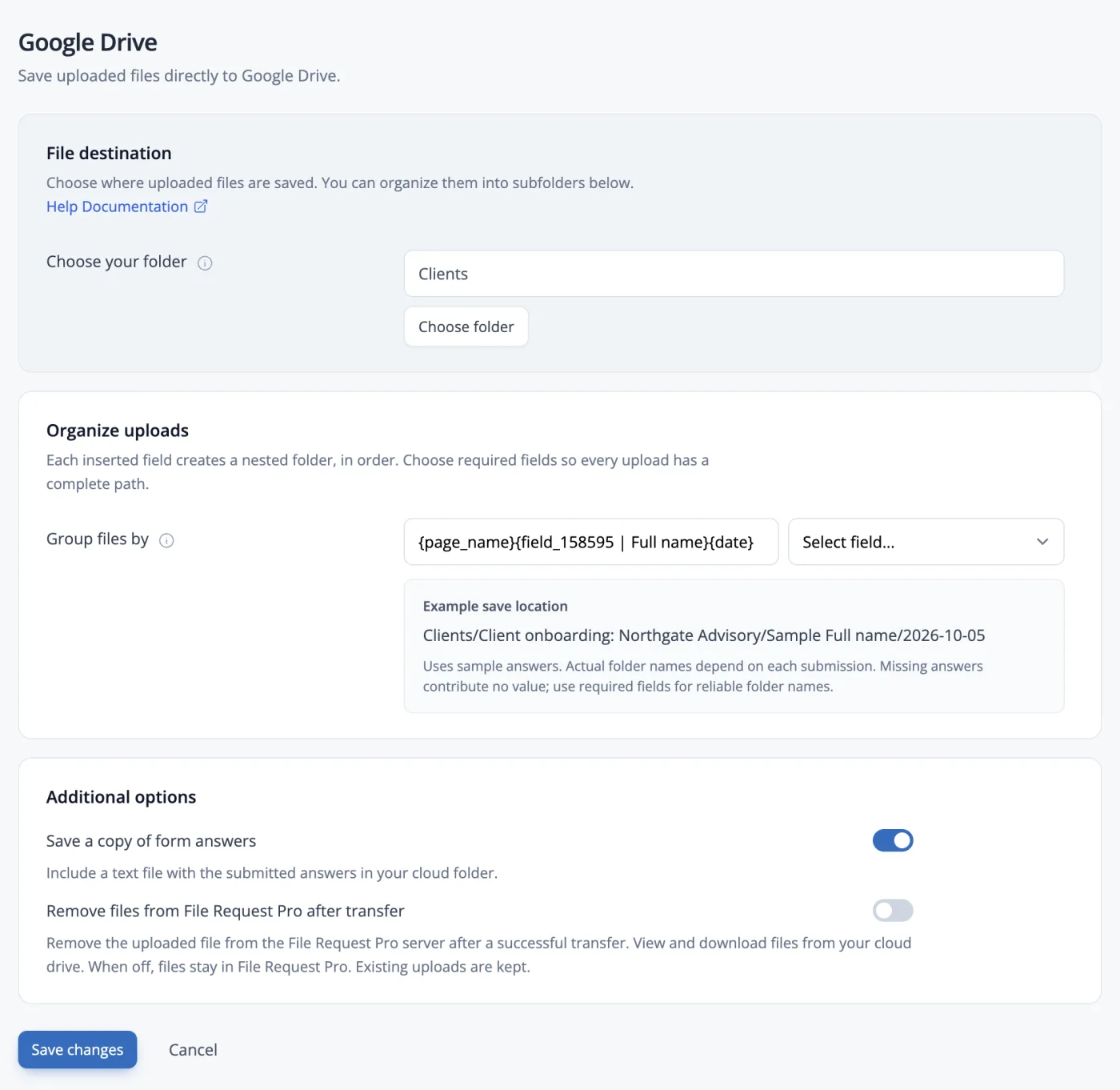
Step 2: Set up automatic folder organization
Configure your tool to create one folder per client, named automatically using a field from the form (like the client's name or company). Files and form data land in the right folder without you touching them.
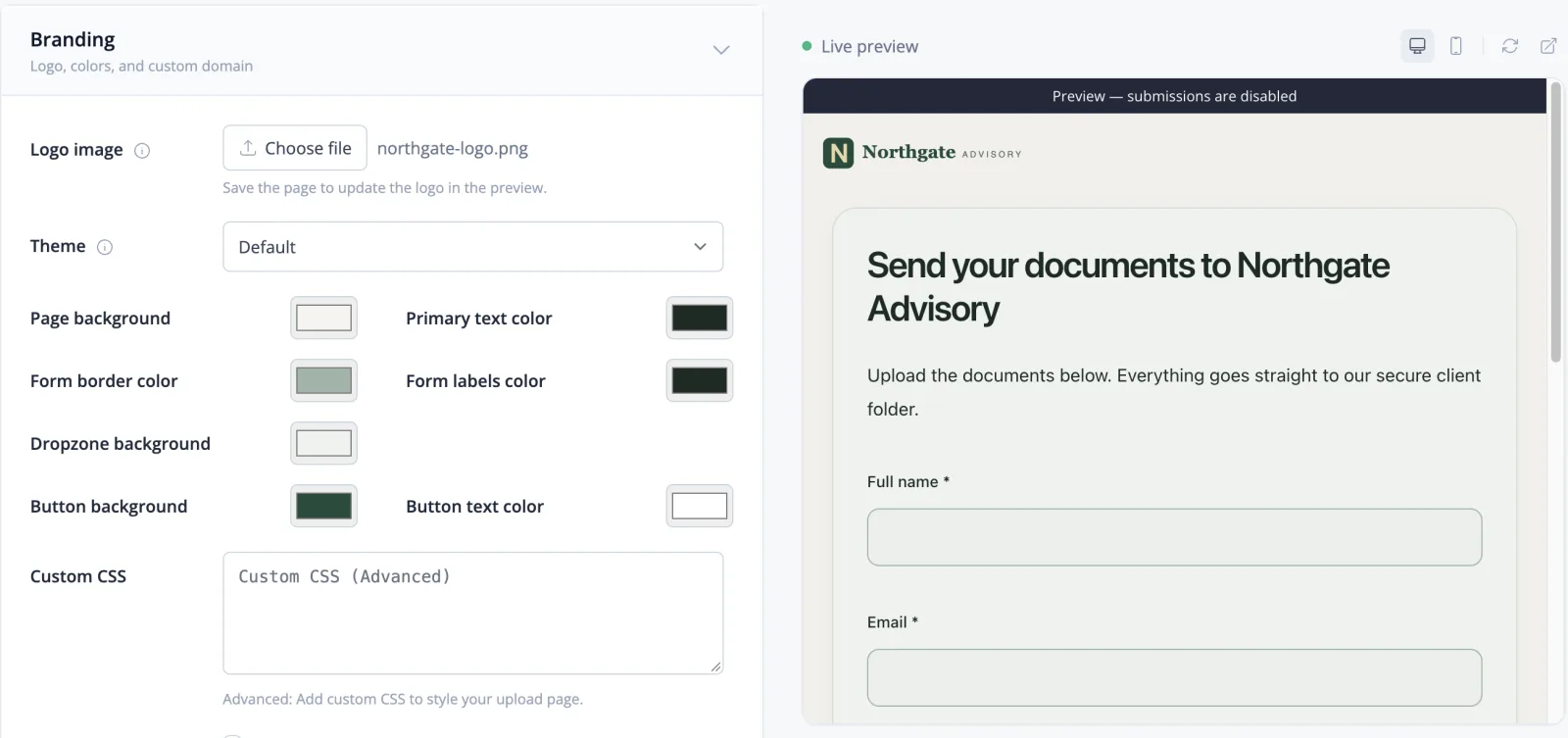
Step 3: Customize your intake form
Add your logo, brand colors, and a custom URL. Then build out your form fields — use the template sections above as a starting point. Include file upload fields for any documents you need alongside the form data.
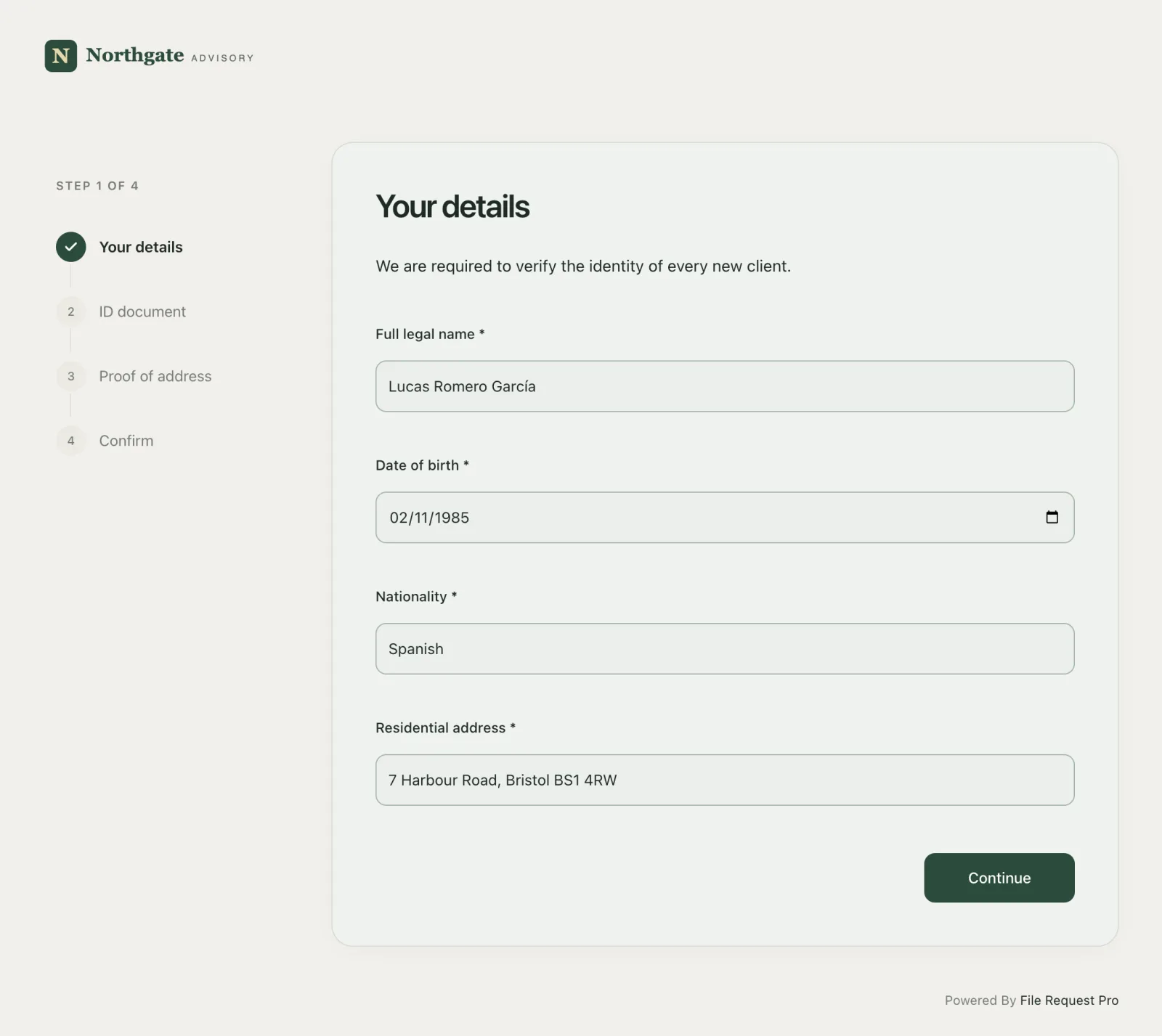
Choose between a single-page form or a multi-page layout with page breaks. For longer intake forms (10+ fields), a multi-page approach reduces the feeling of a wall of questions.
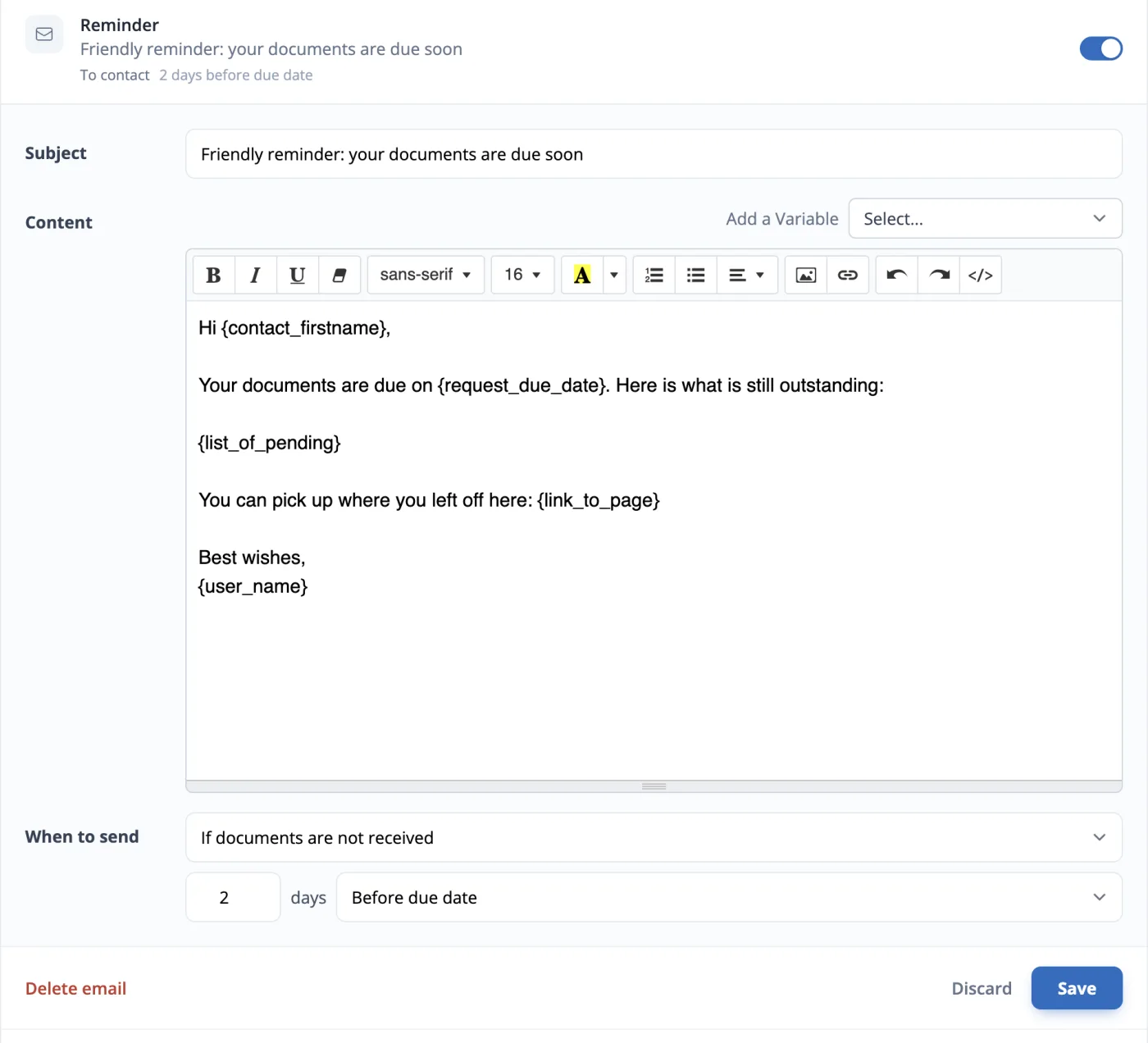
Step 4: Automate reminders
Set up automatic reminder emails for clients who haven't submitted their intake form. Most teams schedule reminders at 3 days, 7 days, and 14 days after the initial request. This eliminates manual chasing entirely — the system follows up for you.
Step 5: Send and track
Send your first intake form. Track who has opened, started, and completed their submission. When responses come in, form data and files appear in your cloud drive, organized in the folder structure you configured.
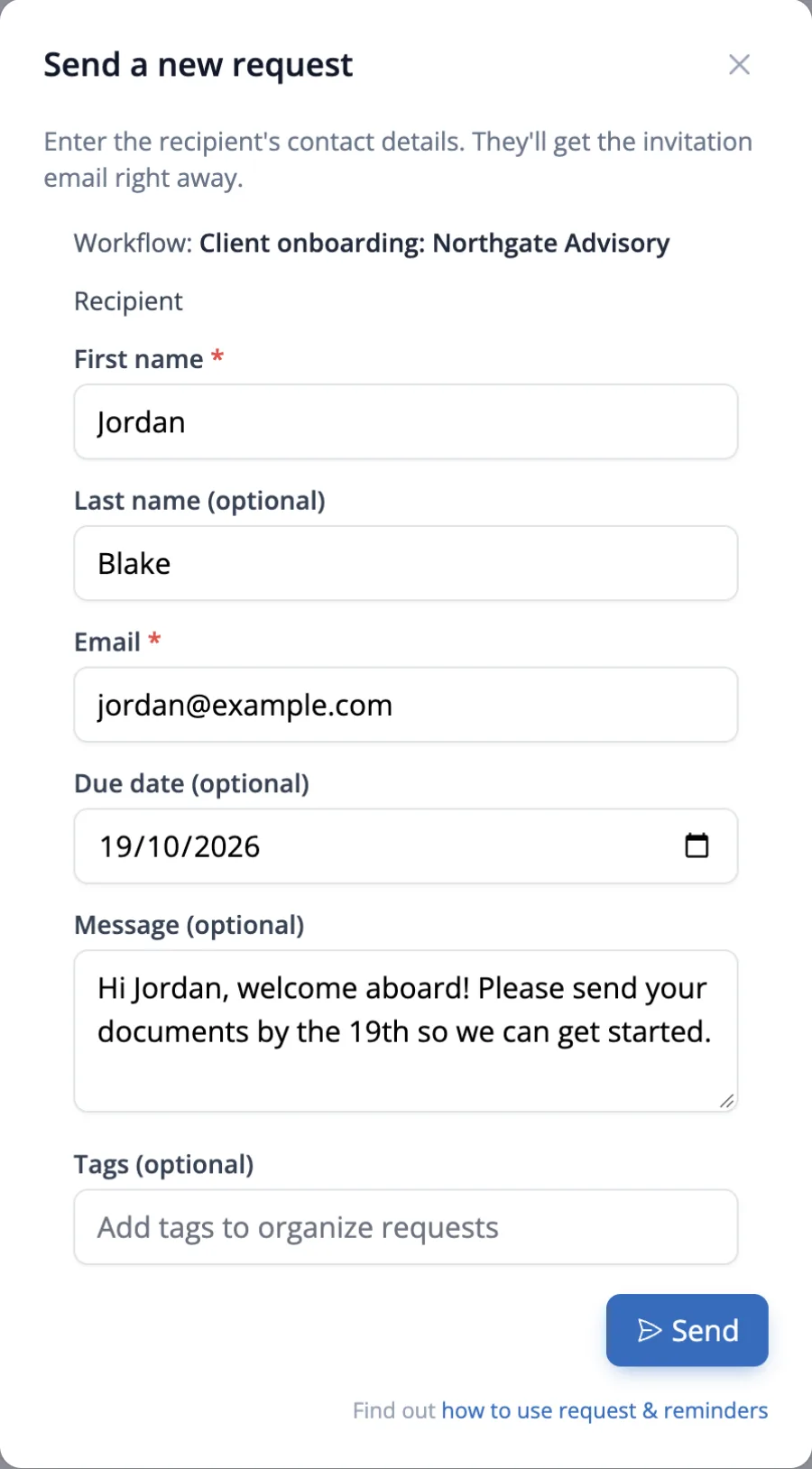
The result: you send one request, the system handles reminders, and completed intake data lands in your cloud storage — organized, encrypted, and ready for your team to use.
How to Design Intake Forms That Get Completed
A form that clients ignore is worse than no form at all — you have added a step to your process and gotten nothing back. Every unfinished intake form means another week of chasing details by email. Here are the design decisions that affect whether clients complete the form.
Brand your form
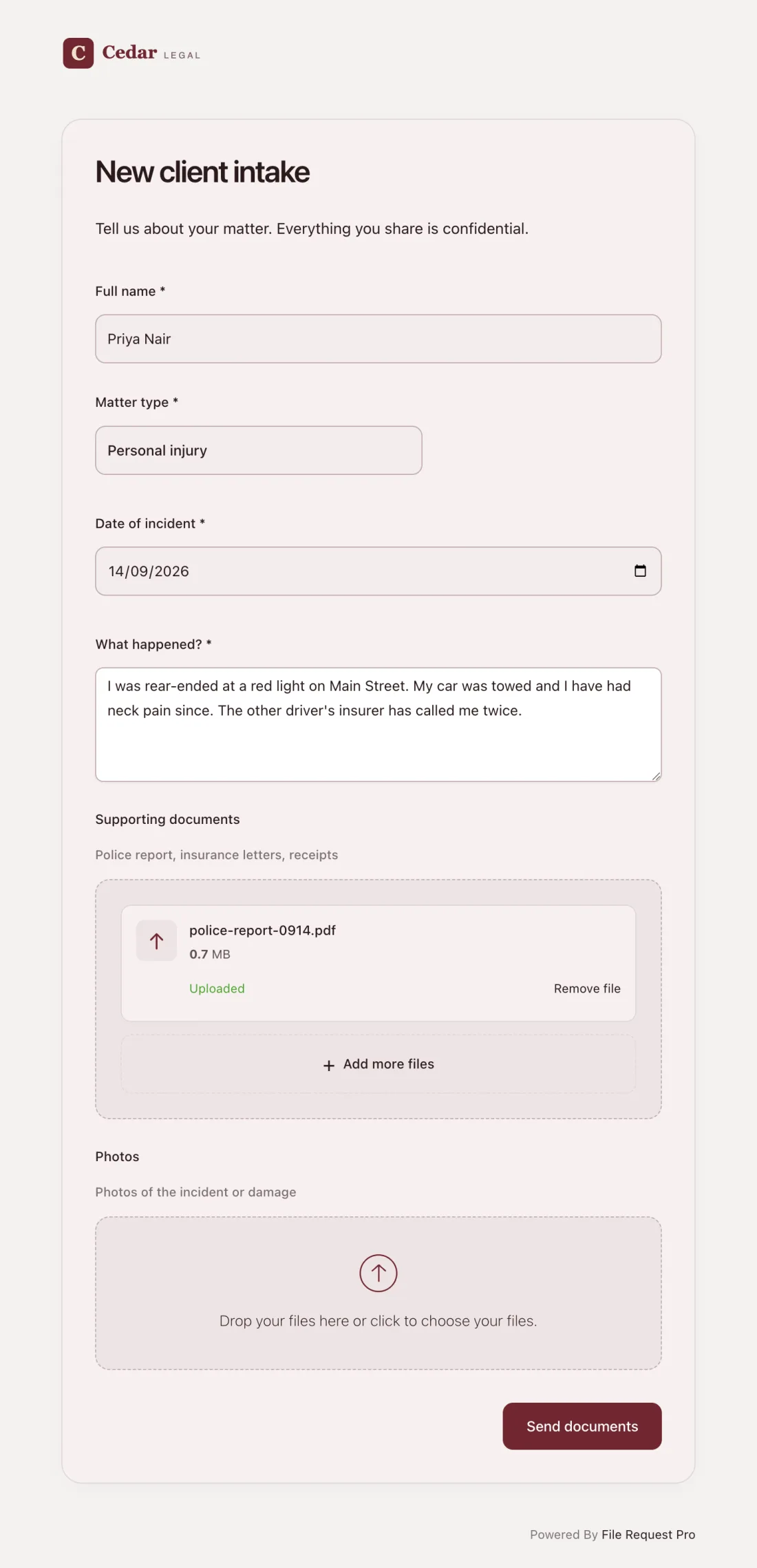
Clients are cautious about filling in forms that look generic or unfamiliar. A form with your logo, colors, and company name feels like a natural part of your process, not a phishing attempt. Branded forms build trust before clients type a single character.
Skip the login requirement
Requiring clients to create an account or sign in before completing your form adds friction that kills completion rates. People are already managing too many passwords. If you can avoid a login requirement, do it. Tools like File Request Pro let clients submit forms and files without creating an account.
Some platforms require login for file uploads specifically. Google Forms and Microsoft Forms both require sign-in for file collection. If your intake form includes document uploads, check whether your tool forces clients to log in first.
Choose the right form length
Long single-page forms can feel overwhelming. One-question-per-page forms can feel tedious with lots of clicking. The right approach depends on your clients:
- Mobile-heavy audiences: Multi-page forms with 3-5 fields per page work better on small screens.
- Detail-oriented professionals: Longer single-page forms let them see all questions at a glance and plan their responses.
- Mixed audiences: Multi-page forms with a progress bar strike a good balance between visibility and manageability.
Only ask for what you need right now
Every extra field reduces your completion rate. If you won't use a piece of information in the first 30 days of the engagement, leave it out. You can always collect more details in a follow-up form once the client has momentum and trust in your process.
Set a clear deadline
Forms without deadlines sit in inboxes indefinitely. Include a specific date in your request: "Please complete this form by Friday, March 14 so we can begin your engagement on schedule." A concrete date creates urgency without being pushy.
Client Intake Form Checklist
Use this client intake checklist every time you set up a new intake form. Copy the items that apply to your practice and check them off as you go.
Form Setup
- Add your company logo and brand colors
- Set a custom URL or form name that clients will recognize
- Include a brief welcome message explaining what the form collects and why
- Add all required contact fields (name, email, phone)
- Add business information fields relevant to your industry
- Add service/project scope fields
- Include file upload fields for required documents
- Mark required vs. optional fields clearly
- Add helper text to sensitive fields (e.g., "Required for tax filing")
- Test the form on mobile and desktop before sending
Automation Setup
- Connect to your cloud storage provider
- Configure automatic folder creation per client
- Set up the initial request email with a clear deadline
- Schedule automated reminder emails (3 days, 7 days, 14 days)
- Configure a thank-you or confirmation email on submission
- Set up notifications so your team knows when a submission arrives
Security and Compliance
- Confirm the form uses encrypted data transfer (SSL/TLS)
- Verify no client login is required (unless your security policy demands it)
- Check GDPR, HIPAA, or other regulatory compliance as needed
- Add a privacy notice or data handling statement
- Restrict internal access to submitted data by role
Before Each New Client
- Review which template fields apply to this client
- Remove unnecessary fields to keep the form short
- Customize any client-specific questions or document requests
- Set the submission deadline
- Send the form and confirm delivery
Organizing and Storing Client Intake Data
Getting clients to complete the form is only half the job. If the responses land in your email inbox or a disorganized shared folder, you've traded one mess for another.
The best approach is to save intake data and files to your cloud storage, organized into folders by client name. This way, anyone on your team can find what they need without searching through email threads or asking a colleague.
If you use Zapier or similar automation tools, you can push intake data into your CRM, project management system, or accounting software automatically. A new client submission can trigger a welcome email, create a new project in your PM tool, and add the client to your billing system — all without manual data entry.
FAQ
What is a client intake form?
A client intake form is a structured document that collects essential information from a new client at the start of your working relationship. It typically includes contact details, business information, service requirements, and a list of documents the client needs to provide. The form replaces the back-and-forth emails and phone calls that slow down onboarding.
What should a client intake form include?
At minimum, include contact information (name, email, phone), business details (company name, industry), and service requirements (what they need and when). Most professional service firms also include a document checklist for items like contracts, identification, and financial records. The exact fields depend on your industry — see the industry-specific sections above for legal, accounting, marketing, and real estate fields.
How do I create a client intake form for free?
Google Forms is the most popular free option. You can create a form with text fields, dropdowns, and checkboxes, then share it as a link. The limitation is that external respondents need a Google account to upload files. For text-only intake forms without file uploads, Google Forms works well.
How do I collect files along with form responses?
Most free form builders don't handle file uploads well — they either require the respondent to log in, impose small file size limits, or dump uploads into a single disorganized folder. A file collection tool like File Request Pro combines form fields with drag-and-drop file uploads in one branded page, then routes everything to your cloud storage automatically.
How can I get clients to complete intake forms faster?
Three things make the biggest difference: set a clear deadline, keep the form short (remove fields you don't need in the first 30 days), and automate reminder emails. Branded forms also help — clients are more likely to complete a form that looks professional and familiar than a generic link from an unknown tool.
Is it safe to collect sensitive client information through online forms?
It depends on the tool. Look for forms that use SSL encryption for data transfer, store data in secure cloud environments, and don't require you to send sensitive information over email. If your industry has specific compliance requirements (GDPR for EU data, HIPAA for healthcare, GLBA for financial services), verify that your collection method meets those standards.
Should I use one long intake form or split it into multiple forms?
For most businesses, one form that covers all the essentials is better than multiple forms. Clients are more likely to complete a single submission than to respond to two or three separate requests. If your intake process genuinely requires a large amount of information, consider a multi-page form that breaks the questions into sections — this feels more manageable than a single scrolling page.
What is the difference between a client intake form and a client onboarding form?
The intake form collects information before or at the start of an engagement — it's the first structured touchpoint. Onboarding is the broader process of getting a client set up and ready to work with you, which might include intake forms, welcome packets, system access setup, kickoff meetings, and ongoing training. The intake form is usually the first step in the onboarding process.
Try File Request Pro free for 15 days or 25 files
Stop chasing clients for documents and details. File Request Pro gives you branded intake forms with file uploads, automated reminders, and files saved to your cloud storage — so new client onboarding takes minutes, not weeks.
Free Client Onboarding Checklist
Get the complete document checklist for your industry — interactive, with progress tracking.
Use the Free Checklist Tool →