You land a new social media client, post a week of content, and immediately get the dreaded email: "This doesn't sound like us at all." You used the wrong tone, promoted a product they're sunsetting, and posted a meme format their CEO finds unprofessional. Now you're deleting published posts, rewriting a week of content, and explaining to the client why the first invoice includes hours spent undoing your own work.
A structured social media client questionnaire prevents this entirely. It captures brand voice, content preferences, platform history, visual assets, and approval workflows before you write a single caption. Below you'll find 37 onboarding questions organized by category, variations for different client types, best practices for higher response rates, and a smarter way to collect answers and brand assets in one step.
What Is a Social Media Client Questionnaire?
A social media client questionnaire is a structured set of questions sent to new clients before work begins. It collects brand background, audience details, platform access, content preferences, visual assets, and performance goals — everything you need to manage their social presence without the daily "quick question" emails that eat into billable hours. If you also manage other marketing channels, our marketing questionnaire template covers the broader business context.
Business and Brand Overview
Before you write a single post, you need to understand what the business does, how it talks about itself, and what makes it different. Skip this and your content will sound like it could belong to any brand in the industry.
- Describe your business in two to three sentences. — How the client describes their business reveals the language you should use in social content. Their phrasing often mirrors what resonates with their audience.
- What products or services do you offer, and which are most important to promote? — Not everything deserves equal airtime. Revenue priorities help you allocate content focus.
- What is your unique selling proposition? — The core message that should thread through every piece of content. Without it, your posts sound like every other brand in the space.
- How would you describe your brand personality? — Professional, playful, bold, approachable, authoritative — a "playful" brand and a "professional" brand handle the same trending audio in completely different ways. Get this wrong and every post feels off.
- Do you have a documented brand voice or tone guide? If so, please share it. — An existing guide can save two to three weeks of trial and error. If they don't have one, you'll need to develop voice guidelines during onboarding — and this question surfaces that gap early.
- Are there any words, phrases, or topics your brand avoids? — Political topics, competitor mentions, certain slang — knowing these boundaries prevents content mistakes that damage trust.
Target Audience
Social content that tries to reach "everyone" reaches no one. These questions force the specificity you need so every post, story, and ad speaks directly to the people who actually buy.
- Who is your ideal customer? — Age range, location, job title, income level, lifestyle. The more specific, the sharper your content targeting.
- What are your customers' biggest pain points or challenges? — Pain points drive engagement. A post that names a specific frustration ("Tired of tracking invoices in spreadsheets?") consistently outperforms generic promotional content in engagement.
- Do you have documented buyer personas? If so, please upload them. — Existing personas save research time and give you immediate targeting clarity for content and paid campaigns.
- Where does your audience spend the most time online? — A B2B audience on LinkedIn needs different content than a Gen Z audience on TikTok. This validates or challenges platform assumptions.
- What type of content does your audience engage with most? — Short-form video, carousels, polls, long-form posts — let the client tell you what they've observed before you impose your own strategy.
Current Social Media Presence
Understanding what exists before you change anything prevents two costly mistakes: killing a tactic that quietly drives leads, or repeating a campaign that already flopped three months ago.
- Which social media platforms are you currently active on? List the handle for each. — Confirms every account so you're not surprised by a forgotten Pinterest or an old Twitter handle with outdated branding.
- What are your current follower counts on each platform? — Establishes the baseline for growth reporting and signals which platforms have traction.
- What's currently working well on your social channels? — Protect what produces results before changing anything. Clients often have content types that perform better than they realize.
- What's not working, and what have you tried that didn't produce results? — Prevents you from repeating failed experiments. The client's diagnosis also reveals their frustrations.
- Have you run any paid social campaigns? On which platforms and with what results? — Historical ad data — cost per click, ROAS, winning audiences — tells you where to allocate paid budget first instead of starting from scratch.
Content Preferences
This is where most onboarding goes wrong. Agencies create content based on what performs well in general, ignoring what the specific client wants on their channels.
- What types of content do you want to see on your channels? — Educational posts, behind-the-scenes, product showcases, user-generated content, memes, testimonials — gives you an approved content mix.
- Are there any content types or formats you do not want us to create? — Some clients hate memes. Others refuse to appear on video. Discovering these hard limits after you've produced a batch of Reels wastes hours of production time and erodes trust.
- Do you have existing content we can repurpose? — Blog posts, newsletters, webinars, podcasts. A single 45-minute webinar can yield 15-20 social posts: quote cards, short clips, carousel takeaways, and discussion prompts.
- Are you open to using user-generated content? — UGC builds authenticity and reduces production workload, but using customer photos without permission creates legal risk.
- What is your content approval process? Who reviews posts before they go live? — Approval bottlenecks are the number-one reason posting schedules fall behind. If three people need to sign off and each takes two days, your "weekly" content calendar becomes biweekly.
Visual Identity and Assets
Social media is visual-first. Chasing logo files and color codes through email threads wastes hours every month — and posting with the wrong shade of blue or a pixelated logo makes your agency look careless. These questions ensure you have production-ready design assets from day one.
- Do you have a brand style guide or visual identity document? If so, please upload it. — Covers logo usage, color palettes, typography, and imagery direction. Without it, your designer is guessing. For broader creative intake, see our graphic design questionnaire.
- Please provide your logo files in all available formats. — PNG, SVG, vector. You'll need full color, white, and dark versions. Request everything now to avoid urgent requests later.
- What are your brand colors? Provide hex codes or RGB values. — Precise values prevent the endless "that blue doesn't look right" revision cycle that wastes designer time on every batch of graphics.
- What fonts does your brand use? — Licensed fonts require the files. Google Fonts require names and weights.
- Do you have a library of approved photos, videos, or product images? — Posts with real product images and team photos consistently outperform stock photography in engagement. Request the originals, not compressed email attachments.
Goals and KPIs
Without clear goals, you cannot prove your value — and agencies that cannot demonstrate measurable results lose clients within the first six months. These questions lock down what "success" actually means before the first report is due.
- What are your primary goals for social media? — Brand awareness, lead generation, website traffic, community building, direct sales — each demands a different strategy.
- How will you measure success? What specific metrics matter most? — Pin down the exact KPIs before you start reporting. A client who expects sales from social but sees a report focused on impressions will question your value by month two.
- How often do you want us to post on each platform? — A client who expects daily posts on four platforms but has budget for ten posts a month creates an immediate conflict. Surface this mismatch now, not after the first monthly report.
- Do you have a budget for paid social advertising? — Paid social extends organic reach. Knowing the budget upfront lets you build campaigns into the strategy from the start.
- Are there upcoming campaigns, launches, or events we should plan content around? — Product launches need two to four weeks of lead-up content. Learning about a launch the week it happens puts you in reactive mode and produces weaker results.
Competitor Accounts
Your client's followers also follow their competitors. Competitive research shows you what content formats and topics are already working in the space — and where the gaps are that your client can own.
- Who are your top three to five competitors on social media? Share their handles. — Competitor accounts reveal content formats, posting frequency, and engagement patterns you can benchmark against.
- What do your competitors do well on social media? — Their perspective tells you what "better" means to them and which benchmarks you need to clear.
- What do your competitors do poorly? — Gaps in competitor execution are your opportunities to differentiate.
Access and Logistics
Nothing stalls content execution faster than missing credentials or unclear approval chains. These operational questions feel unglamorous, but skipping them guarantees a frustrating first week spent chasing logins instead of creating content.
- Please provide admin access for each social media account and ad account. — Specify Business Manager access for Meta, admin roles for LinkedIn. Use platform-native permissions rather than sharing passwords in plain text.
- What scheduling or management tools are you currently using? — Hootsuite, Buffer, Sprout Social, Later — avoid paying for duplicate subscriptions. Decide early whether to adopt their tool or migrate to yours, because switching mid-engagement disrupts workflows.
- Who is the primary point of contact for approvals, and what is the best communication channel? — A single decision-maker prevents the all-too-common scenario where the marketing manager approves a post and the founder overrides it an hour before publishing. Establish the channel — email, Slack, or project management tool — upfront.
Adapting the Questionnaire for Different Client Types
The 37-question core covers standard social media onboarding, but a SaaS company and a clothing brand have fundamentally different content needs. Tailor these sections based on client type. For clients outside social media, use our general client onboarding questionnaire.
B2B clients. Add questions about sales cycle length (often three to twelve months), whether executives need personal brand presence on LinkedIn, industry events they attend, and CRM integration for tracking social leads through to closed deals.
E-commerce brands. Add questions about catalog size, seasonal sales calendar, shoppable post usage, and influencer relationships. Request the product photography library upfront.
Personal brands. Ask about comfort level on camera, the three to five topics they want to be known for, how much personal life they want to share, and existing content (podcasts, videos) you can repurpose. Approval is usually faster with personal brands (one person, not a committee) but more subjective — every post has to "feel like them."
Multi-location businesses. Clarify whether each location has separate accounts, what level of corporate brand control is required, and whether local events need social coverage.
Best Practices for Social Media Questionnaires
Send it before the kickoff call. Reviewing answers in advance lets you skip 30 minutes of basic fact-gathering and spend the call on strategy — tone interpretation, competitive positioning, and content direction.
Request assets alongside answers. Social media onboarding requires both information and files — logos, brand guidelines, product photos. A text-only form forces clients to email assets separately, which means you spend the first week chasing attachments instead of creating content.
Set a clear deadline. "Please complete this by Friday so we can prepare for Tuesday's strategy session." Without a deadline, questionnaires sit in inboxes while your content calendar waits.
Explain the payoff. "Your answers shape our entire content strategy — the more detail you provide, the better your content will be from day one." Clients who understand the benefit give better responses.
Follow up once, then call. If the questionnaire isn't completed within three days of your deadline, one reminder is appropriate. After that, a phone call resolves it faster than another email.
Collect Questionnaire Answers and Brand Assets in One Step
Most agencies email their social media client questionnaire as a Google Form or Word doc, then spend three to five days chasing clients for logo files, brand guidelines, and product photos through separate email threads. Answers end up in one tool, files scattered across another, and the project folder stays permanently incomplete.
File Request Pro eliminates that cycle. Combine form fields and file uploads on a single branded page. Clients answer your onboarding questions and upload brand assets in one submission — no account required, no downloads, no back-and-forth.
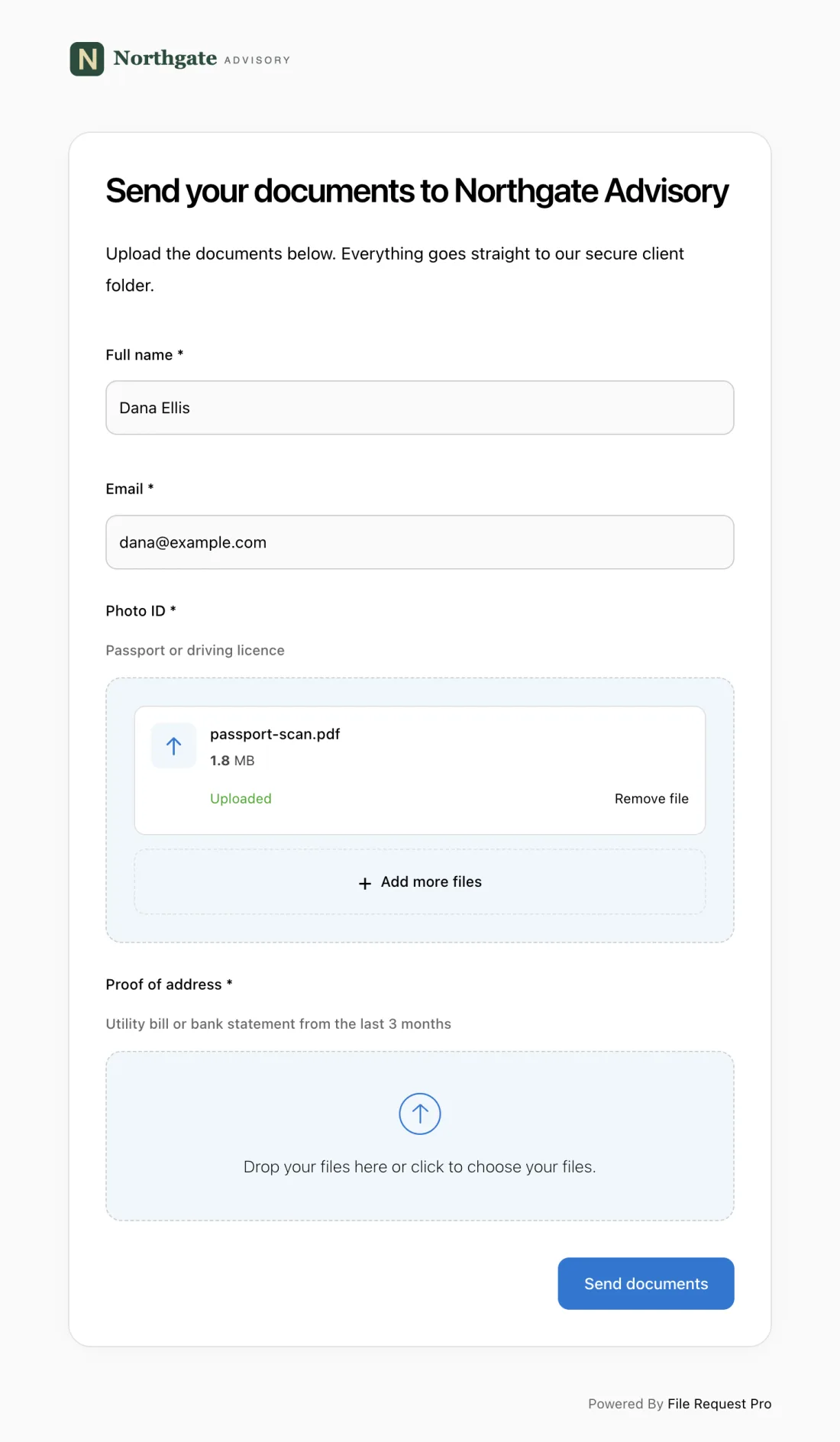
Here is what this looks like in practice for a social media agency:
- Branded intake page — your logo, your colors, your custom domain. Clients see a polished, professional experience that reinforces your agency's credibility from the first interaction.
- Form fields + file uploads combined — collect answers and brand assets (logos, style guides, product photos) in one submission. No separate emails.
- Automated reminders — clients who haven't responded get automatic follow-ups on a schedule you set. No more "just checking in" emails.
- Cloud storage sync — files and responses sync automatically to Google Drive, OneDrive, SharePoint, or Dropbox, organized into client folders.
- No client login required — clients click a link, answer questions, upload files, and submit. No account creation, no sign-ups, no "I can't figure out how to log in" emails stalling your timeline.
One link, one submission, everything organized in the right place. If your agency also handles SEO or design work, you can build additional intake pages for each service: an SEO client questionnaire for search engagements or a graphic design questionnaire for creative briefs — all using the same branded collection process.
Frequently Asked Questions
How many questions should a social media client questionnaire include?
Aim for 30-40 questions. Use the core sections — business overview, audience, content preferences, goals, and access — for every client, then add variation questions for B2B, e-commerce, personal brand, or multi-location engagements. A focused questionnaire typically gets completed within two to three business days. A 60-question marathon gets abandoned halfway through.
When should I send the questionnaire — before or after the kickoff call?
Before. Send it three to five business days ahead of the kickoff call. Reviewing answers in advance lets you skip 30 minutes of basic fact-gathering and jump straight into the strategic conversation — tone interpretation, competitive positioning, and content direction. Your client immediately sees that you came prepared.
What if a client doesn't complete the questionnaire?
Send one automated reminder after three days. If it's still incomplete, call the client directly — a five-minute phone call resolves more than three follow-up emails. Many agencies make questionnaire completion a prerequisite before content creation begins, which creates natural accountability and protects your timeline.
Should I ask for social media login credentials in the questionnaire?
Ask for access, but not passwords in plain text. For Meta platforms, request Business Manager admin access by email. For LinkedIn, ask to be added as a page admin. For X and TikTok, request access through the platform's native team features. If direct credentials are unavoidable, use a secure password-sharing tool like 1Password or LastPass — never a questionnaire text field.
How do I handle clients who already have a strategy they want to keep?
The questionnaire naturally surfaces this. Questions about what's working, content preferences, and goals reveal whether the client wants you to execute an existing plan or build a new one. Acknowledge what's working and propose improvements rather than scrapping everything. Clients who feel their existing efforts are respected are far more open to strategic changes.
Can I combine a social media questionnaire with other intake forms?
Yes, but keep sections clearly separated with headings. A combined form that jumps between social media, SEO, and design topics feels disorganized. If you handle multiple channels, use a marketing questionnaire for the overall business context, then add channel-specific sections.
